EasyManua.ls Logo

Detex EAX-500 - User Manual

Detex EAX-500
8 pages
Print Icon
To Next Page IconTo Next Page
Loading...
101321 Page 1
9V Battery
P/N: PP-5567 (or equivalent)
Battery retainer
P/N: 102606
Circuit board kit
P/N: 102656-1 (Standard)
P/N: 102656-2 (Weatherized)
Cam assembly kit
P/N: 102655
Magnet locator
P/N: 102607
Switch guard
P/N: 102613
03 Rim cylinder plate
P/N: 102638
(not used on wall
mounted devices)
#8-32 Truss HD screw
P/N: 102627-15
Cover lock,
nut, and 2 keys
P/N: PP-5572
Cylinder nut
P/N: 100783
Parts breakdown depiction
(Mortise cylinder required)
Locate this component
for Step 6
INSTALLATION INSTRUCTIONS FOR THE EAX-500 EXIT ALARM
(EAX-500 / 500W / 500SK)
Detex Corporation, 302 Detex Drive, New Braunfels, Texas 78130-3045
(830)629-2900 / 1-800-729-3839 / Fax (830)620-6711
E-MAIL: detex@detex.com INTERNET: www.detex.com
101321 September 26, 2011
U.S. PATENT NUMBERS:
20050257389
20050231363
20050223764
Magnet Kit
P/N: 102665
Hardware Kit
P/N: 102633
(includes Keystop
P/N: 102688)
Backplate
P/N: 102603
Mortise Cylinder with
standard Yale cam
required
.715"
.313"
Mag switch
(surface mount)
P/N: MS-1039S
(EAX-500SK only)
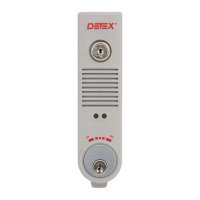
The Detex EAX-500 is designed for applications that require an alarmed exit device on secured doors. The alarm, with
approximately 100dB, will sound when someone attempts an unauthorized exit. The EAX-500, with it's smaller size
makes it the choice for quick and easy installations on emergency exit and restricted doors.
OPTIONAL:
Cylinder nut socket
P/N: 103779
Drawing # 102600
Device will vary based on
configuration and order options.

Questions and Answers

  • N
    Nathan MurphyAug 13, 2025
    Why does my Detex Security System chirp every 45 seconds?
    • J
      Jacqueline FitzgeraldAug 13, 2025
      If your Detex Security System chirps every 45 seconds, it likely indicates a low battery. Install a new battery to resolve this issue.
  • B
    bstevensAug 16, 2025
    What to do if the alarm sounds after the time delay on my Detex EAX-500?
    • K
      Kyle SnyderAug 16, 2025
      If the alarm sounds after the time delay on your Detex Security System, ensure the door is completely closed and re-arm the door. Also, verify the magnet alignment using a magnet locator and shim as needed.
  • H
    houseseanAug 21, 2025
    How to troubleshoot a Detex EAX-500 Security System that is not powering up?
    • A
      allison92Aug 21, 2025
      If your Detex Security System is not powering up, check the following: 1. Ensure the battery is correctly installed by removing it and firmly reinstalling it. 2. If the cylinder microswitch lever is broken, the microswitch needs replacement. Remove the PCB and return it to Detex for repair. 3. Verify the cylinder installation. Ensure the key is turned counter-clockwise all the way to the ON position.
  • M
    Maureen VangAug 25, 2025
    What to do if the external magnet is not working on my Detex EAX-500?
    • V
      vluceroAug 25, 2025
      If the external magnet is not working on your Detex Security System: 1. Ensure the device is set for an external magnet by sliding MagRst to ON then OFF, and listen for three chirps. Then, disconnect the battery, turn JP1 to the OFF position, and reinstall the battery. 2. If using MS-2049, ensure it is wired correctly by connecting the MS-2049 black and white wires to the green connector.
  • E
    Erica MoralesAug 28, 2025
    Why is my Detex Security System not arming when Auto Rearm is OFF?
    • A
      Ashley SchwartzAug 28, 2025
      If your Detex Security System is not arming and Auto Rearm is OFF, it could be due to: 1. The magnet not being aligned correctly. Use a magnet locator to install the magnet, referring to the magnet handing instructions. 2. A dead battery. Replace the battery.
  • J
    Jennifer LozanoSep 1, 2025
    How to enable auto rearming on a Detex Security System?
    • L
      Larry BoydSep 1, 2025
      If your Detex Security System is not auto rearming, slide the Auto Rearm slide switch to the ON position.
  • M
    Michael BatesSep 5, 2025
    How do I turn on the status indicator on my Detex EAX-500 Security System?
    • B
      Brooke VelasquezSep 5, 2025
      If there is no status indicator on your Detex Security System, slide the Status Indicator slide switch to the ON position.
  • D
    Dawn WhiteSep 8, 2025
    Why does one side of my Detex EAX-500 Security System not work?
    • H
      Haley Baker MDSep 8, 2025
      If one side of your Detex Security System does not work, rehanding needs to occur because the unit is handed on the wrong side.

Summary

Installation Instructions for the EAX-500 Exit Alarm

Steps 1-5: Prep Device

Step 6: For all models except SK

Door Prep & Backplate; Magnet Mounting

Prepare door and mount backplate and magnets for installation.

Outside Key Control (OKC) Installation

Instructions for installing the optional Outside Key Control.

Step 6: For SK models Backplate Mounting

Step 7: Multi-door & SK function wiring connection

Step 8: Install Device

Step 9: Key Stop Installation

Operations

Special Notes and Definitions

Provides definitions and important notes for operating the device.

Magnet Handing Procedure

Guides on how the device detects door open/closed status.

Re-handing

Procedure to re-establish the device's magnet handing.

Disarming

How to turn off the alarm or disarm the system.

Auto Rearm

Describes the automatic rearming feature after door closure.

Extended;Non-Extended (Timed) Bypass

Explains bypass modes for arming and timing.

Troubleshooting

Optional Accessories

Detex EAX-500 Specifications

General IconGeneral
Power Source9V Battery
dB Rating95 dB
Tamper ResistanceYes
Key OverrideYes
Operating Voltage9V
Sound Level95 dB
FinishGray
Operating Temperature-20°C to 60°C

Related product manuals