P.12
FO
F
230V
NO
230V
OFF
ON
BA
BA
BA
5”
BA
BA
BA
1
2
3
4
FO
F
230V
NO
230V
OFF
ON
BA
BA
BA
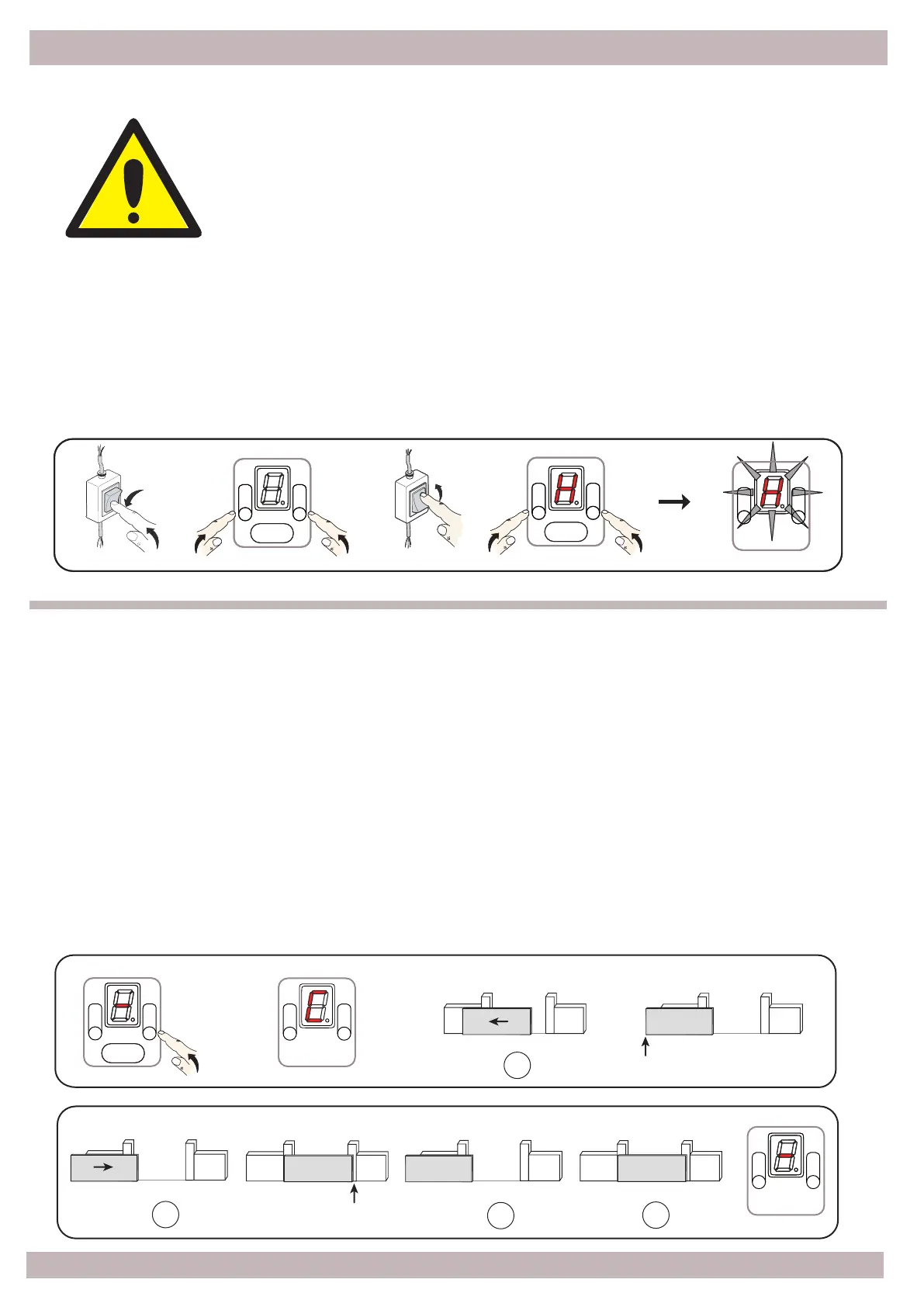
Press and hold the B buon, aer 5" the icon [ [ ] flashes, release the buon, the gate moves slowly
to the le in search of the first mechanical stop which must be the Opening stop, if not, to reverse
the movement to the right, press and release the B buon, the direcon of rotaon changes
as well as the display icon [ ] ].
The control unit performs a first automac maneuver at low speed, Opening and Closing with a
short pressure on the mechanical limit switches to store the complete cycle.
It then performs two more maneuvers to store the torque profile in opening and closing with the
default operang parameters.
At the end of the cycle, the [ - ] icon comes on to confirm that the automaon is ready to work.
Once the setup is completed, the B buon becomes a STEP-BY-STEP command if pressed.
Turn off the power, press and hold the buons A and B at the same me, power on and hold
buons pressed unl a [ H ] flashes on the display; now release the buons, all the
parameters are reset to factory default.
Press
4 - CONTROL UNIT CONFIGURATION
4.2 - Automac inial setup
Opening
Mechanical Stop
STOP
Closing
STOP
Mechanical Stop
Opening
Closing
PLEASE NOTE
Any safety devices (Photocells or Stop) must be connected before
programming, otherwise they are NOT acve.
It is possible to acvate them later by following chapter 6 Opon 9.
Before proceeding with programming, make sure that the Opening
and Closing mechanical stops are present.
4.1 – Reset default parameters
Press
ATTENTION
Press


 To Next Page