P.13
5”
BA
BA
BA
BA
BA
5”
BA
BA
BA
BA
5”
BA
BA
BA
BA
BA
X2
5 - REMOTE CONTROL SETTINGS
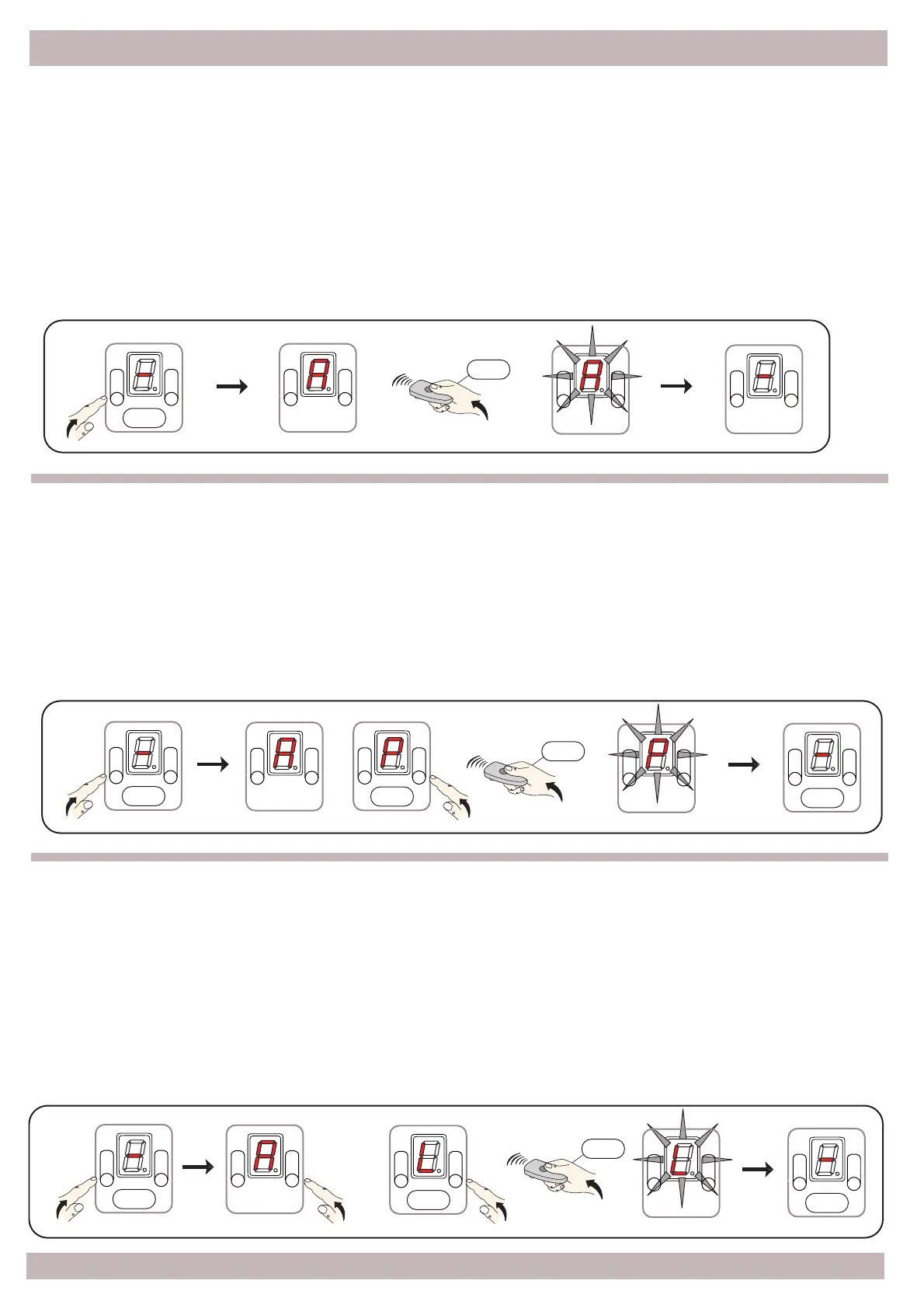
5.1 – Total opening remote learning
Press and hold the A buon, aer 5" on the display the icon [ A ] comes on; release the buon,
press the key of the remote transmier that you want to program within 5"; the correct storage
is highlighted by a brief flash on the display; in order to program addional transmiers, press in
sequence the keys on the transmiers, if no signal is transmied aer a few seconds the [ - ]
icon comes on to confirm that the automaon is ready to work.
5.2 – Paral/Pedestrian opening remote learning
5.3 – Remote control learning on Relay contact
Press
Press
Press
Press
Press
Press
Press
Press
Press
Press
Press and hold the A buon, aer 5" on the display the [ A ] icon comes on, release the A buon,
press and release the B buon, the [ P ] icon comes on the display, now press the key of the remote
transmier that you want to program within 5"; the correct storage is highlighted with a short flash
on the display; in order to program addional transmiers, press in sequence the keys on the
transmiers, if no signal is transmied aer a few seconds the [ - ] icon comes on to confirm that the
automaon is ready to work.
Press and hold the A button, after 5"on the display the icon [ A ] comes on, now release the button,
press the B button twice and release; on the display the [ L ] icon comes on, now press the key of the
remote transmitter that you want to program within 5"; the correct storage is highlighted with a
short ash on the display; in order to program additional transmitters, press in sequence the keys
on the transmitters, if no signal is transmitted after a few seconds the [ - ] icon comes on to conrm
that the automation is ready to work.
PLEASE NOTE - The function is available only if Option 4 or 5 of Menu 8 is active


 To Next Page