EasyManua.ls Logo

DeviceWell HDS7105S - Parameter; TALLY Interface

DeviceWell HDS7105S
44 pages
Print Icon
To Next Page IconTo Next Page
To Previous Page IconTo Previous Page
Loading...
24
SWITCHER
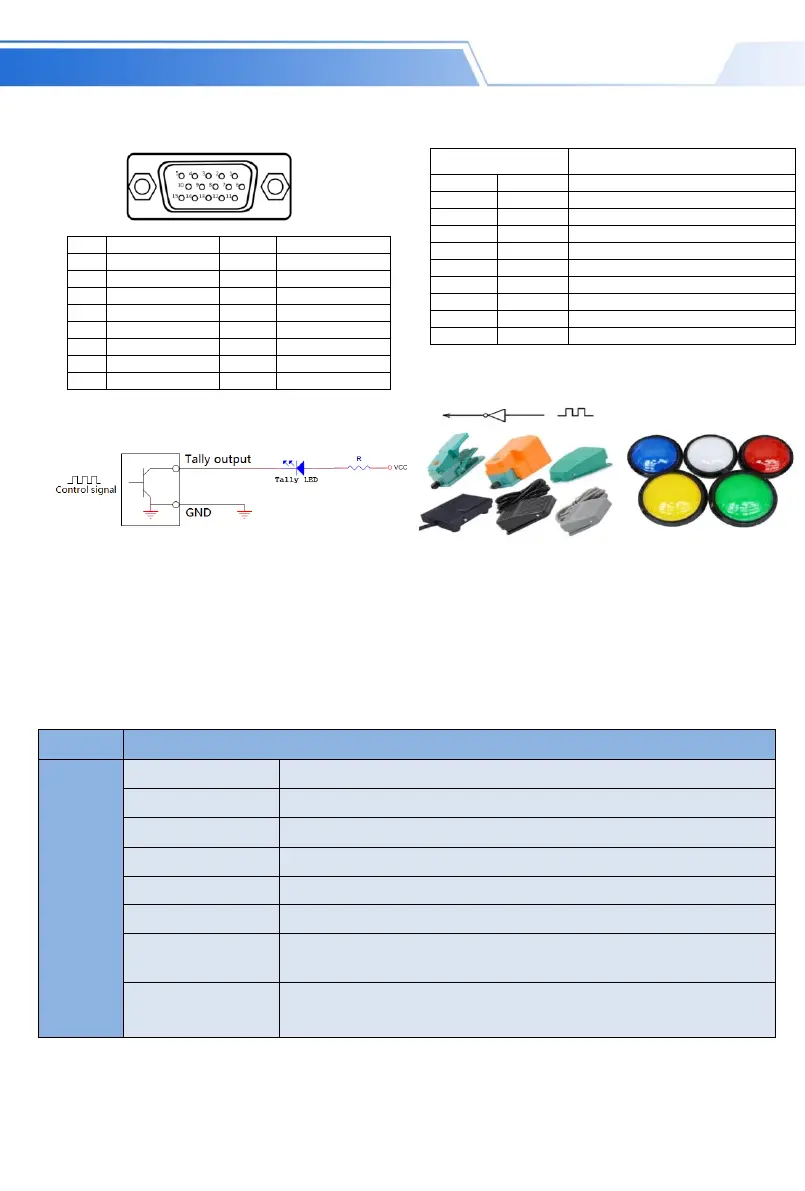
3.2 TALLY /GPI Interface
3.3 Parameters
Name
4*HDMI+1*DP Switcher
Video
Signal
Input
Input signal
HDMI1.4/DP1.2 video signal
Connector
Standard
Reflection loss
>15dB 5MHz~3GHz
Signal amplitude
800mV±10%(HDMI)
Impedance
100Ω (HDMI)
Balance
Adaptive
DVD input
HDMI support
480i/576i,480p/576p,720p,1080i,1080p,
Computer HDMI
input support
1920x1080,1680x1050,1600x900,1440x1050,1366x768,1360x768,1360x768,1280x1024,
1280x960,1280x800,1280x768,1280x720,1280x600,1152x864,1024x768,800x600,
PI
N
Function(TALLY)
PIN
Function(GPI)
11
PGM-IN1
1
GPI-IN1
12
PGM-IN2
2
GPI -IN2
13
PGM-IN3
3
GPI -IN3
14
PGM-IN4
4
GPI -IN4
6
PVW-IN1
10
GPI -IN5
7
PVW-IN2
15
GPI -IN6
8
PVW-IN3
5
GND
9
PVW-IN4
GPI Optional feature list
GPI-Inx Optional feature
Description
1
PGM1
Simulate PGM1 button messages
2
PGM2
Simulate PGM2 button messages
3
PGM3
Simulate PGM3 button messages
4
PGM4
Simulate PGM4 button messages
5
PGM_BA
R
Simulate PGM_BAR button messages
6
CUT
Simulate CUT button messages
7
AUTO
Simulate AUTO button messages
8
MUTE
Simulate MUTE button messages
9
FTB
Simulate FTB button messages
10
STILL
Simulate STILL button messages
G
GPI Control Schematic
Foot Switch
DJ Button
TALLY connection diagram
NoteTally LED: for external display device
Tally output Active low (Tally LED is lit) High level is invalid (Tally out is off)

Related product manuals