Trouble Shooting
Water temperature is too low
Electric supply is off
Water flow too high
Water flow too high
E2
Incorrect power supply
Water connections are
reversed
No or low water flow
Turn on the main circuit
breaker.
Reduce the water flow.
Reduce the water flow.
Replace the water temperature
sensor.
Contact after sales service.
Make sure that the device
is connected to the voltage
supply specified on the rating
label on the front cover of the
device and no other.
Cold water inlet = blue;
Hot water outlet = red.
Ensure that the minimum water
pressure (0,05Mpa/0,5bar)
to switch on the device is
met. Also check that the inlet
filter screen is clear from any
debris. This is located in the
inlet.
Maintenance
Professional maintenance may only be carried out by duly authorised technical
staff.
If faulty, never try to repair the hot water device yourself. Please contact the
nearest service specialist or the party that supplied the appliance originally.
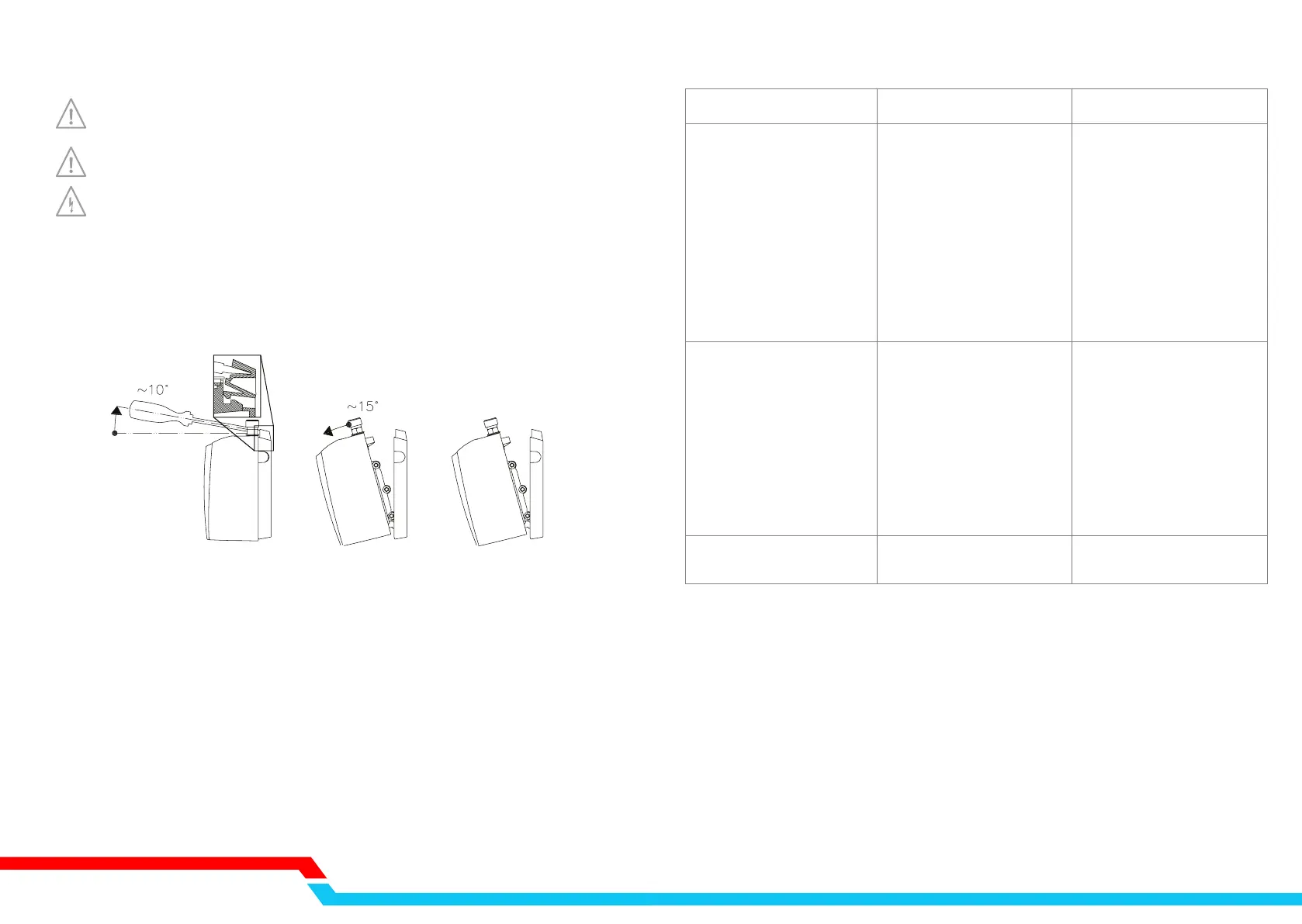
Disassembly
Removing the appliance from the wall bracket. (1) Insert a flat screwdriver under the lip
between the water connections. Carefully lever the screwdriver upwards slightly. (2) Tip
the appliance at an angle relative to the wall bracket and (3) disengage it by lifting it
upwards.
Care
The enclosure can simply be cleaned with a damp cloth. Do not use aggressive cleaners or
cleaners with a scouring effect!
Prolonged shutdown
Do not use heated water as drinking water. After prolonged shutdown of the device for
example due holiday, the device should be fully heated up to the maximum temperature
(tap at minimum flow) before re-using. It is recommended to flush the pipes for one minute.
Cleaning the filter
Check the filter which is incorporated in the cold water inlet of the device (blue) regularly
and keep it free from debris and dirt. This can be obtained by separating the device from
the tap. Make sure you have switched off the main power supply and the main water
supply.
23
1
23
Cause Remedy
DXI55 INSTANT WATER HEATER
No heat, indicator light off
No heat or little hot water,
indicator light on


 To Next Page
 Loading...