Welcome to DFRobot: www.DFRobot.com.cn 26 / 49
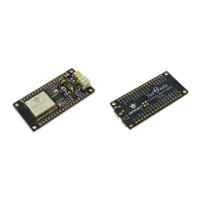
1 x FireBeetle Board-ESP32
Hardware linking method
Plug FireBeetle Covers-Gravity Adapter Board to FireBeetle Board-ESP32 and plug simulative angle
sensor into A0 here in the ADC experiment.
And connect FireBeetle Board-ESP32 directly to your computer by USB data wire.
With codes as follows
Open Arduino IDE. You would better enter the code manually than open Course-> Item-3 to be
familiar with it.
With codes as follows
void setup() {
// put your setup code here, to run once:
Serial.begin(115200);
}
void loop() {
// put your main code here, to run repeatedly:
Serial.println(analogRead(A0));
delay(100);
}
Please click verify/compile to review and please upload it after the confirmation.
Once you click Upload, IDE will send codes to FireBeetle Board-ESP32.
Once the upload finishes, open the built-in serial monitor of Arduino IDE, rotate simulative angle
sensor, you can see the movement of the numbers, shown as below.


 To Next Page
