33
1 5: 020 4/1 1 /2 011
P 4 .0
TEST
2
STOP
ESC
15 :0 204 /1 1 /2 01 1
set 4 . 0 Bar
P 4 .1
1 2
OFF
SYSTEM
ESC
SYSTEM
OFF
21
P 4 .1
set 4 . 0 Bar
0 4/ 11 /2 0 11 1 5:0 2
STOP
START
1 5: 020 4/1 1 /2 011
P 4 .1
TEST
2
STOP
START
STOP
50 .
0 HZ
- - - A
4 1 0 V
1 5:0 204 /1 1 /2 011
P 7.6
TEST
2
STOP
TEST
1
TEST
P 4 .0
0 4/1 1 /2 0 11 1 5 :0 2
STOP
START
15 :0 204 /1 1 /2 01 1
set 4 . 0 Bar
P 4 .0
1 2
OFF
SYSTEM
41 0 V
0.0 A
00 .
0 HZ
15 :0 204 /1 1 /2 01 1
set 4 . 0 Bar
P 4 .0
1 2
1 2
2 WORK
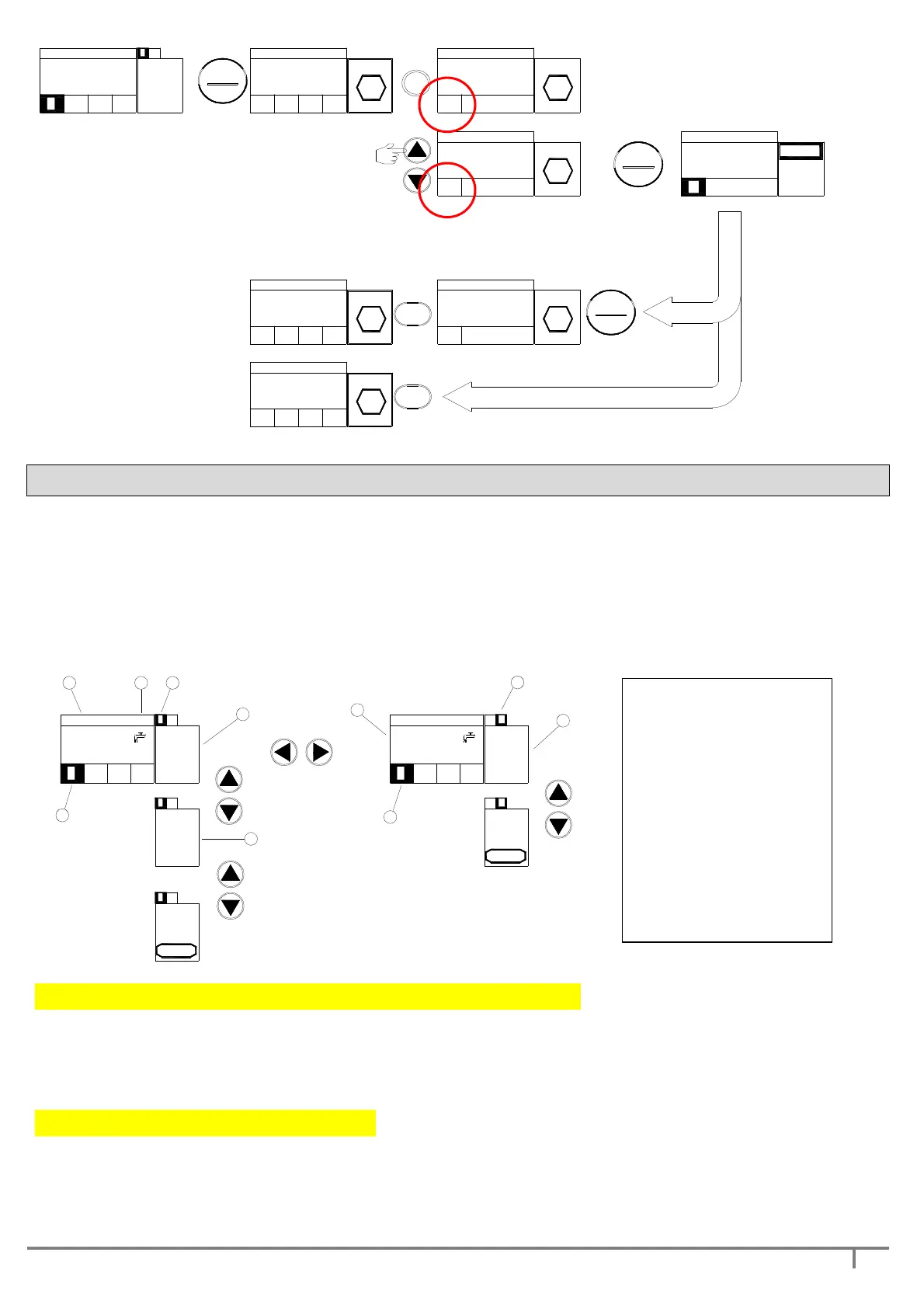
Access to WORK mode is automatic as soon as DGBOX is energised, unless it was manually placed in OUT OF
SERVICE mode before the last switch-off.
In WORK mode, the operating parameters of the variable-speed pump and of the fixed-speed pump can be
displayed (see fig. below), and finally, the STOP option is displayed for placing the single pump in OUT OF
SERVICE.
If the single pump is in OUT OF SERVICE, the last display shows the START option for returning it to WORK
mode.
410 V
5.5 A
36.
8 HZ
15:0204/11/2011
set 4.0 Bar
P 4.0
1 2
1 2 21
21
P 4.0
set 4.0 Bar
04/11/2011 15:02
00.
0 HZ
0.0 A
410 V
21
584 Vb
0:05:37
49 °C
1 2
STOP
ENTER
?
1 2
?
ENTER
STOP
4
4
5
7
1
3
6
6
2 3
fig. 4.14
AUTOMATIC REDUCTION OF THE OPERATING FREQUENCY:
if during normal operation overloads
occur (current or thermal), DGBOX does not stop the pumps immediately, but automatically reduces the
operating frequency until the parameters are returned to their normal values; during this period the displayed
frequency flashes, to indicate the fault status.
OPERATING PRESSURE QUICK ADJUST
: in WORK mode, the work pressure can be quickly changed,
without having to access the SET menu; by pressing the ENTER key and, at the same time, the UP or DOWN
arrow (depending on whether the pressure is to be increased or decreased), the work pressure is changed with
step 0.1 bar for each strike of the arrow.
1. date
2. hour
3. pump selection
4. pump 1 operating
parameters
5. pump 2 operating
parameters
6. working pump (pump 1)
7. system pressure


 To Next Page