EasyManua.ls Logo

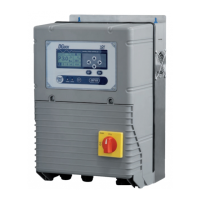
DGFLOW DGB MV 30 - User Manual

DGFLOW DGB MV 30
40 pages
Print Icon
To Next Page IconTo Next Page
Loading...
1
DGBOX
rev. 1602
Inverter electronic control panels
for single pumps or pumping units
OPERATOR’S AND MAINTENANCE MANUAL
Model V in V out A P (kW) P (HP)
DGB MV 30
3 ~ 400V 3 ~ 400V
8 3 4
DGB MV 55
3 ~ 400V 3 ~ 400V
14 5,5 7,5
DGB MV 75
3 ~ 400V 3 ~ 400V
18 7,5 10
DGB MVF 30
3 ~ 400V 3 ~ 400V
8 + 8 3 + 3 4 + 4
DGB MVF 55
3 ~ 400V 3 ~ 400V
14 + 14 5,5 + 5,5 7,5 + 7,5
DGB MVF 75
3 ~ 400V 3 ~ 400V
18 + 18 7,5 + 7,5 10 + 10
DGB MW 30
3 ~ 400V 3 ~ 400V
8 + 8 3 + 3 4 + 4
DGB SV 30
3 ~ 400V 3 ~ 400V
8 3 4
DGB SV 55
3 ~ 400V 3 ~ 400V
14 5,5 7,5
DGB SV 75
3 ~ 400V 3 ~ 400V
18 7,5 10
10154507A .03 - 170530

EN

Questions and Answers

  • R
    Rhonda PerryAug 18, 2025
    What to do if the DGFLOW Control Panel shows OVER VOLTAGE?
    • W
      William HernandezAug 18, 2025
      If the DGFLOW Control Panel displays 'OVER VOLTAGE', it means the inverter power voltage is too high (over +15%). You should check the supply voltage.
  • J
    Jasmine HendersonAug 21, 2025
    What causes UNDER VOLTAGE on a DGFLOW Control Panel?
    • V
      Victoria BlackwellAug 21, 2025
      If the DGFLOW Control Panel displays 'UNDER VOLTAGE', it indicates that the inverter power voltage is too low (under -15%). To resolve this, check the supply voltage and the section and length of the inverter power cables.
  • S
    Sabrina RichardsonAug 26, 2025
    How to fix OVER TEMP MOD error on DGFLOW Control Panel?
    • K
      Kristina GibsonAug 26, 2025
      If the DGFLOW Control Panel displays 'OVER TEMP MOD', the inverter module is overheating. Ensure the air cooling channels are free, the fans are working, the ambient temperature is below 45°C, and the maximum operating current is within limits.
  • M
    Michael AdkinsAug 27, 2025
    What does OVER TEMP CAP mean on my DGFLOW Control Panel?
    • M
      Michelle ChandlerAug 28, 2025
      If the DGFLOW Control Panel displays 'OVER TEMP CAP', the inverter capacitors are overheating. Ensure the air cooling channels are free and that the fans are working. Also, check that the ambient temperature is not above 45°C and verify the maximum operating current.
  • H
    Holly MunozAug 30, 2025
    What causes OVER TEMP BOX error on DGFLOW Control Panel?
    • R
      Robert DawsonAug 30, 2025
      If the DGFLOW Control Panel displays 'OVER TEMP BOX', it means the inverter is overheating internally. You should ensure the air cooling channels are free, the fans are working correctly, and the ambient temperature is not exceeding 45°C. Also, check the maximum operating current.
  • B
    Brianna EllisSep 1, 2025
    What does LOW PRESS mean on my DGFLOW Control Panel?
    • D
      davidsongavinSep 1, 2025
      If the DGFLOW Control Panel indicates 'LOW PRESS', and you're using a flow sensor, it means either the working pressure is near zero or the pump can't reach the set pressure. Check the pipes for leaks, verify the pressure sensor's operation, ensure the maximum pump pressure exceeds the set pressure, and inspect the pump for wear or obstructions.
  • J
    jasonsanchezSep 3, 2025
    What to do if the FIXED SPEED pump fails to start on my DGFLOW Control Panel?
    • D
      Dean MaloneSep 3, 2025
      If the FIXED SPEED pump fails to start, it could be due to the ammeter cutout tripping because the pump is drawing too much current. Check the current absorption at maximum load, verify the ammeter setting, and check the voltage at the pump terminals under load.
  • Z
    Zachary Booth IISep 6, 2025
    What does EXT OFF mean on my DGFLOW Control Panel?
    • M
      Mackenzie ZamoraSep 6, 2025
      If the DGFLOW Control Panel shows 'EXT OFF', it means the inverter is out of service due to an external signal. You should check the external signal to resolve this issue.
  • J
    Jessica SpearsSep 8, 2025
    Why does my DGFLOW Control Panel pump run constantly?
    • S
      Stephanie DavilaSep 8, 2025
      If the DGFLOW Control Panel's pump runs constantly when not needed, it could be due to system leaks, a faulty pressure sensor, a low 'switch off frequency' setting, or a flow rate sensor issue. Find and fix any leaks, inspect the pressure sensor, increase the switch off frequency setting, and inspect the flow sensor.
  • M
    michelle39Sep 10, 2025
    Why does the DGFLOW Control Panel's pump stop too soon?
    • S
      Susan ShortSep 12, 2025
      If the pump stops too soon when requested, it could be due to a high switch off frequency setting or a fault with the flow rate sensor. Try setting a lower switch off frequency and inspecting the flow sensor.

Summary

SAFETY STANDARDS

INSTALLATION

DESCRIPTION OF THE MAIN COMPONENTS

INPUT; OUTPUT SIGNAL CONNECTIONS

INPUT SIGNAL CONNECTIONS

Details on connecting input signals for sensors and control.

OUTPUT SIGNAL CONNECTIONS

Details on connecting output signals for relays and indicators.

MASTER - SLAVE CONNECTIONS

STARTING UP

SELF-LEARNING CONFIGURATION

MAIN MENU and PARAMETER MENU

BASE SETUP

Sets up basic operational parameters like working pressure and pump current.

ADVANCED CONFIGURATION (ADV SETUP)

Configures advanced parameters for optimizing plant engineering situations.

HARDWARE CONFIGURATION (HARDWARE SETUP)

Sets up signal inputs and outputs on the control board.

SETTING THE PARAMETERS REQUIRED FOR OPERATION

CHECKING THE DIRECTION OF THE MOTOR (PUMP 1 ROTATION)

PARAMETER CONFIGURATION AND CHECKS

CHECKING ELECTRIC MOTOR FREQUENCY

Verify MOTOR FREQ parameter matches the motor plate frequency.

CHECKING MAXIMUM OPERATING FREQUENCY

Verify MAX FREQ parameter matches motor plate frequency.

SETTING OFF FREQUENCY (SP1)

Set the shutdown frequency for operation without a flow sensor.

SETTING PRESSURE SENSOR FULL-SCALE

Enter the full-scale value for connected pressure sensors.

SETTING THE FLOW SENSOR

Configure the flow sensor parameter.

CONTROL OF DRY RUNNING APPLICATIONS WITHOUT FLOW SENSOR

TEST

ALARMS

PART 2 - USERS MANUAL

GENERAL REMARKS

Overview of DGBOX control panels for single and multi-pump units.

CONTROL PANEL

EMERGENCY ELECTRONIC BOARD

TECHNICAL DATA and WORKING LIMITS

DIMENSIONS and WEIGHTS

MULTI-PUMPS SYSTEMS

PRODUCT MODELS AND IDENTIFICATION CODES

SURGE TANK

SAFETY PRESSURE SWITCH

OPERATING MODES

CONFIGURATION

Access and modify working parameters, including base, advanced, hardware setups, and maintenance.

TEST

Perform manual functional tests on variable-speed and fixed-speed pumps.

WORK

Normal operating mode, controlling parameters and displaying alarms.

OUT OF SERVICE

Manually stop the system or single pumps for maintenance or configuration.

UPDATE

Perform DGBOX maintenance or software update operations via USB.

TROUBLESHOOTING

WARRANTY

DISPOSAL

DECLARATION OF CONFORMITY

DGFLOW DGB MV 30 Specifications

General IconGeneral
BrandDGFLOW
ModelDGB MV 30
CategoryControl Panel
LanguageEnglish

Related product manuals