REMOTE CONTROL
7
LIGHT
Switch the LED display on the
indoor unit panel ON or OFF.
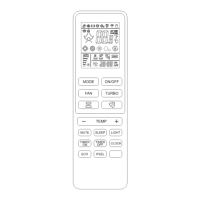
1. Press and hold the and TEMP + but-
t o n s f o r 3 s e c o n d s t o a c v a t e t h i s f u n c o n .
will appear on the remote display.
2. This funcon will auto start the heang
mode when the room temperature is
lower than 8°C (46°F), and it will return to
standby if the temperature reaches 9°C
(48°F).
3. Press the any buon other than TIMER
ON, TIMER OFF, I FEEL or SWING will deac-
vate the 8°C Heang funcon.
Press the LIGHT buon to switch o the LED
display. Press the buon again to switch on
the LED display.
To acvate this funcon, the indoor unit
must be o with the mode set to COOL or
DRY. This funcon cannot be acvated with
TURBO funcon.
Press and hold the MUTE buon for 5 sec-
onds to acvate this funcon. will appear
on the remote display.
1. This funcon helps to clear accumulat-
ed dust, bacteria, etc. from the indoor
evaporator.
2. Aer the cleaning process is nished,
the unit will return to the preset mode.
The symbol will remain for 10 minutes
aer funcon is complete. Press the
ON/OFF or MODE buon to cancel this
funcon.
It's normal if there is some noise during this
operaon, as plasc materials expand with
heat and contract with cold.
Perform this funcon in the following am-
bient condions to avoid acvang certain
safety protecon features:
It is recommended to perform this funcon
every 3 months.
Indoor
Unit
Temp < 86°F (30°C)
Outdoor
Unit
41°F (5°C) < Temp < 86°F (30°C)
1. Press and hold the TIMER ON and
TIMER OFF buons together to acve
this funcon. Perform this step again to
deacvate this funcon.
2. When the Child-Lock funcon is acvated,
the buons on the remote will be inacve.


 To Next Page