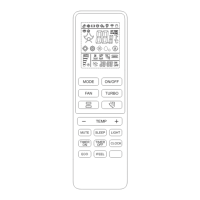
REMOTE CONTROL
5
TIMER ON
TIMER OFF
CLOCK
Change the current local me.
Switch the unit OFF aer a set me.
Switch the unit ON aer a set me.
Press the CLOCK buon once. Set the cur-
rent local me in 24 hour format using the
+ and - buons. Press the CLOCK buon a
second me to conrm.
Never adjust or set the ap or deectors manually as
this could damage the mechanism.
Note: If unit does not have 4-way airow funcon,
the horizontal airow may be adjusted manually.
Never insert ngers, scks or other objects into the
air inlet or outlet vents as this acon could cause
serious injury or damage to the unit.
Avoid seng the horizontal louver downward for an
extended period of me in Cooling or Dry modes to
prevent condensed water from dripping out of the
front of the unit.
With the unit switched o, set the TIMER. To set
the mer to switch the unit on automacally:
1. Press the TIMER ON buon once. The
"12:00 ON" will appear and ash on the
remote display.
2. Press the + or - buons to set the desired
Timer-on me in 24hr format.
3. Press the TIMER ON buon a second me
to conrm. A beep will sound, "ON" will stop
ashing and the mer indicator on the indoor
unit will light up.
4. Aer seng the mer press the MODE
buon to set the needed mode (Auto, Cool,
Dry, Fan or Heat). Set the needed fan speed
by pressing the FAN buon.
Press + or - to set the needed operaon
temperature. CANCEL the mer funcon by
pressing the TIMER ON buon again.
1. Press the buon to acvate the
horizontal ap to swing up and down.
The symbol will appear on the remote
display. Press again to stop the swing
movement at the current angle.
2. Press to acve the vercal deec-
t o r s t o s w i n g l e a n d r i g h t . T h e s y m b o l
will appear on the remote display.
Press again to stop the swing movement
at the current angle.
To set the mer to switch the unit o automat-
ically:
1. Conrm the appliance is ON.
2. Press the TIMER OFF buon once to set the
unit to switch o. The "12:00 OFF" will appear
and ash on the remote display. Press the +
or - to set the mer in 24hr format.
3. Press the TIMER OFF buon a second me
to conrm. A beep will sound, "OFF" will stop
ashing and the mer indicator on the indoor
unit will light up. Cancel the mer funcon by
pressing the TIMER OFF buon again.
• Press the + or - buon once, the me increases/
decreases by 1 minute.
• Press and hold the + or - buon for 2 seconds, the
me increases/decreases by 10 minutes.
• Long press the + or - buon, the me increases/
decreases by 1 hour.
Note: If the Timer ON/OFF buon has been pressed
and there is no further acvity for 10 seconds, the
unit will return to normal operaon and the mer
funcon will be canceled.
▲
▼
▲
▼
The horizontal louver is automacally ad-
justed according to the selected operang
mode. The direcon of airow can be further
adjusted by using the SWING buons on the
remote control.
COOL, DRY Horizontal
HEAT, FAN ONLY Downward


 To Next Page
 Loading...