Page 34
Open Loop
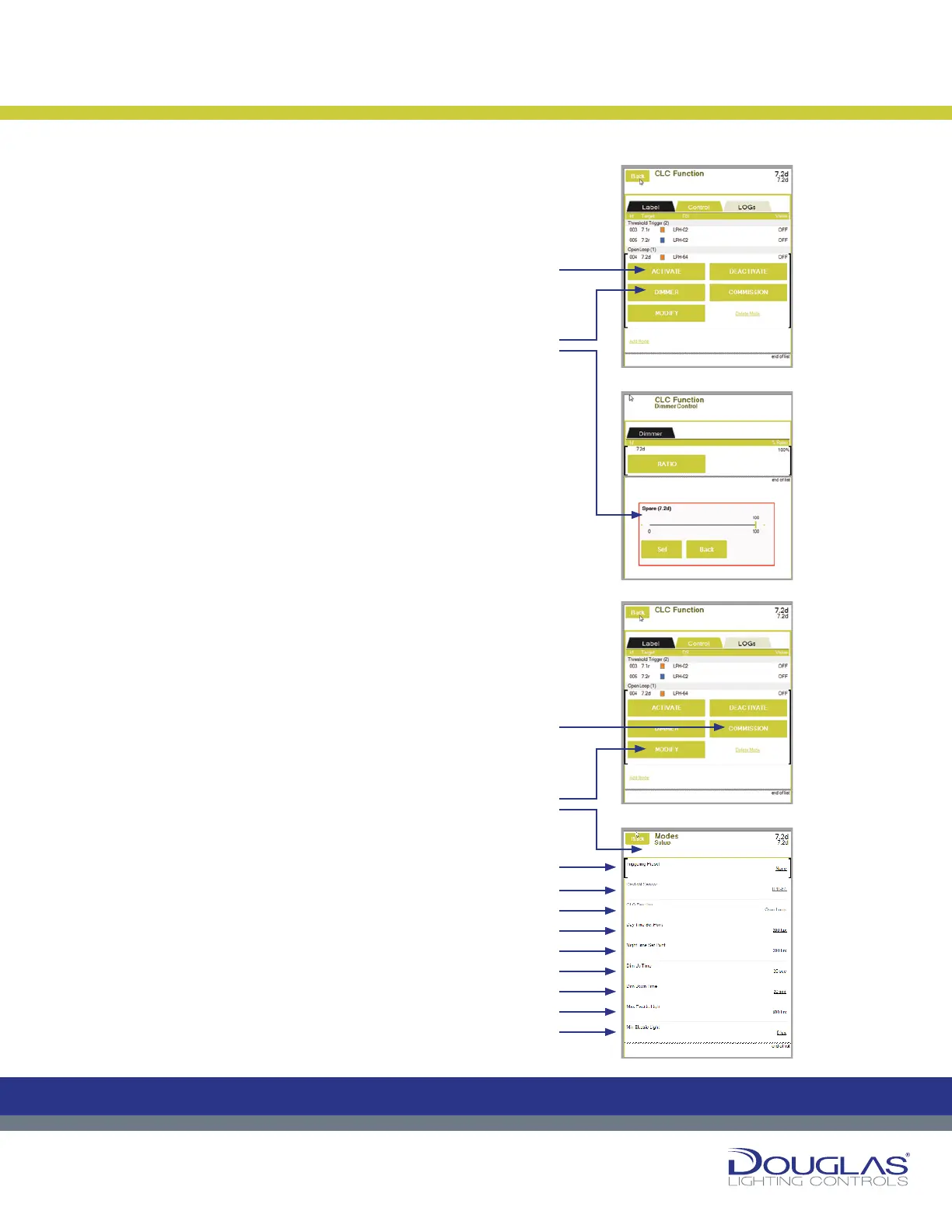
a) Activate or deactivate a selected dimmer group by selecting
the ACTIVATE or DEACTIVATE button.
An orange rectangle is displayed for activated modes and a
blue rectangle for a deactivated preset.
b) Select the DIMMER button to adjust the dimmer out dimming
level Set Point. This is set as a percentage. Use the slider to
adjust the level and select the Set button. In the case when
the there are multiple dimmer outputs controlled by the same
sensor, this value is the dimmer RATIO.
c) Select the COMMISSION button to initiate the Commissioning
process, in which the system tests the full dimming spectrum
and sets up the Open Loop CLC. Commissioning is a multi-
step process and this is typically done as part of the initial
installation. This must be done correctly for the CLC mode
to function properly. If you are initiating a Commission,
refer to the documentation describing the commissioning
procedure.
d) Select the MODIFY button to view or modify the sensor
parameters, as follows:
1. Triggering Preset - display any of the CLC triggering
presets associated with the output.
2. Daylight Sensor - select the associated link to modify
the controlling sensor. Next, select the new sensor.
3. CLC Function - select the associated link to modify the
CLC type. Next, select the Open Loop or Closed Loop
option and select the OK button.
4. Day Time Set Point - select the associated link to
modify the value, which is used in the commissioning
process. First, select the Interior or Exterior option, use
the slider to set the new value, and select the OK button.
5. Night Time Set Point - select the associated link to
modify the value, which is used in the commissioning
process. Use the slider to set the new value and select
the OK button.
6. Dim Up Time - select the associated link to modify the
value, which is the maximum time required for the dimmer
to go from a lower to a higher dimming percentage when
the ambient brightness changes. Use the slider to set
the new value and select the OK button.
7. Dim Down Time - select the associated link to modify
the value, which is the maximum time required for
the dimmer to go from a higher to a lower dimming
percentage when the ambient brightness changes. Use
the slider to set the new value and select the OK button.
8. Max Electric Light - select the associated link to modify
the value, which is the brightness stable light level value
in the area controlled by the CLC. Use the slider to set
the new value and select the OK button.
9. Min Electric Light - select the associated link to modify
the value, which is the dimmest stable light level value in
the area controlled by the CLC. Use the slider to set the
new value and select the OK button.
Constant Lighting Controller
33
Dialog® Lighting Control System
Open Loop
a) Activate or deactivate a selected dimmer group by selecting the ACTIVATE
or DEACTIVATE button.
An orange rectangle is displayed for activated modes and a blue rectangle
for a deactivated preset.
b) Select the DIMMER button to adjust the dimmer out dimming level Set
Point. This is set as a percentage. Use the slider to adjust the level and
select the Set button. In the case when the there are multiple dimmer
outputs controlled by the same sensor, this value is the dimmer RATIO.
c) Select the COMMISSION button to initiate the Commissioning process,
in which the system tests the full dimming spectrum and sets up the
Open Loop CLC. Commissioning is a multi-step process and this is
typically done as part of the initial installation. This must be done correctly
for the CLC mode to function properly. If you are initiating a Commission,
refer to the documentation describing the commissioning procedure.
d) Select the MODIFY button to view or modify the sensor parameters, as
follows:
1. Triggering Preset
- display any of the CLC triggering presets
associated with the output.
2. Daylight Sensor - select the associated link to modify the controlling
sensor. Next, select the new sensor.
3. CLC Function - select the associated link to modify the CLC type. Next,
select the Open Loop or Closed Loop option and select the OK button.
4. Day Time Set Point - select the associated link to modify the value,
which is used in the commissioning process. First, select the Interior or
Exterior option, use the slider to set the new value, and select the OK
button.
5. Night Time Set Point - select the associated link to modify the value,
which is used in the commissioning process. Use the slider to set the
new value and select the OK button.
6. Dim Up Time - select the associated link to modify the value, which is
the maximum time required for the dimmer to go from a lower to a higher
dimming percentage when the ambient brightness changes. Use the
slider to set the new value and select the OK button.
7. Dim Down Time - select the associated link to modify the value, which
is the maximum time required for the dimmer to go from a higher to a
lower dimming percentage when the ambient brightness changes. Use
the slider to set the new value and select the OK button.
8. Max Electric Light - select the associated link to modify the value,
which is the brightness stable light level value in the area controlled by
the CLC. Use the slider to set the new value and select the OK button.
9. Min Electric Light - select the associated link to modify the value,
which is the dimmest stable light level value in the area controlled by the
CLC. Use the slider to set the new value and select the OK button.
Constant Lighting Controller
C
M
Y
CM
MY
CY
CMY
K
C
M
Y
CM
MY
CY
CMY
K
33
Dialog® Lighting Control System
Open Loop
a) Activate or deactivate a selected dimmer group by selecting the ACTIVATE
or DEACTIVATE button.
An orange rectangle is displayed for activated modes and a blue rectangle
for a deactivated preset.
b) Select the DIMMER button to adjust the dimmer out dimming level Set
Point. This is set as a percentage. Use the slider to adjust the level and
select the Set button. In the case when the there are multiple dimmer
outputs controlled by the same sensor, this value is the dimmer RATIO.
c) Select the COMMISSION button to initiate the Commissioning process,
in which the system tests the full dimming spectrum and sets up the
Open Loop CLC. Commissioning is a multi-step process and this is
typically done as part of the initial installation. This must be done correctly
for the CLC mode to function properly. If you are initiating a Commission,
refer to the documentation describing the commissioning procedure.
d) Select the MODIFY button to view or modify the sensor parameters, as
follows:
1. Triggering Preset
- display any of the CLC triggering presets
associated with the output.
2. Daylight Sensor - select the associated link to modify the controlling
sensor. Next, select the new sensor.
3. CLC Function - select the associated link to modify the CLC type. Next,
select the Open Loop or Closed Loop option and select the OK button.
4. Day Time Set Point - select the associated link to modify the value,
which is used in the commissioning process. First, select the Interior or
Exterior option, use the slider to set the new value, and select the OK
button.
5. Night Time Set Point - select the associated link to modify the value,
which is used in the commissioning process. Use the slider to set the
new value and select the OK button.
6. Dim Up Time - select the associated link to modify the value, which is
the maximum time required for the dimmer to go from a lower to a higher
dimming percentage when the ambient brightness changes. Use the
slider to set the new value and select the OK button.
7. Dim Down Time - select the associated link to modify the value, which
is the maximum time required for the dimmer to go from a higher to a
lower dimming percentage when the ambient brightness changes. Use
the slider to set the new value and select the OK button.
8. Max Electric Light - select the associated link to modify the value,
which is the brightness stable light level value in the area controlled by
the CLC. Use the slider to set the new value and select the OK button.
9. Min Electric Light - select the associated link to modify the value,
which is the dimmest stable light level value in the area controlled by the
CLC. Use the slider to set the new value and select the OK button.
Constant Lighting Controller
C
M
Y
CM
MY
CY
CMY
K
C
M
Y
CM
MY
CY
CMY
K
33
Dialog® Lighting Control System
Open Loop
a) Activate or deactivate a selected dimmer group by selecting the ACTIVATE
or DEACTIVATE button.
An orange rectangle is displayed for activated modes and a blue rectangle
for a deactivated preset.
b) Select the DIMMER button to adjust the dimmer out dimming level Set
Point. This is set as a percentage. Use the slider to adjust the level and
select the Set button. In the case when the there are multiple dimmer
outputs controlled by the same sensor, this value is the dimmer RATIO.
c) Select the COMMISSION button to initiate the Commissioning process,
in which the system tests the full dimming spectrum and sets up the
Open Loop CLC. Commissioning is a multi-step process and this is
typically done as part of the initial installation. This must be done correctly
for the CLC mode to function properly. If you are initiating a Commission,
refer to the documentation describing the commissioning procedure.
d) Select the MODIFY button to view or modify the sensor parameters, as
follows:
1. Triggering Preset
- display any of the CLC triggering presets
associated with the output.
2. Daylight Sensor - select the associated link to modify the controlling
sensor. Next, select the new sensor.
3. CLC Function - select the associated link to modify the CLC type. Next,
select the Open Loop or Closed Loop option and select the OK button.
4. Day Time Set Point - select the associated link to modify the value,
which is used in the commissioning process. First, select the Interior or
Exterior option, use the slider to set the new value, and select the OK
button.
5. Night Time Set Point - select the associated link to modify the value,
which is used in the commissioning process. Use the slider to set the
new value and select the OK button.
6. Dim Up Time - select the associated link to modify the value, which is
the maximum time required for the dimmer to go from a lower to a higher
dimming percentage when the ambient brightness changes. Use the
slider to set the new value and select the OK button.
7. Dim Down Time - select the associated link to modify the value, which
is the maximum time required for the dimmer to go from a higher to a
lower dimming percentage when the ambient brightness changes. Use
the slider to set the new value and select the OK button.
8. Max Electric Light - select the associated link to modify the value,
which is the brightness stable light level value in the area controlled by
the CLC. Use the slider to set the new value and select the OK button.
9. Min Electric Light - select the associated link to modify the value,
which is the dimmest stable light level value in the area controlled by the
CLC. Use the slider to set the new value and select the OK button.
Constant Lighting Controller
C
M
Y
CM
MY
CY
CMY
K
C
M
Y
CM
MY
CY
CMY
K
33
Dialog® Lighting Control System
Open Loop
a) Activate or deactivate a selected dimmer group by selecting the ACTIVATE
or DEACTIVATE button.
An orange rectangle is displayed for activated modes and a blue rectangle
for a deactivated preset.
b) Select the DIMMER button to adjust the dimmer out dimming level Set
Point. This is set as a percentage. Use the slider to adjust the level and
select the Set button. In the case when the there are multiple dimmer
outputs controlled by the same sensor, this value is the dimmer RATIO.
c) Select the COMMISSION button to initiate the Commissioning process,
in which the system tests the full dimming spectrum and sets up the
Open Loop CLC. Commissioning is a multi-step process and this is
typically done as part of the initial installation. This must be done correctly
for the CLC mode to function properly. If you are initiating a Commission,
refer to the documentation describing the commissioning procedure.
d) Select the MODIFY button to view or modify the sensor parameters, as
follows:
1. Triggering Preset
- display any of the CLC triggering presets
associated with the output.
2. Daylight Sensor - select the associated link to modify the controlling
sensor. Next, select the new sensor.
3. CLC Function - select the associated link to modify the CLC type. Next,
select the Open Loop or Closed Loop option and select the OK button.
4. Day Time Set Point - select the associated link to modify the value,
which is used in the commissioning process. First, select the Interior or
Exterior option, use the slider to set the new value, and select the OK
button.
5. Night Time Set Point - select the associated link to modify the value,
which is used in the commissioning process. Use the slider to set the
new value and select the OK button.
6. Dim Up Time - select the associated link to modify the value, which is
the maximum time required for the dimmer to go from a lower to a higher
dimming percentage when the ambient brightness changes. Use the
slider to set the new value and select the OK button.
7. Dim Down Time - select the associated link to modify the value, which
is the maximum time required for the dimmer to go from a higher to a
lower dimming percentage when the ambient brightness changes. Use
the slider to set the new value and select the OK button.
8. Max Electric Light - select the associated link to modify the value,
which is the brightness stable light level value in the area controlled by
the CLC. Use the slider to set the new value and select the OK button.
9. Min Electric Light - select the associated link to modify the value,
which is the dimmest stable light level value in the area controlled by the
CLC. Use the slider to set the new value and select the OK button.
Constant Lighting Controller
C
M
Y
CM
MY
CY
CMY
K
C
M
Y
CM
MY
CY
CMY
K
Open Loop:
a)
1.
2.
3.
4.
5.
6.
7.
8.
9.
c)
b)
d)


 To Next Page
 Loading...