Page 23
Constant Lighting Controller Menus
The Modes menu has two menus—Daylight Sensors and Constant
Lighting Control Functions. Each of these menus has multiple
submenus, as described in the following sections:
Daylight Sensors Menu
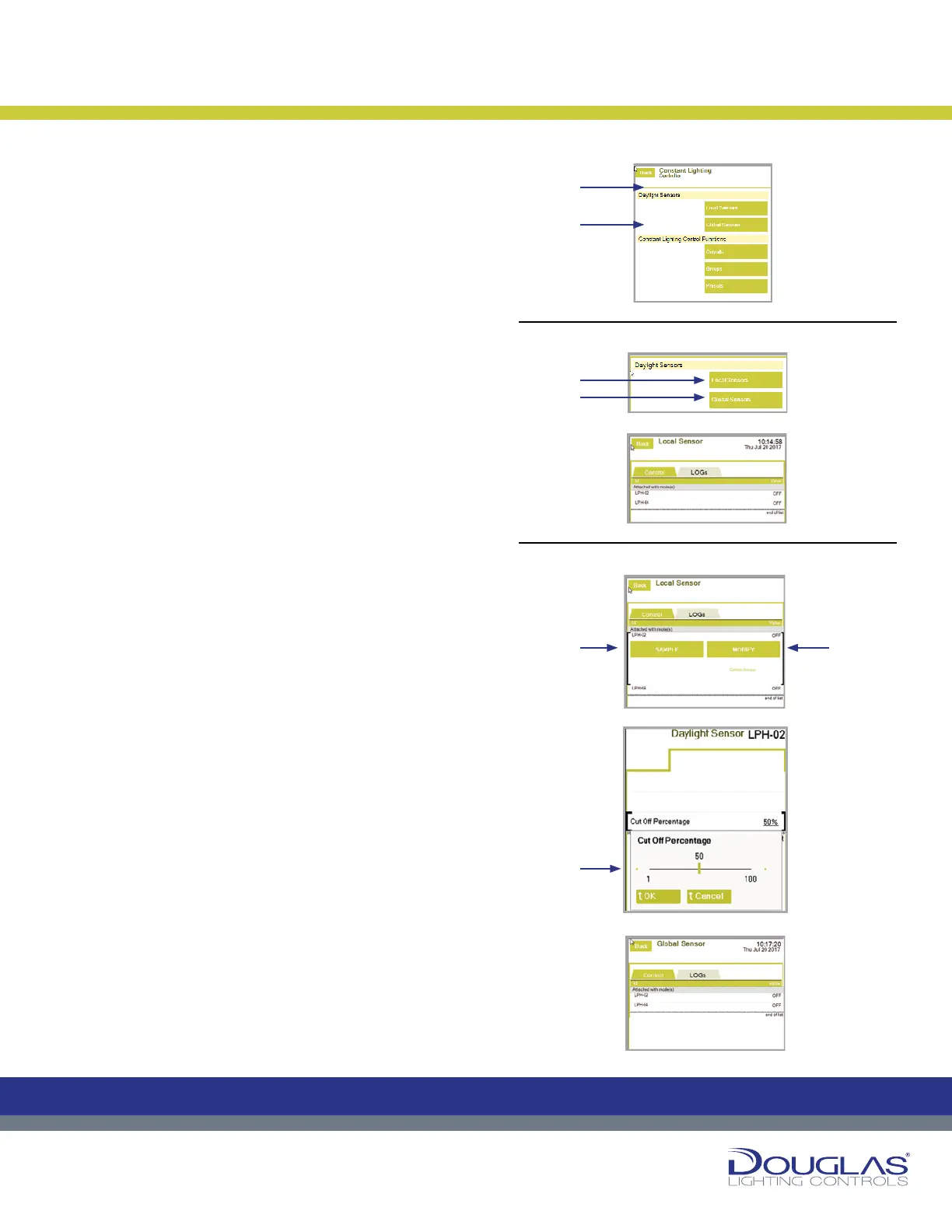
The Daylight Sensors menu has two submenus. You access
the conguration for each of these submenus by selecting the
corresponding button:
1. Daylight Sensors > Local Sensors
2. Daylight Sensors > Global Sensors
1. Local Sensors
The Local Sensors screen displays the local sensors, which are
photosensor addresses with an RS-485 connection to the LCU
(maximum 64) and the sensors ON/OFF state. Using the Local
Sensor screen, you can obtain a real-time light intensity reading
(Sample) and modify the sensor parameters.
The Local Sensors screen has two tabs:
1. Control
Control
To sample or modify a sensor:
a) With a sensor selected, select the Sample button to monitor
the current light-level reading. If the photosensor is ON and
properly connected, its light-level reading (LUX) is displayed.
b) With a sensor selected, select the MODIFY button to modify
the conguration settings. You can change the Refresh
Rate (the frequency the sensor takes the light-level reading),
the Buffer Size (used for storing previous readings), and
the Cut Off Percentage (default is set at 50%). To modify a
parameter, select it and use the slider to adjust the value and
select the OK button.
3. LOGs
You can view the historical activity for a selected mode by
selecting the LOGs tab.
2. Global Sensors
The Global Sensors screen displays the global sensors, which
are photosensor addresses recognized by other LCUs in the
network. Global sensors which are also local sensors with an RS-
485 connection to the LCU are displayed in a black font and can be
sampled and modied, as local sensors can be. Sensors displayed
in a gray font do not have a connection to an RS-485 connection.
Dialog
®
Lighting Control System
Constant Lighting Controller
22
Dialog® Lighting Control System
The Modes menu has two menus— Daylight Sensors and Constant Lighting
Control Functions. Each of these menus has multiple submenus, as described
in the following sections:
Constant Lighting Controller
The Daylight Sensors menu has two submenus. You access the conguration
for each of these submenus by selecting the corresponding button:
1. Daylight Sensors > Local Sensors
2. Daylight Sensors > Global Sensors
1. Local Sensors
The Local Sensors screen displays the local sensors, which are photosensor
addresses with an RS-485 connection to the LCU (maximum 64) and the
sensors ON/OFF state. Using the Local Sensor screen, you can obtain a real-
time light intensity reading (Sample) and modify the sensor parameters.
The Local Sensors screen has two tabs:
1. Control
Control
To sample or modify a sensor:
a) With a sensor selected, select the Sample button to monitor the current
light-level reading. If the photosensor is ON and properly connected, its
light-level reading (LUX) is displayed.
b) With a sensor selected, select the MODIFY button to modify the
conguration settings. You can change the Refresh Rate (the frequency
the sensor takes the light-level reading), the Buffer Size (used for storing
previous readings), and the Cut Off Percentage (default is set at 50%). To
modify a parameter, select it and use the slider to adjust the value and
select the OK button.
3. LOGs
Y
ou can view the historical activity for a selected mode by selecting the LOGs
tab.
2. Global Sensors
The Global Sensors screen displays the global sensors, which are photosensor
addresses recognized by other LCUs in the network. Global sensors which are
also local sensors with an RS-485 connection to the LCU are displayed in a
black font and can be sampled and modied, as local sensors can be. Sensors
displayed in a gray font do not have a connection to an RS-485 connection.
Constant Lighting Controller Menus
Daylight Sensors Menu
C
M
Y
CM
MY
CY
CMY
K
22
Dialog® Lighting Control System
The Modes menu has two menus— Daylight Sensors and Constant Lighting
Control Functions. Each of these menus has multiple submenus, as described
in the following sections:
Constant Lighting Controller
The Daylight Sensors menu has two submenus. You access the conguration
for each of these submenus by selecting the corresponding button:
1. Daylight Sensors > Local Sensors
2. Daylight Sensors > Global Sensors
1. Local Sensors
The Local Sensors screen displays the local sensors, which are photosensor
addresses with an RS-485 connection to the LCU (maximum 64) and the
sensors ON/OFF state. Using the Local Sensor screen, you can obtain a real-
time light intensity reading (Sample) and modify the sensor parameters.
The Local Sensors screen has two tabs:
1. Control
Control
To sample or modify a sensor:
a) With a sensor selected, select the Sample button to monitor the current
light-level reading. If the photosensor is ON and properly connected, its
light-level reading (LUX) is displayed.
b) With a sensor selected, select the MODIFY button to modify the
conguration settings. You can change the Refresh Rate (the frequency
the sensor takes the light-level reading), the Buffer Size (used for storing
previous readings), and the Cut Off Percentage (default is set at 50%). To
modify a parameter, select it and use the slider to adjust the value and
select the OK button.
3. LOGs
Y
ou can view the historical activity for a selected mode by selecting the LOGs
tab.
2. Global Sensors
The Global Sensors screen displays the global sensors, which are photosensor
addresses recognized by other LCUs in the network. Global sensors which are
also local sensors with an RS-485 connection to the LCU are displayed in a
black font and can be sampled and modied, as local sensors can be. Sensors
displayed in a gray font do not have a connection to an RS-485 connection.
Constant Lighting Controller Menus
Daylight Sensors Menu
C
M
Y
CM
MY
CY
CMY
K
22
Dialog® Lighting Control System
The Modes menu has two menus— Daylight Sensors and Constant Lighting
Control Functions. Each of these menus has multiple submenus, as described
in the following sections:
Constant Lighting Controller
The Daylight Sensors menu has two submenus. You access the conguration
for each of these submenus by selecting the corresponding button:
1. Daylight Sensors > Local Sensors
2. Daylight Sensors > Global Sensors
1. Local Sensors
The Local Sensors screen displays the local sensors, which are photosensor
addresses with an RS-485 connection to the LCU (maximum 64) and the
sensors ON/OFF state. Using the Local Sensor screen, you can obtain a real-
time light intensity reading (Sample) and modify the sensor parameters.
The Local Sensors screen has two tabs:
1. Control
Control
To sample or modify a sensor:
a) With a sensor selected, select the Sample button to monitor the current
light-level reading. If the photosensor is ON and properly connected, its
light-level reading (LUX) is displayed.
b) With a sensor selected, select the MODIFY button to modify the
conguration settings. You can change the Refresh Rate (the frequency
the sensor takes the light-level reading), the Buffer Size (used for storing
previous readings), and the Cut Off Percentage (default is set at 50%). To
modify a parameter, select it and use the slider to adjust the value and
select the OK button.
3. LOGs
Y
ou can view the historical activity for a selected mode by selecting the LOGs
tab.
2. Global Sensors
The Global Sensors screen displays the global sensors, which are photosensor
addresses recognized by other LCUs in the network. Global sensors which are
also local sensors with an RS-485 connection to the LCU are displayed in a
black font and can be sampled and modied, as local sensors can be. Sensors
displayed in a gray font do not have a connection to an RS-485 connection.
Constant Lighting Controller Menus
Daylight Sensors Menu
C
M
Y
CM
MY
CY
CMY
K
22
Dialog® Lighting Control System
The Modes menu has two menus— Daylight Sensors and Constant Lighting
Control Functions. Each of these menus has multiple submenus, as described
in the following sections:
Constant Lighting Controller
The Daylight Sensors menu has two submenus. You access the conguration
for each of these submenus by selecting the corresponding button:
1. Daylight Sensors > Local Sensors
2. Daylight Sensors > Global Sensors
1. Local Sensors
The Local Sensors screen displays the local sensors, which are photosensor
addresses with an RS-485 connection to the LCU (maximum 64) and the
sensors ON/OFF state. Using the Local Sensor screen, you can obtain a real-
time light intensity reading (Sample) and modify the sensor parameters.
The Local Sensors screen has two tabs:
1. Control
Control
To sample or modify a sensor:
a) With a sensor selected, select the Sample button to monitor the current
light-level reading. If the photosensor is ON and properly connected, its
light-level reading (LUX) is displayed.
b) With a sensor selected, select the MODIFY button to modify the
conguration settings. You can change the Refresh Rate (the frequency
the sensor takes the light-level reading), the Buffer Size (used for storing
previous readings), and the Cut Off Percentage (default is set at 50%). To
modify a parameter, select it and use the slider to adjust the value and
select the OK button.
3. LOGs
Y
ou can view the historical activity for a selected mode by selecting the LOGs
tab.
2. Global Sensors
The Global Sensors screen displays the global sensors, which are photosensor
addresses recognized by other LCUs in the network. Global sensors which are
also local sensors with an RS-485 connection to the LCU are displayed in a
black font and can be sampled and modied, as local sensors can be. Sensors
displayed in a gray font do not have a connection to an RS-485 connection.
Constant Lighting Controller Menus
Daylight Sensors Menu
C
M
Y
CM
MY
CY
CMY
K
22
Dialog® Lighting Control System
The Modes menu has two menus— Daylight Sensors and Constant Lighting
Control Functions. Each of these menus has multiple submenus, as described
in the following sections:
Constant Lighting Controller
The Daylight Sensors menu has two submenus. You access the conguration
for each of these submenus by selecting the corresponding button:
1. Daylight Sensors > Local Sensors
2. Daylight Sensors > Global Sensors
1. Local Sensors
The Local Sensors screen displays the local sensors, which are photosensor
addresses with an RS-485 connection to the LCU (maximum 64) and the
sensors ON/OFF state. Using the Local Sensor screen, you can obtain a real-
time light intensity reading (Sample) and modify the sensor parameters.
The Local Sensors screen has two tabs:
1. Control
Control
To sample or modify a sensor:
a) With a sensor selected, select the Sample button to monitor the current
light-level reading. If the photosensor is ON and properly connected, its
light-level reading (LUX) is displayed.
b) With a sensor selected, select the MODIFY button to modify the
conguration settings. You can change the Refresh Rate (the frequency
the sensor takes the light-level reading), the Buffer Size (used for storing
previous readings), and the Cut Off Percentage (default is set at 50%). To
modify a parameter, select it and use the slider to adjust the value and
select the OK button.
3. LOGs
Y
ou can view the historical activity for a selected mode by selecting the LOGs
tab.
2. Global Sensors
The Global Sensors screen displays the global sensors, which are photosensor
addresses recognized by other LCUs in the network. Global sensors which are
also local sensors with an RS-485 connection to the LCU are displayed in a
black font and can be sampled and modied, as local sensors can be. Sensors
displayed in a gray font do not have a connection to an RS-485 connection.
Constant Lighting Controller Menus
Daylight Sensors Menu
C
M
Y
CM
MY
CY
CMY
K
22
Dialog® Lighting Control System
The Modes menu has two menus— Daylight Sensors and Constant Lighting
Control Functions. Each of these menus has multiple submenus, as described
in the following sections:
Constant Lighting Controller
The Daylight Sensors menu has two submenus. You access the conguration
for each of these submenus by selecting the corresponding button:
1. Daylight Sensors > Local Sensors
2. Daylight Sensors > Global Sensors
1. Local Sensors
The Local Sensors screen displays the local sensors, which are photosensor
addresses with an RS-485 connection to the LCU (maximum 64) and the
sensors ON/OFF state. Using the Local Sensor screen, you can obtain a real-
time light intensity reading (Sample) and modify the sensor parameters.
The Local Sensors screen has two tabs:
1. Control
Control
To sample or modify a sensor:
a) With a sensor selected, select the Sample button to monitor the current
light-level reading. If the photosensor is ON and properly connected, its
light-level reading (LUX) is displayed.
b) With a sensor selected, select the MODIFY button to modify the
conguration settings. You can change the Refresh Rate (the frequency
the sensor takes the light-level reading), the Buffer Size (used for storing
previous readings), and the Cut Off Percentage (default is set at 50%). To
modify a parameter, select it and use the slider to adjust the value and
select the OK button.
3. LOGs
Y
ou can view the historical activity for a selected mode by selecting the LOGs
tab.
2. Global Sensors
The Global Sensors screen displays the global sensors, which are photosensor
addresses recognized by other LCUs in the network. Global sensors which are
also local sensors with an RS-485 connection to the LCU are displayed in a
black font and can be sampled and modied, as local sensors can be. Sensors
displayed in a gray font do not have a connection to an RS-485 connection.
Constant Lighting Controller Menus
Daylight Sensors Menu
C
M
Y
CM
MY
CY
CMY
K
Constant Lighting Controller Menus
Daylight Sensors Menu
Control
1)
1)
2)
2)
a)
b)
b)


 To Next Page
 Loading...