Page 9
4. Setup (continued)
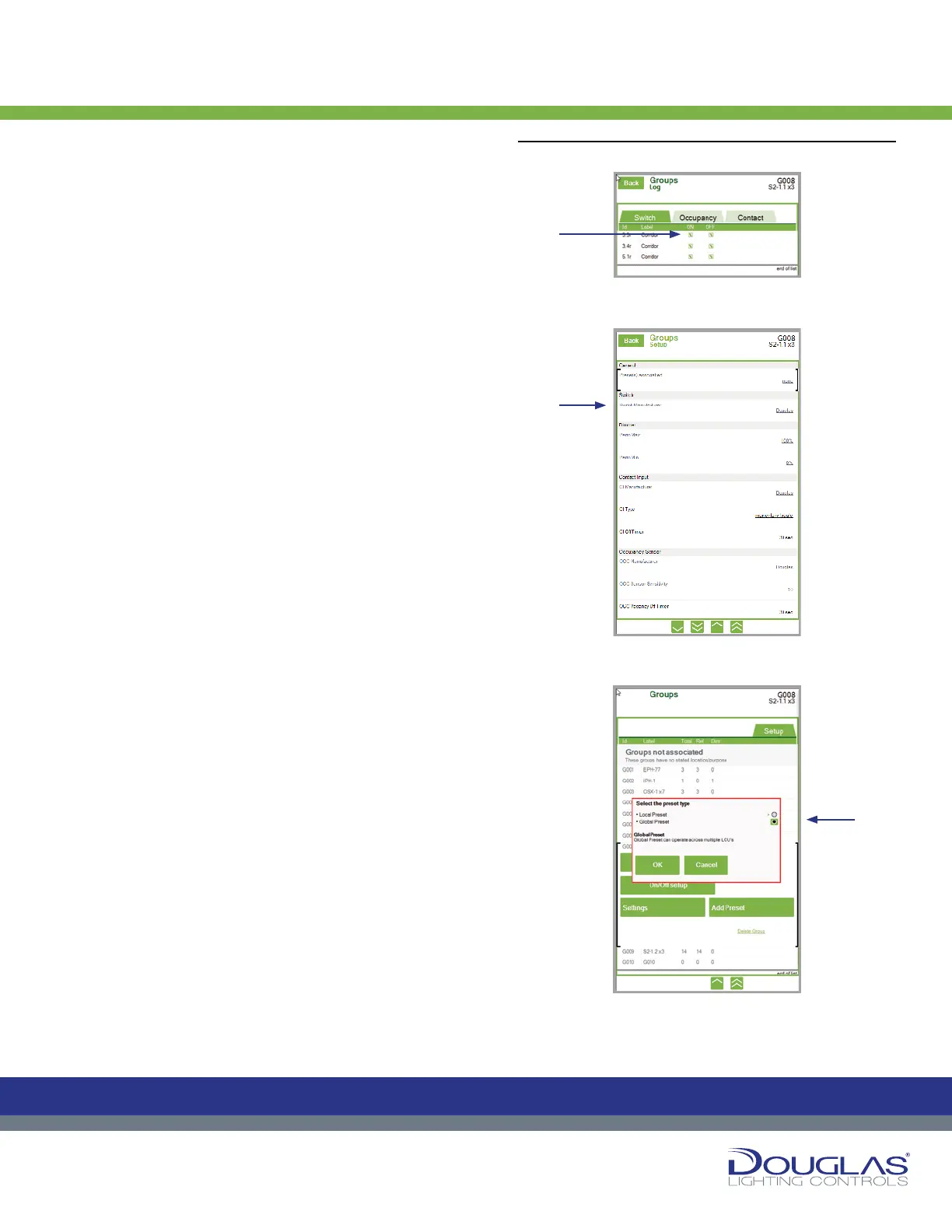
c) To set a group as turned on (only), turned off (only), or
turned on/turned off by its controlling input, select the On/Off
Setup button. Select the corresponding input type—switch,
occupancy sensor, or contact input—and then select the
ON/OFF check box for each output in the group.
d) To set the parameters of the inputs controlling the group,
select the Settings button. Select the link for the setting you
are conguring and enter the new conguration values. The
settings include the following:
Presets Associated - displays the preset values set up for
the group. Switch - select the manufacturer of the switch input
and select on the OK button. The default value is Douglas.
Dimmer - set the maximum and minimum percentage the
group can be dimmed by moving the slider. The maximum
(Perm Max) default value is 100% and the minimum (Perm
Min) default value is 0%.
Contact Input - select the manufacturer and type of the
contact input. The default value for the manufacturer is
Douglas and the default value for the type is Momentary
Toggle. Also, set the delay OFF time by using the slider and
selecting Set. The default value is 30 seconds.
Occupancy Sensor - select the manufacturer of the
occupancy sensor input. The default value is Douglas. Also,
set the sensitivity of the occupancy sensor input and delay
OFF time by selecting Douglas as the OCC Manufacturer
and using the slider and selecting Set. The default values are
10 seconds 30 seconds, respectively. Alternatively, you can
select OCC Vacancy OFF Timer and set the delay OFF time
and clicking the OK button.
e) If the group is to be associated with a Preset set up in the
Presets menu, select the Add Preset button. Select the
Local Preset option (operates within the panels controlled
by this LCU) or Global Preset option (operates over the
entire network of multiple LCUs) and select the OK button.
Groups
8
Dialog® Lighting Control System
4. Setup (continued)
c) T
o set a group as turned on (only), turned o
o
On/Off Setup button. Select the
corresponding input type—switch, occupancy sensor, or contact input—
and then select the ON/OFF check box for each output in the group.
d) To set the parameters of the inputs controlling the group, select the
Settings
Presets Associated - displays the preset values set up for the group.
Switch - select the manufacturer of the switch input and select on the OK
button. The default value is Douglas.
Dimmer - set the maximum and minimum percentage the group can be
dimmed by moving the slider. The maximum (Perm Max) default value is
100% and the minimum (Perm Min) default value is 0%.
Contact Input - select the manufacturer and type of the contact input.
The default value for the manufacturer is Douglas and the default value
for the type is Momentary Toggle. Also, set the delay OFF time by using
the slider and selecting Set. The default value is 30 seconds.
Occupancy Sensor - select the manufacturer of the occupancy sensor
input. The default value is Douglas. Also, set the sensitivity of the
occupancy sensor input and delay OFF time by selecting Douglas as the
OCC Manufacturer and using the slider and selecting Set. The default
values are 10 seconds 30 seconds, respectively. Alternatively, you can
select OCC Vacancy OFF Timer and set the delay OFF time and clicking
the OK button.
e)
If the group is to be associated with a Preset set up in the Presets menu,
select the Add Preset button. Select the Local Preset option (operates
within the panels controlled by this LCU) or Global Preset option
(operates over the entire network of multiple LCUs) and select the OK
button.
Groups
C
M
Y
CM
MY
CY
CMY
K
C
M
Y
CM
MY
CY
CMY
K
8
Dialog® Lighting Control System
4. Setup (continued)
c) T
o set a group as turned on (only), turned o
o
On/Off Setup button. Select the
corresponding input type—switch, occupancy sensor, or contact input—
and then select the ON/OFF check box for each output in the group.
d) To set the parameters of the inputs controlling the group, select the
Settings
Presets Associated - displays the preset values set up for the group.
Switch - select the manufacturer of the switch input and select on the OK
button. The default value is Douglas.
Dimmer - set the maximum and minimum percentage the group can be
dimmed by moving the slider. The maximum (Perm Max) default value is
100% and the minimum (Perm Min) default value is 0%.
Contact Input - select the manufacturer and type of the contact input.
The default value for the manufacturer is Douglas and the default value
for the type is Momentary Toggle. Also, set the delay OFF time by using
the slider and selecting Set. The default value is 30 seconds.
Occupancy Sensor - select the manufacturer of the occupancy sensor
input. The default value is Douglas. Also, set the sensitivity of the
occupancy sensor input and delay OFF time by selecting Douglas as the
OCC Manufacturer and using the slider and selecting Set. The default
values are 10 seconds 30 seconds, respectively. Alternatively, you can
select OCC Vacancy OFF Timer and set the delay OFF time and clicking
the OK button.
e)
If the group is to be associated with a Preset set up in the Presets menu,
select the Add Preset button. Select the Local Preset option (operates
within the panels controlled by this LCU) or Global Preset option
(operates over the entire network of multiple LCUs) and select the OK
button.
Groups
C
M
Y
CM
MY
CY
CMY
K
C
M
Y
CM
MY
CY
CMY
K
8
Dialog® Lighting Control System
4. Setup (continued)
c) T
o set a group as turned on (only), turned o
o
On/Off Setup button. Select the
corresponding input type—switch, occupancy sensor, or contact input—
and then select the ON/OFF check box for each output in the group.
d) To set the parameters of the inputs controlling the group, select the
Settings
Presets Associated - displays the preset values set up for the group.
Switch - select the manufacturer of the switch input and select on the OK
button. The default value is Douglas.
Dimmer - set the maximum and minimum percentage the group can be
dimmed by moving the slider. The maximum (Perm Max) default value is
100% and the minimum (Perm Min) default value is 0%.
Contact Input - select the manufacturer and type of the contact input.
The default value for the manufacturer is Douglas and the default value
for the type is Momentary Toggle. Also, set the delay OFF time by using
the slider and selecting Set. The default value is 30 seconds.
Occupancy Sensor - select the manufacturer of the occupancy sensor
input. The default value is Douglas. Also, set the sensitivity of the
occupancy sensor input and delay OFF time by selecting Douglas as the
OCC Manufacturer and using the slider and selecting Set. The default
values are 10 seconds 30 seconds, respectively. Alternatively, you can
select OCC Vacancy OFF Timer and set the delay OFF time and clicking
the OK button.
e)
If the group is to be associated with a Preset set up in the Presets menu,
select the Add Preset button. Select the Local Preset option (operates
within the panels controlled by this LCU) or Global Preset option
(operates over the entire network of multiple LCUs) and select the OK
button.
Groups
C
M
Y
CM
MY
CY
CMY
K
C
M
Y
CM
MY
CY
CMY
K
4. Setup (continued):
c)
d)
e)


 To Next Page
 Loading...