8.3. Throwing a BullPen
To get started, make sure that you have a ball connected to your device. To get to Bullpens, select the grid
icon at the bottom of your Dashboard page that says Bullpens. You’ll be directed to your Bullpens page.
Throwing a Bullpen
From your list of Bullpens, select the Bullpen you’d like to throw. Once selected you’ll be taken into that
Bullpen. At the bottom of page you’ll see an option for Throw Bullpen.
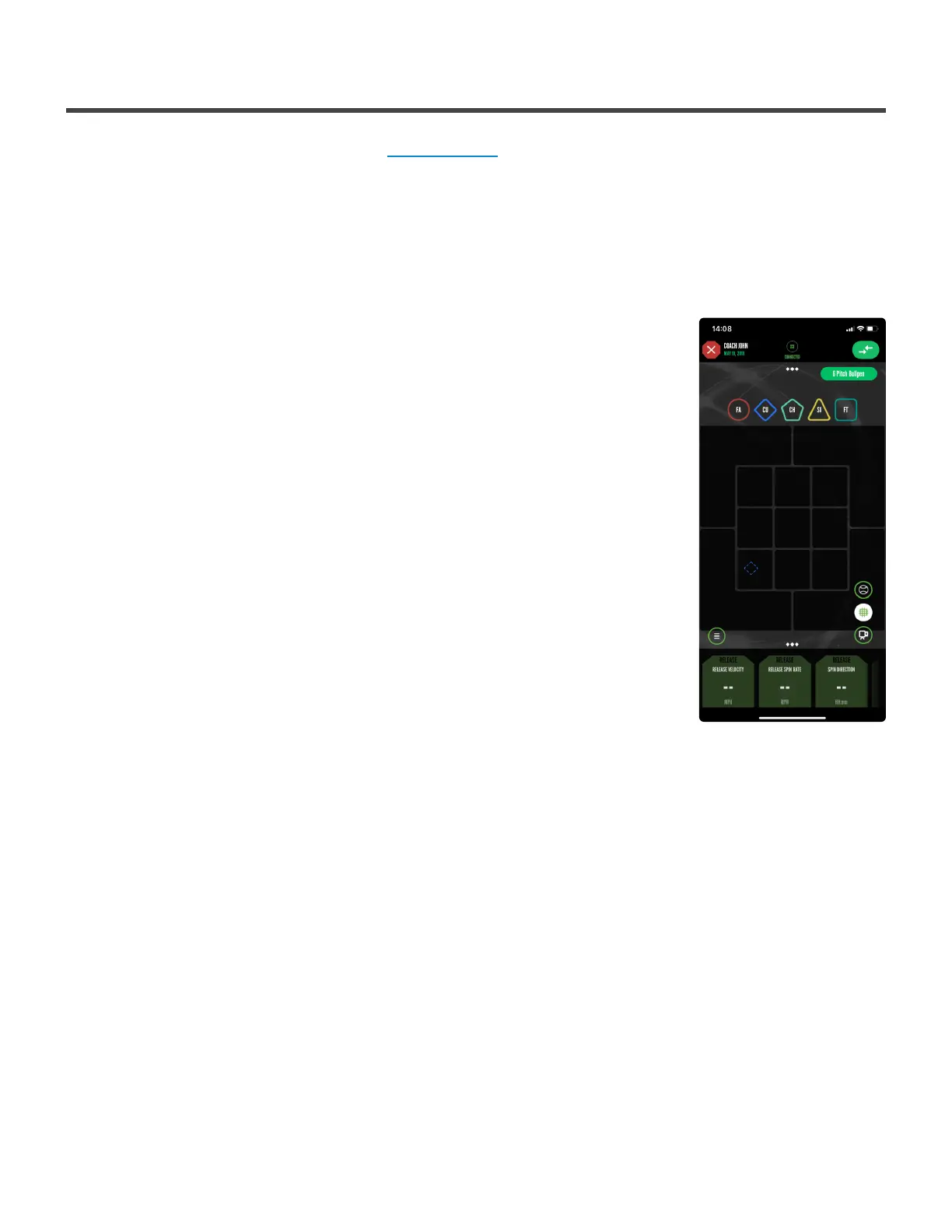
In the upper left you’ll see a diamond with an abbreviation for the desired pitch
type in the center. On the strike-zone grid, you’ll see a dashed outline of the
pitch types shape in the desired location. Follow the steps the below:
1. Throw the ball as marked on the screen (pitch type and location)
2. You’ll see the outline change to a solid line instead of dashed. Chart on
the strike-zone where the pitch was actually thrown. The pitch that you
chart will be a solid shape.
3. You’ll see the next pitch appear at the top labeled with the desired pitch
type. You’ll also see that pitch represented on the grid with a dashed
outline. Throw the next pitch as marked.
4. The previous pitch you threw will fade out as you chart your next pitch
5. Continue these steps until you complete your Bullpen
Once the last pitch is thrown in the Bullpen, you’ll recieve a notification that the
Bullpen has ended and you’ll be taken back to your Bullpen page. All data that
was recorded in the Bullpen will appear in history.
Throwing an Assigned Bullpen
At the top of this page you’ll see MY BULLPENS highlighted in white. Next to this you’ll see ASSIGNED
BULLPENS. Select ASSIGNED BULLPENS. Next Select the Bullpen you’d like to throw from your list of
assigned Bullpens. Once selected you’ll be taken into that Bullpen. At the bottom of page you’ll see an
option for Throw Bullpen.
In the upper left you’ll see a diamond with an abbreviation for the desired pitch type in the center. On the
strike-zone grid, you’ll see a dashed outline of the pitch types shape in the desired location. Follow the
steps the below:
1. Throw the ball as marked on the screen (pitch type and location)
2. You’ll see the outline change to a solid line instead of dashed. Chart on the strike-zone where the
pitch was actually thrown. The pitch that you chart will be a solid shape.
Diamond Kinetics PitchTracker Baseball - PitchTracker Ba
Page 35 of 76



 To Next Page