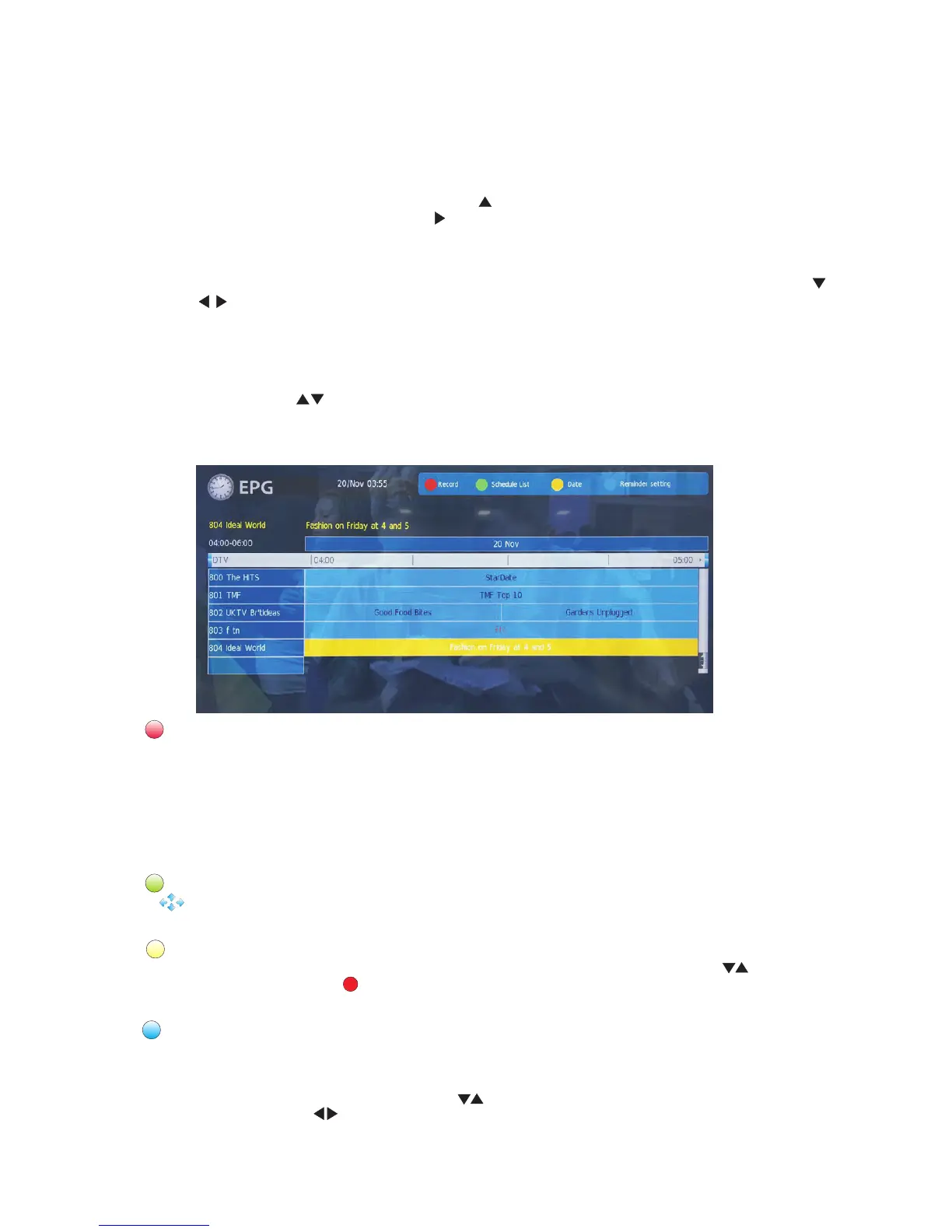
EPG MENU (Electronic Program Guide)
19
The EPG Menu is used to look at what is being broadcast by DTV stations. After you turn the TV
on and select the DTV input, your TV will commence receiving EPG data progressively over a
period of time as you move from channel to channel. Press the EPG Button to access the EPG
Menu. You will receive detailed program information on the channel you are currently watching
as well as programs in the near future. Press the cursor to move to the top of the EPG screen to
the Programme Guide tab, then press the cursor to select either Time or Channel listings. There
will be a short delay while
the EPG changes modes.
In the Time mode, move the highlighted tab down to the date line using the cursor keys, then
press the cursor keys to select the desired reception date. Use the down cursor to move
thru the available programs for the selected date and time.
In the Channel mode, use the cursor keys to select the desired DTV channel, then scroll thru the
available programs into the near future. If a DTV channel shows “No information”, it means that
the EPG has not loaded the data for that channel. You can speed up this process, (just for this
channel), by using the cursor keys to select the channel in the EPG list, then press OK on the
Remote Control. The TV will change to the newly selected channel, and start loading the EPG
data. Once the selected program is chosen you can select to tag it for Reminder activity using the
Blue button on the Remote Control, and then view the planned activity in the Schedule List.
1.
Press the Red button to book a DTV program for future recording and add it to the Schedule List.
Once the Record settings are in place, the TV will make the recording even if the TV is in Standby
power mode.Move the cursor to the bottom of the Recorder screen to first select from Auto, Once,
Everyday or Weekly recording options. Then, apart from the Auto option, you can adjust the start
and stop times to account for changes in the TV station’s schedules, as many programs are not
always transmitted at the time stated in the EPG; most programs often run a few minutes late. To
avoid missing the end of a program, you can modify the finish time manually, e.g. a finish time of
14:30 can be manually “bumped ” to 14:40 to ensure the entire program gets recorded.
Record
4.
Press the Blue button on the Remote Control to book a DTV program for future viewing and add it
to the Schedule List. Only future programs can be booked, and an on-screen warning will be
displayed if you attempt to book a currently running program. You can select the Reminder setting
to run Once, Every Day, or Weekly. Press the cursor buttons to move within the Reminder
setting area, then use the cursor buttons to change the required settings.
Remind
3.
Press the Yellow button to list all the stored reminders in the Schedule List. Press to choose
within the list, press red key to delete a selected item within the schedule list, then press
EPG to return to the EPG menu.
Schedule
DELETE
2.
Use to select a program and then press the Green Button or INFO key on the Remote to
display the highlighted program's information (if transmitted by the TV station).
INFO


 To Next Page