Page | 8
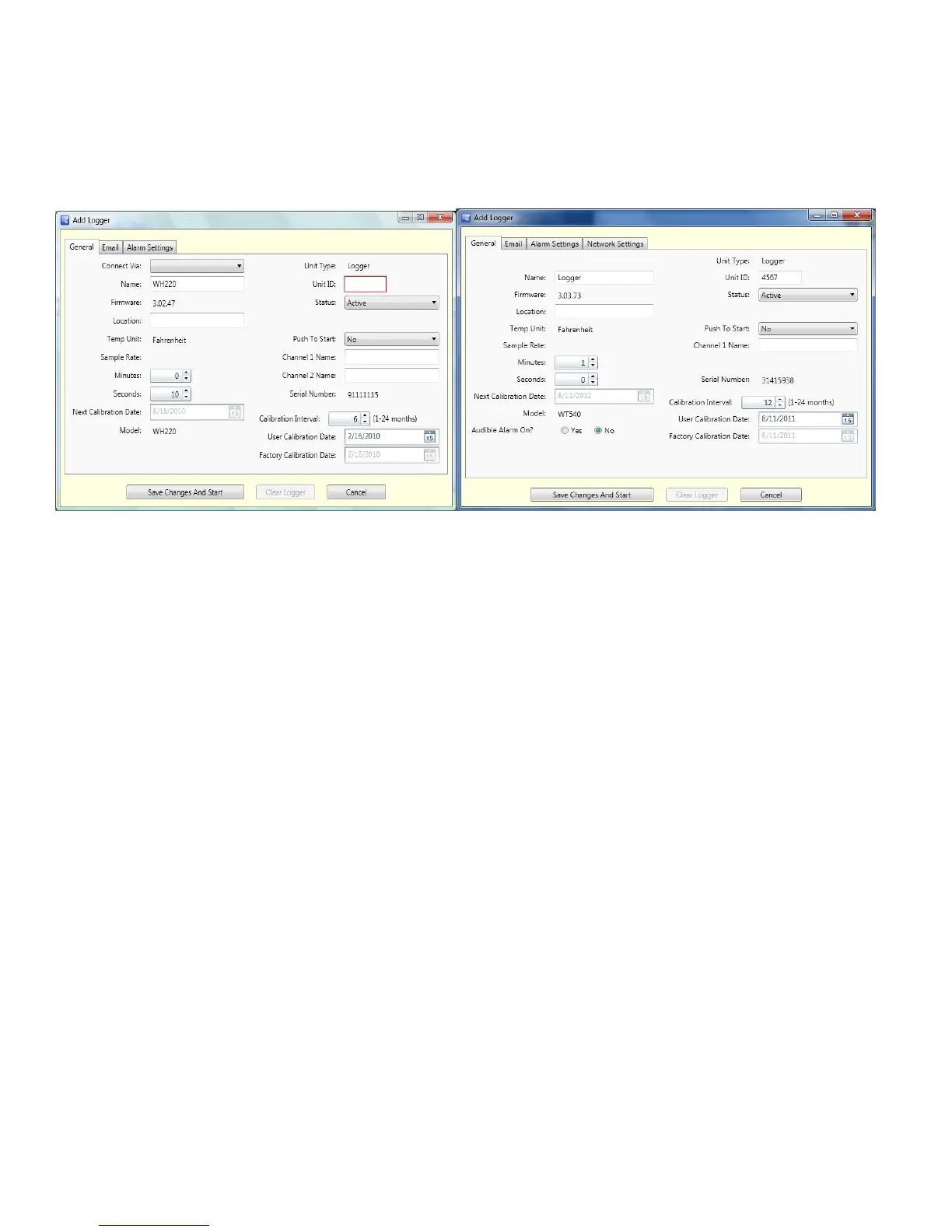
4) “Add Logger” window will open
General Tab
Add Wireless Loggers Add Ethernet Loggers
Complete the following fields:
Connect Via: Select the Receiver or an installed Repeater (Not required for Ethernet Loggers)
Name: Alpha/numeric 15 characters or less
Unit ID: Any ID. Must be 4 characters using 0-9 and A-F. NOTE: 0000 and FFFF are not valid
IDs, and we do not recommend starting an ID with lead zeros (eg. 0001).
Status: Active
Location: Alpha/numeric 20 characters or less
Push to Start: No. Set to Yes ONLY if logger should not start logging until the Push to Start button
on the logger is pressed
Sample Rate: User selectable up to 1 hour starting at 10 seconds in 10 second intervals
Channel 1 Name & Channel 2 Name: Alpha/numeric 23 characters
Calibration Interval: User selectable up to 24 months
Audible Alarm On?: Remote Probe Wireless and Ethernet Loggers feature an audible alarm that can be
turned on or off. If running a Wireless logger on battery power it is recommended that
Audible Alarm be turned off to conserve battery life.
Email Tab
Enabled for WiZARD2 Enterprise and Secure version only. Feature may not be enabled. If you are running
Enterprise or Secure version, see page 13 for setup instructions. To upgrade to Enterprise or Secure, contact
Dickson Customer Service to purchase.


 To Next Page