M o d e l S M - 5 3 0 0 U s e r M a n u a l | 33
–––––––––––––––––––––––––––––––––––––––––
2. [Price Discount] Function Key in Accumulation Mode
This is used to discount the total price by the following formula.
PRICE TO PAY = ORIGINAL TOTAL PRICE - ENTERED DISCOUNT VALUE
Note: [PRICE DISC] function key must be assigned in advance, please refer to preset key programming in
Operation Manual Advance
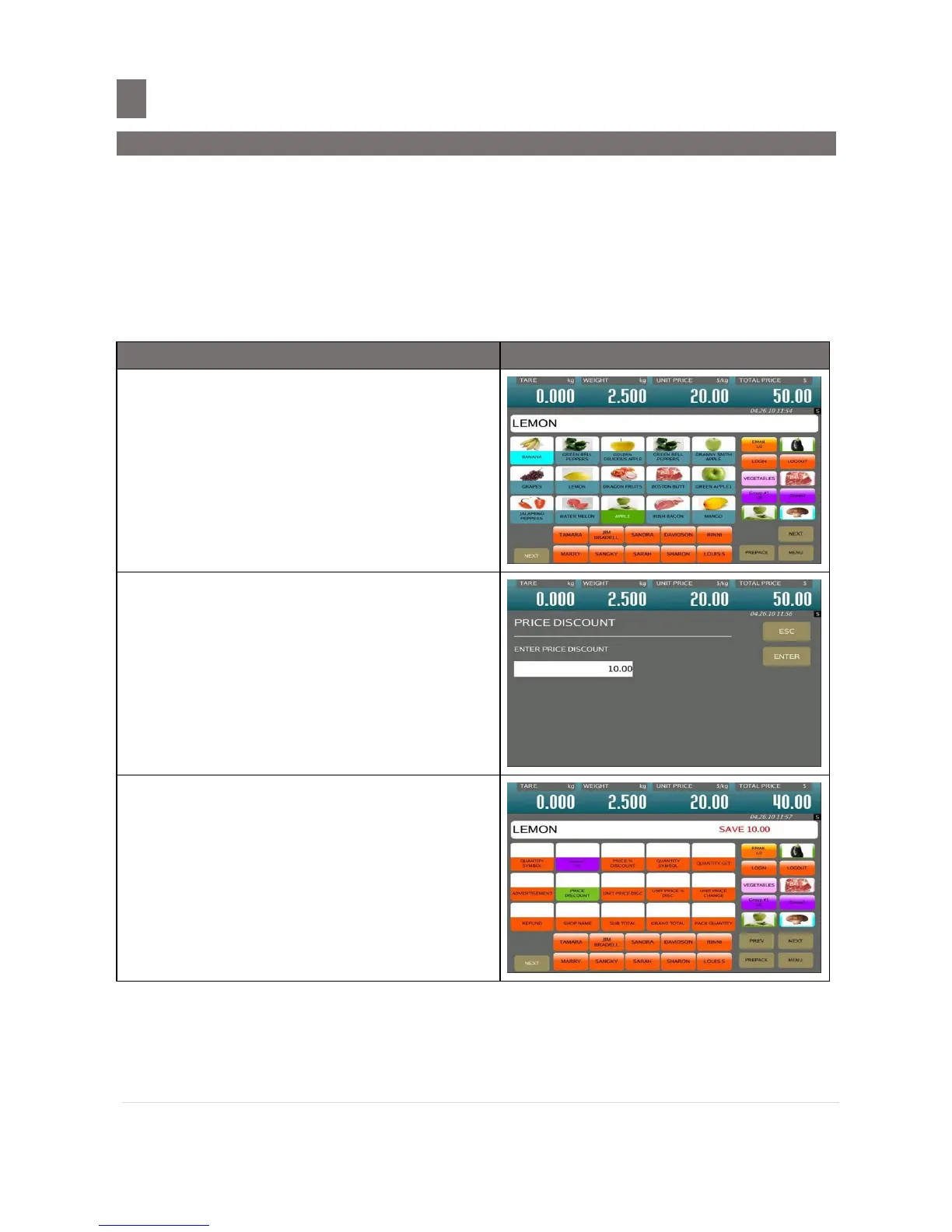
Example: Giving Price Discount of $10.00 for buying 2.5kg of CABBAGE.
In REGISTRATION MODE, call up a PLU
weight item (e. g. LEMON) and place the
product on platter (e.g. 2.500kg).
Touch [PRICE DISCOUNT] key to enter to
the PRICE DISCOUNT setting screen and
then enter the discount amount (e.g.
$10.00) by numeric keypad.
Note: Touch [ESC] key to cancel PRICE
DISCOUNT function.
Touch [ENTER] key.
Note:
1. $10.00 has been deducted from the
Original Total Price.
2. It will show that customer has got
discount $10.00


 To Next Page
 Loading...








