Touch RFID
Shared & Assigned Use Functionality
Product Guide
8
or or
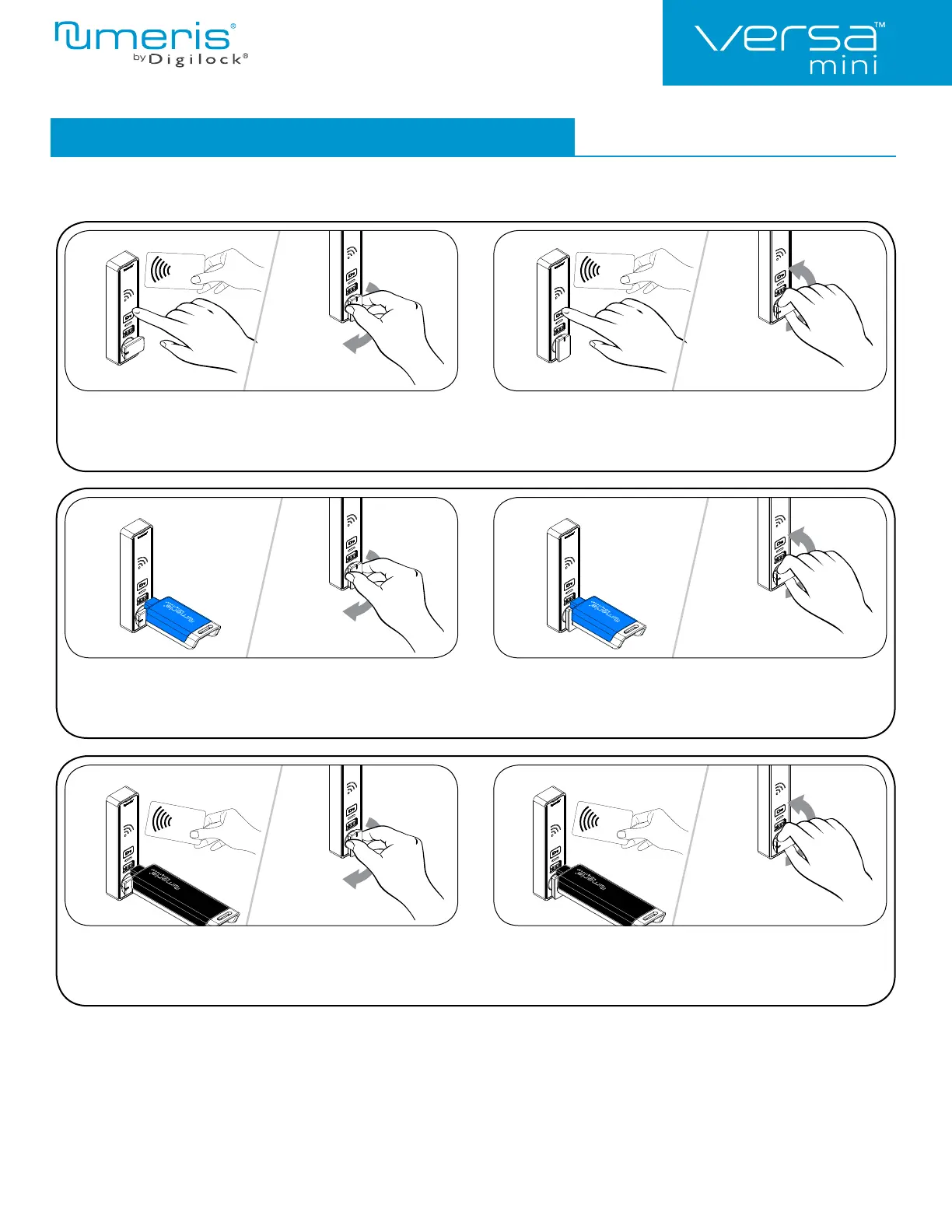
Operating Instructions - In Shared Use Functionality
1a 1b 2a 2b
1a 1b
1a 1b
2a 2b
2a 2b
In shared use functionality, the user presents any User RFID Credential or inserts any User Key to lock and uses the same User RFID
credential to unlock. Once unlocked, the lock is available for a different user.
Operate with a User RFID Credential
To lock: Close the door. Touch ` and present any User RFID
Credential, then turn the knob to the locked position.
To unlock: Touch ` and present the same User RFID Credential, then
turn the knob to the unlocked position. Open the door.
Operate with a User Key
To lock: Close the door. Insert any User Key then turn the
knob to the locked position.
To unlock: Insert the same User Key then turn the knob to the unlocked
position. Open the door.
*If a valid Manager Credential is used to relock, the previous user credential will continue to operate the lock.
Operate with a Manager Credential
To lock: Close the door. Insert a valid Manager Key or touch `,
present a valid Manager RFID then turn the handle to the
locked position.
To unlock: Insert a registered Manager Key or touch `, present a valid
Manager RFID then turn the handle to the unlocked position.
Open the door.*


 To Next Page