Touch RFID
Shared & Assigned Use Functionality
Product Guide
7
Programming Instructions - In Assigned Use Functionality
Replace an Assigned User Credential
123
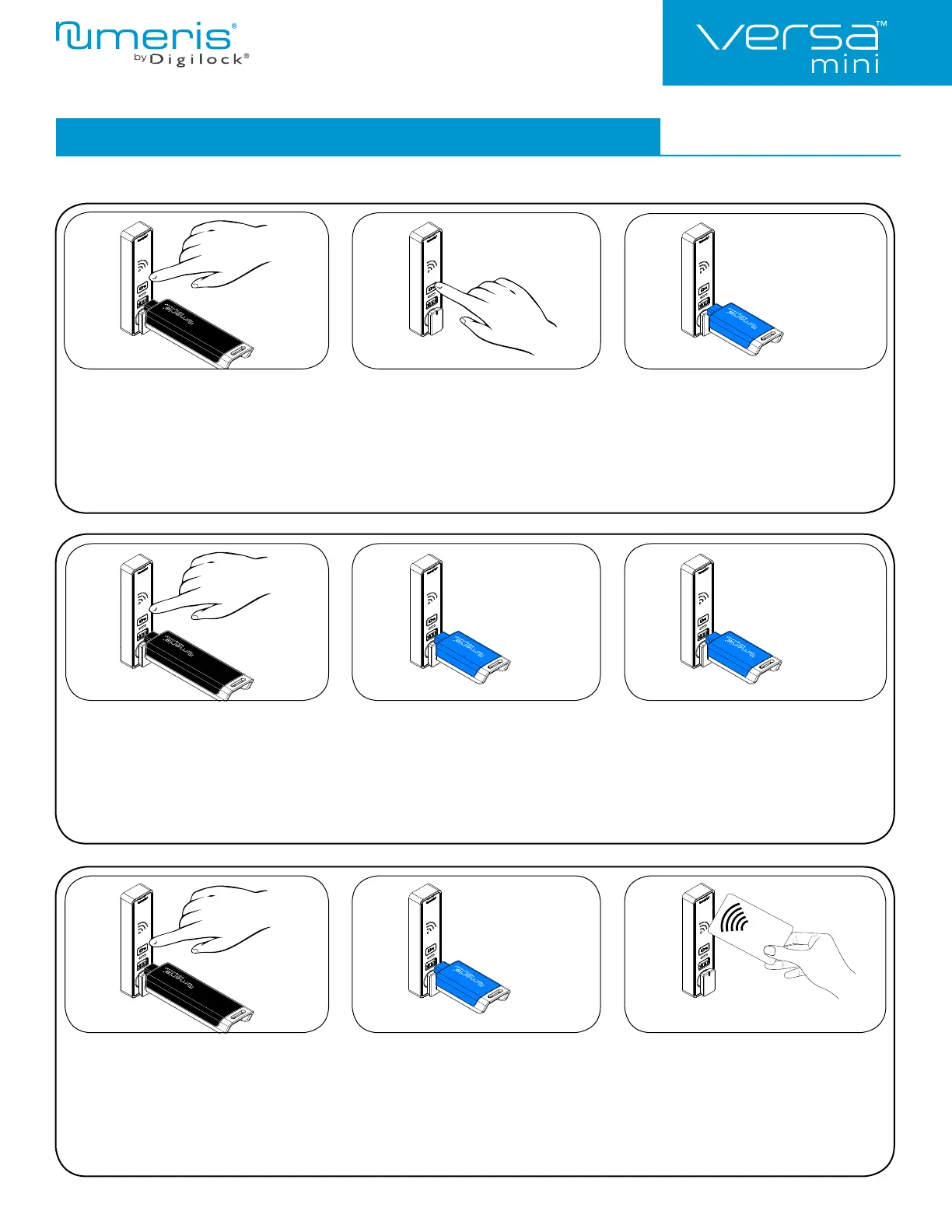
Replace an Assigned User RFID
Credential with a New User Key:
Touch and hold ` for 5 seconds (a two-tone
beep will be heard after 5 seconds) then release.
Insert a valid Manager Key or present a valid
Manager RFID Credential..
A two-tone beep will be heard and the LED
will turn on.
While the LED is on, present the assigned
User RFID Credential to be replaced.
A two-tone beep will be heard.
While the LED is on, insert a new User Key.
Two sets of two-tone beeps will be heard
and the LED will turn off.
Replace an Assigned User Key
with a New User Key:
Touch and hold ` for 5 seconds (a two-tone
beep will be heard after 5 seconds) then release.
Insert a valid Manager Key or present a valid
Manager RFID Credential.
A two-tone beep will be heard and the LED
will turn on.
While the LED is on, insert the assigned user Key.
A two-tone beep will be heard.
While the LED is on, insert a new User Key.
Two sets of two-tone beeps will be heard
and the LED will turn off.
123
Replace an Assigned User Key
with a New User RFID Credential:
Touch and hold ` for 5 seconds (a two-tone beep will
be heard after 5 seconds) then release. Insert a valid
Manager Key or present a valid Manager RFID Credential.
A two-tone beep will be heard and the LED will
turn on.
While the LED is on, insert the assigned User Key.
A two-tone beep will be heard.
While the LED is on, present the new User
RFID Credential.
Two sets of two-tone beeps will be heard
and the LED will turn off.
123
RFID
CARD


 To Next Page