Touch RFID
Shared & Assigned Use Functionality
Product Guide
6
Programming Instructions - In Assigned Use Functionality
1
3
2a 2b
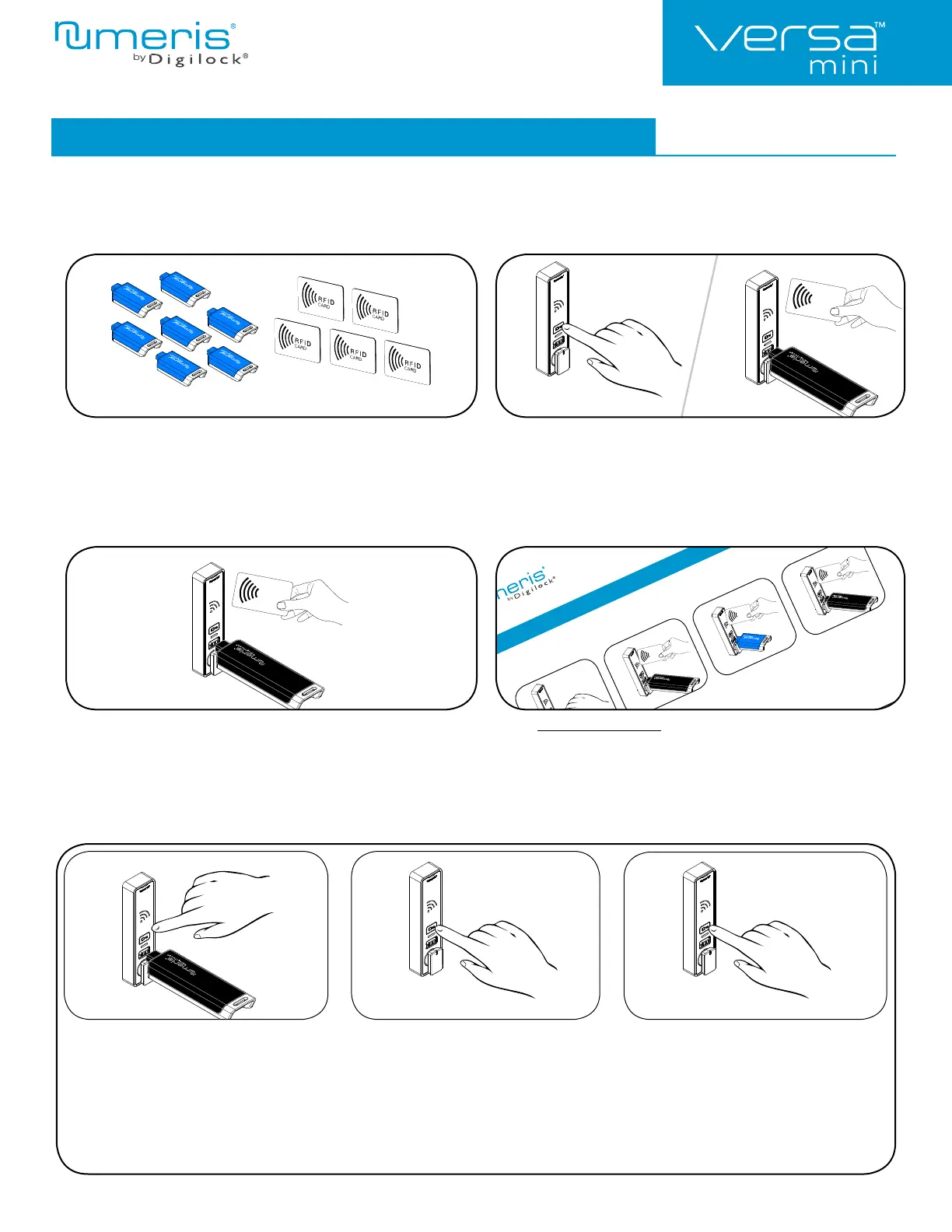
Remove User Credentials (for assigned use functionality only)
Make sure the lock is in assigned use functionality (a green LED will fl ash when ` is touched). The locks must be reprogrammed to remove
user credentials from operating a lock.
Collect all remaining and replacement user credentials
(User RFID Credentials and User Keys).
Touch and hold ` for 5 seconds (a two-tone beep will be heard after 5
seconds) then release.
The LED will start to fl ash.
While the LED is fl ashing, insert a valid Manager Key or present a valid
Manager RFID Credential.
A two-tone beep will be heard.
Insert the Manager Key or present the Manager RFID Credential again.
Three sets of two-tone beeps will be heard and the LED will turn off.
All previously assigned user credentials will be removed.
Follow Assign User Credentials instructions to assign the remaining and
replacement user credentials to the locks.
123
Replace an Assigned User RFID
Credential with a New RFID Credential:
Touch and hold ` for 5 seconds (a two-tone
beep will be heard after 5 seconds) then release.
Insert a valid Manager Key or present a valid
Manager RFID Credential.
A two-tone beep will be heard and the LED
will turn on.
While the LED is on, present the assigned
User RFID Credential to be replaced.
A two-tone beep will be heard.
While the LED is on, present the new User
RFID Credential.
Two sets of two-tone beeps will be heard
and the LED will turn off.
Replace an Assigned User Credential
or
or
Programming Instructions - In Assigned Use Functionality
or
Assign User Credentials (for assigned use functionality only)
Make sure that the lock is set for assigned use functionality (a green LED will fl ash when ` is touched). Up to 20 use
RFID Credentials and/or User Keys) may be assigned to each lock.
LED is fl ashing, insert a
or present a valid
While the LED is on, insert each
User Key or present each User
RFID one at a time.
A two-tone beep will be heard for
each user credential successfully
grammed.
End Add Users:
Insert a valid Manager Key or present
a valid Manager RFID.
A two-tone beep will be heard
and the LED will turn off.
or
1324
The Programming Key can q
4


 To Next Page