EasyManua.ls Logo

Digital-Ally DVM-500Plus - SYSTEM DIAGRAM

Digital-Ally DVM-500Plus
21 pages
Print Icon
To Next Page IconTo Next Page
To Previous Page IconTo Previous Page
Loading...
DVM-500Plus Installation Guide 002-0501-02 REV C Page 7
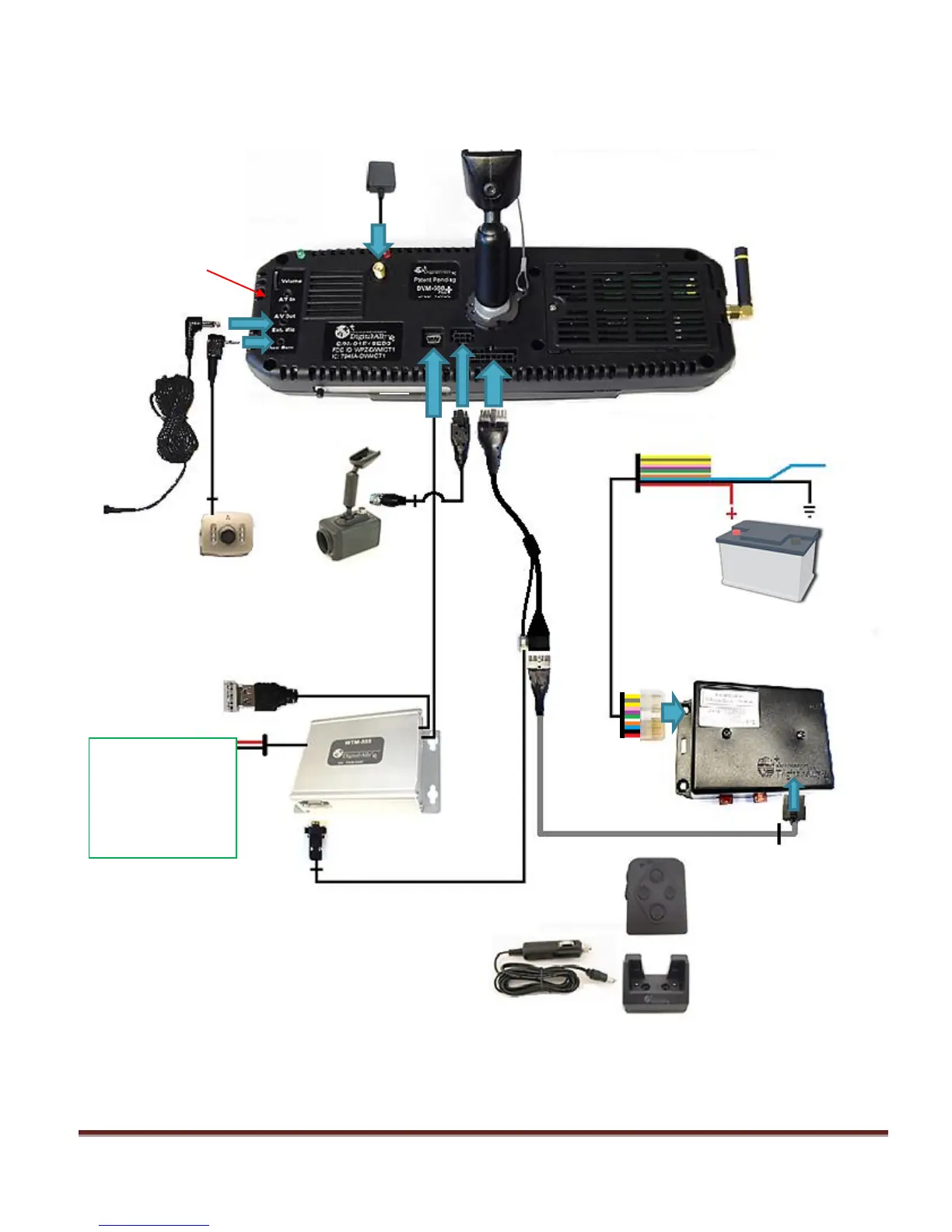
SYSTEM DIAGRAM
Optional Back Seat Camera Front Camera
WIFI USB Dongle
Interface Box
External Microphone
Wireless Transfer
Module (optional)
USB1
USB2
Serial
WTM POWER HARNESS
RED = Constant 12V+
WHITE = Switched 12V+
BLACK = Ground
(See WTM-555
installation guide)
Constant 12V+ Ground
Switched
Ignition 12V+
Input Triggers
(see page 17)
Vehicle to IF
Box Harness
DVM to I/O Box harness
Shown With Optional
Wireless Transfer Module
(WTM)
Voice Vault Wireless Microphone and Charger
Assembly with Cigarette Lighter Adapter
DVM Y Cable
WTM to DVM serial cable
Optional A/V
Connections

Related product manuals