Connecting IP cameras
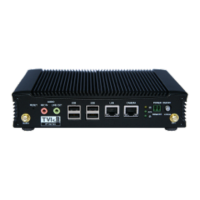
The HD-IP200 allows for connection of one IP camera via the ethernet port located on the front of the
unit. The camera should be connected to the device using standard Ethernet cable.
Refer to Section 5 for details on configuring the Ethernet ports and IP cameras to work together.
Storage medium
The HD-IP200 can record video to an external USB storage device. For further details on how to properly
prepare a recording disk refer to Section 5.
Updating the software on the unit
There are two ways to update the firmware – locally using a USB Pen, or remotely using Vodafone Business
Surveillance Server.
To update remotely, upload the new firmware to the Firmware page within the Vodafone Business
Surveillance Server web interface and then, from the Encoder’s status and diagnostics page, select
Upgrade Firmware from the menu on the right-hand side.
To update locally, copy the update onto a USB flash drive and insert into a USB port on the front of
the unit. The flash drive can be inserted into a running unit or before the unit is powered up. The
update procedure will cause the LEDs under the Ethernet and USB ports to cycle. When the update
is complete, all LEDs will remain on. At this point it is safe to remove the pen and the unit will
automatically reboot.



 To Next Page