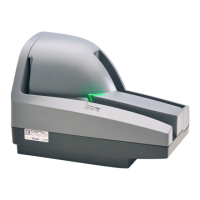
CheXpress
®
CX30 User Manual
Rev 042516
Page | 9
Cable Connections and Scanner Placement
Note: Do not connect the ‘USB’ cable from the scanner to your PC before installing the ‘drivers’ or the
‘scanning application / software’.
Place the unit on a flat surface near the PC and away from direct light sources such as spotlights or
underneath desk lamps. Place the scanner in a position that is at least 6 inches away from its ‘Power
Supply’ or others.
Connect the external ‘Power Supply’ by plugging the connector into the bottom access port.
Connect the ‘USB’ cable by plugging it into the bottom access port.
Route the two cords through any of the three cable channels to provide the best routing for your
environment.
Disconnecting the USB and Power Supply Cables
When removing or disconnecting the ‘USB’ or ‘Power Supply’ cables from the CheXpress CX30, be sure to pull
straight back on the cable and remove as shown below.
Do not remove the cable by pulling up, vertically or at an angle. Doing so can damage the connector. The
cables must be removed by gently pulling straight back on the cable from the connector.


 To Previous Page
 Loading...