12
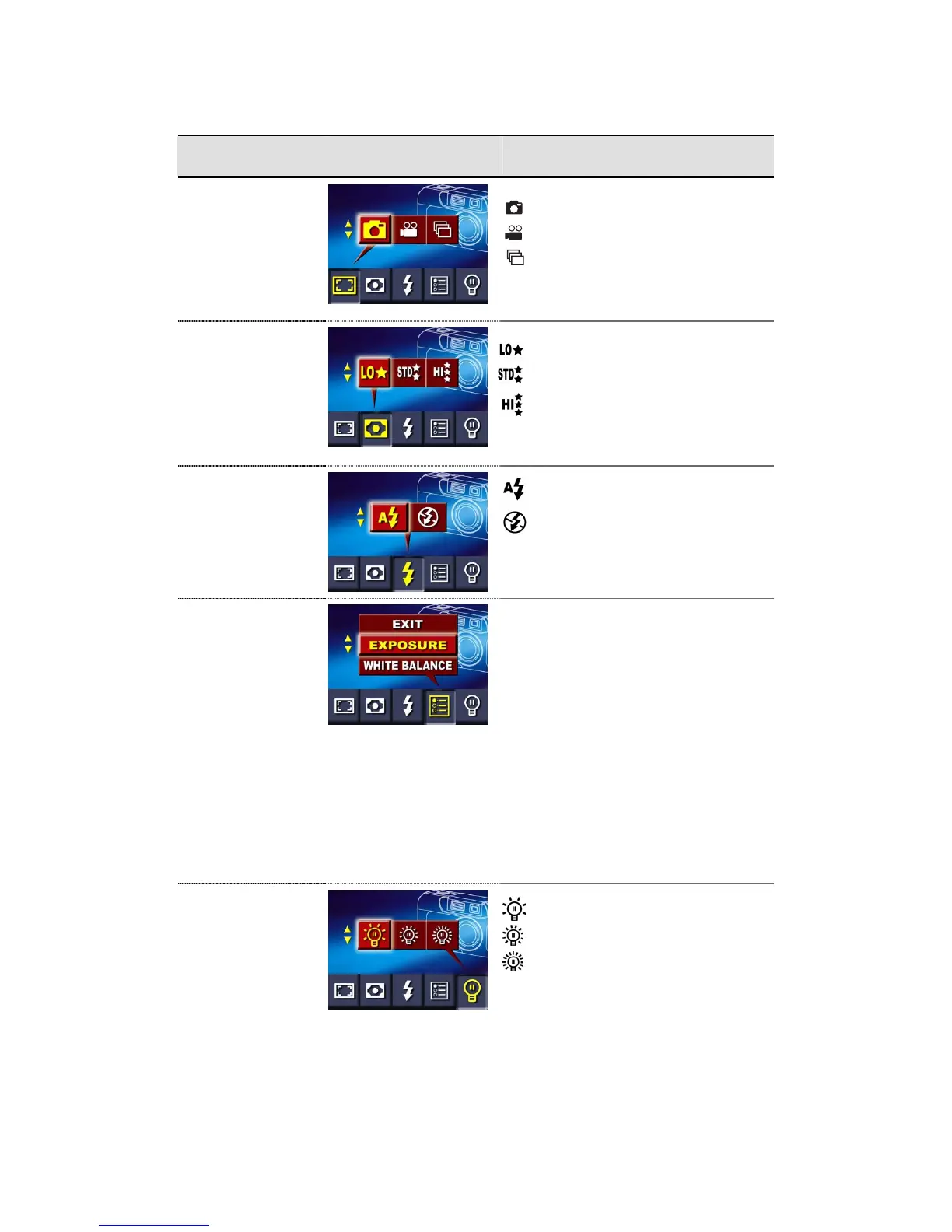
The following table summarizes the choices available in the Camera Mode Options Menu:
Submenu Display Options
Shooting Mode
Single Photo Mode (default setting)
Movie Mode
Continuous Shooting Mode
Resolution
Low resolution
Standard resolution (default setting)
High resolution
Flash Setting
Flash Off (default setting)
Advanced Settings
The Advanced Settings submenu allows you
to set the following:
Ö Exposure
Ö White Balance
Ö Sharpness
Ö Quick Review
Ö Video Format
Ö Sound
Ö Format SD Card
Ö Language
LCD Brightness
Low Brightness
Normal Brightness (default setting)
High Brightness
Changes made to Resolution, Flash, Quick Review, Video, Sound and Language settings are saved
when the camera is powered off. Other options return to their default settings each time the camera is
powered on.
Auto-flash



 To Next Page