How to Update Contents
- 17 -
# Formatting
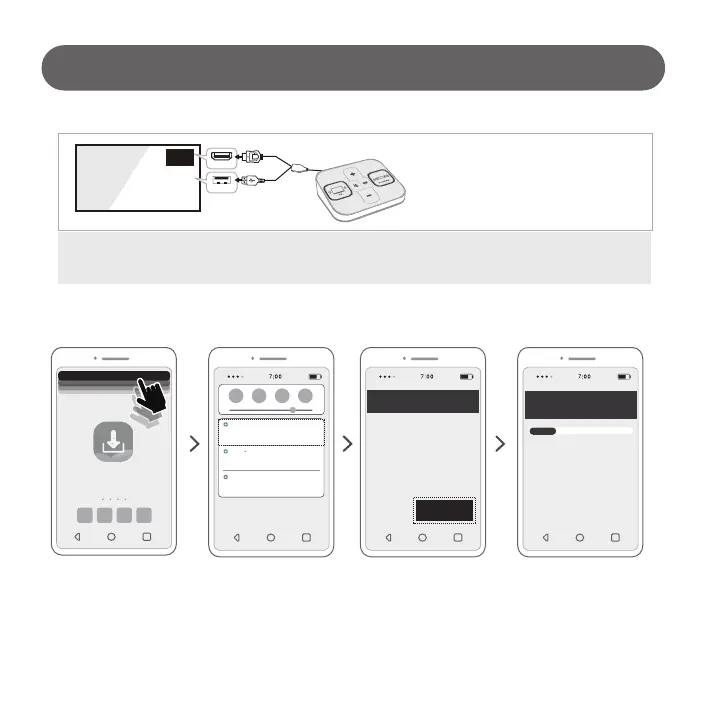
1) Please drop
notification-bar down.
2) Select the menu “USB drive
corrupted” or “Issue With
SanDisk USB drive”.
(# Different by phone)
3) Format the USB drive built
into the Sound Switcher –
select “FORMAT” button.
4) When the USB drive format
is complete, select the “DONE”
button.
LG Demo
System Updater
Settings
Available for moving images and other media files
USB drive
Settings
Top to fix
USB drive corrupted
NOTIFICATION SETTINGS CLEAR ALL
Android System
Tap to change settings
Physical keyboard connected
Use as portable storage
The USB drive should be formatted to use it on
ther devices.
This will erase all data on the USB drive. To
avoid losing data. back it up by moving your
apps and files on the USB drive to a different
storage on this phone. You can aiso move your
files to a computer using a USB cable.
FORMAT
20%
Formatting USB drive...
(20%)
Do not remove while formatting
TV
USB
HDMI 1
7) Re-connect Sound Switcher to TV
with Complex Cable.
# Do not remove the USB during the update.
The sound switcher may not work properly if the update is not completed.



 To Next Page