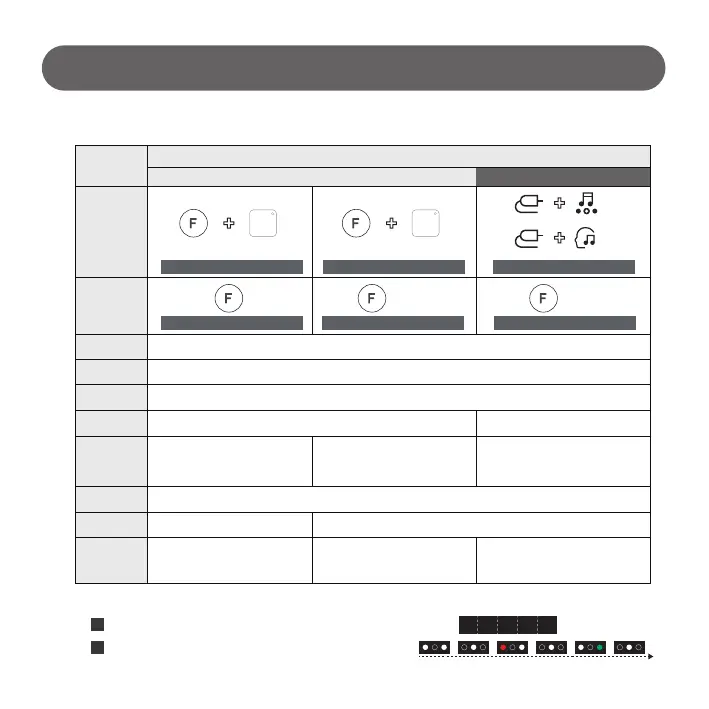
OPT/ARC, HDMI [Fixed entry mode]
OPT/ARC, HDMI [Fixed entry mode]
X
X
SP11, SP9, SP8, G1, SPD7, SP7 : “DEME” is displayed on the front of the screen.
- 7 -
Sound Bar Setting
1) Check how to enter demo mode of sound bar
# The display when entering Store Mode on 21' Soundbar
Item
Entering
demo mode
Cancel
Demo mode
Entry mode
Mode change
Internal source
Applicable model
Control range
Volume
APD Entering
Initialize
20 (SL8/9/10: 24) or
previous volume
[Automatic return after 90sec]
20 (SN7/8/9/10/11: 24) or
previous volume
[Automatic return after 90sec]
20 (SP7), 24 (SP11/9/8/D7, G1, QP5) or
previous volume
[Automatic return after 90sec]
Cancel demo
SL10’s, SL9’s, SL8’s, SL7’s,
SL6’s, SL5’s, SL4’s
SN11’s, SN10’s, SN9’s, SN8’s,
GX, SN7’s,
SN6’s, SNH5, SN5’s, SN4’s
SP11, SP9, SP8,
G1, QP5, SPD7,
SP7
Cancel demo
`21`20`19
Sound bar
(Shop mode)
Long press(5sec)Long press(5sec)
SOUND
EFFECT
Remote control
Function Sound Effect
Function
Long press(5sec)
Long press(5sec)
SOUND
EFFECT
Long press(5sec)
Remote controlFunction
Function AI Sound Pro
(*QP5 Only)
# Condition :
Volume “2”
Long press(5sec)
# Condition :
Volume “2”
Volume Key (+,-), F Key (Pause)
Volume Key (+,-), Function Key (Pause)
[Volume “10” setting]
1
QP5 :
LEDs are displayed sequentially as follows (changes to 800mS cycle)
2
D E M O



 To Next Page