How to Use
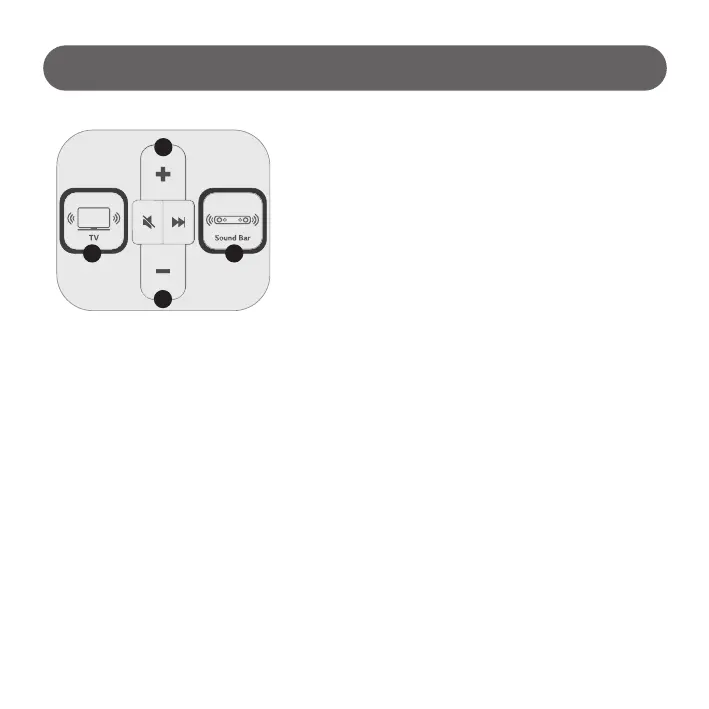
2) Select speakers to sound
3) Volume Control
Select TV(①)
- TV button selected : Play Switcher Mode
- Sound output : TV Speaker (Keep lighting LED ON )
- Default Volume : 30 (User changeable)
1) Initial TV connection
IDLE Status
- Playing Picture Quality contents / Volume : 0
Volume ‘+’ selected
- TV sound output (Default Volume 30)
Select Sound Bar(⑥)
- Sound Bar button selected : Play Switcher Mode
- Sound output : Sound Bar (Keep lighting LED ON )
- Default Volume : 30 (SL model only, User changeable)
Select TV(①) and press Volume button(②,⑤)
- Short Press : TV volume Up/Down. (LED ON when pressing)
- Long Press : TV volume continuous Up/Down. (Keep lighting LED ON during pressing)
Select Sound Bar(⑥) and press Volume button(②,⑤)
- Short Press : Sound Bar volume Up/Down. (LED ON when pressing)
- Long Press : Sound Bar volume continuous Up/Down. (Keep lighting LED ON during pressing)
1 6
2
5
- 10 -



 To Next Page