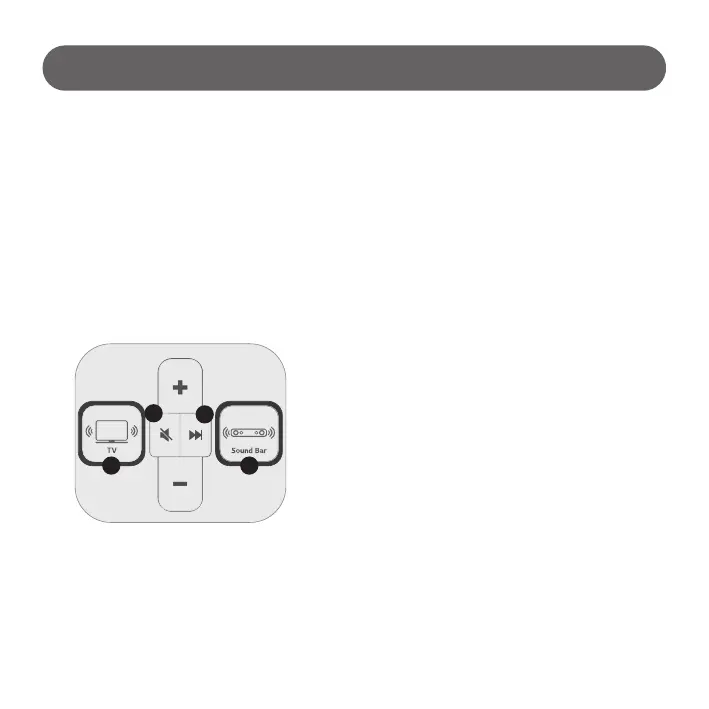
3-1) Default volume setting
5) Play Next Content
4) Mute
Select TV(①) and press Mute button(③)
- TV Mute (Button LED ON, Mute sign will be displayed on TV screen)
- Unmute : Press volume or Mute button to unmute.
Select Sound Bar(⑥) and press Mute button(③)
- Sound Bar Mute.
(Button LED ON, Mute sign will be displayed on TV screen and SB LCD)
- Unmute : Press volume or Mute button to unmute.
How to Use
SB Default volume setting (2019 model and above applied only)
- Long pressing Sound Bar(⑥) button over 5 seconds. (until SB button LED blinking)
- Set preferred Sound Bar volume.
- Long pressing Sound Bar(⑥) button over 5 seconds to complete setting. (until SB button LED blinking)
Press Next button(④)
- Play next one of currently playing file.
Hidden Key - Next button(④) Long Press
- Press more than 5 sec : Return to IDLE status.
(PQ contents / Vol : 0)
1 6
3
4
- 11 -
TV Default volume setting
- Select TV(①) and set preferred volume.
- Long pressing TV(①) button over 5 seconds. (until TV button LED blinking)



 To Next Page