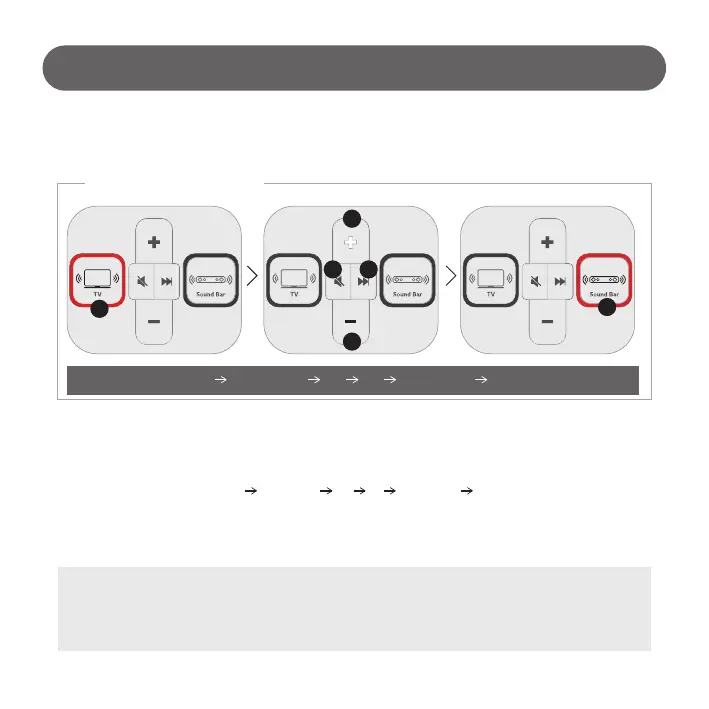
- Return idle state after 2 and a half minutes unless user input.
- Play Picture Quality contents
- LED turns on sequentially. (① ②③④⑤ ⑥ ① ②③④⑤ …)
- TV Volume is changed to ‘0’.
- Sound Bar volume is returned to default. (2019 model and above applied only)
- The same applies when muted.
5) IDLE state
How to Use
LED lighting sequence
Return to IDLE
① ②③④⑤ ⑥ ① ②③④⑤ …
1
2
5
3 4
6
- 12 -
# TV volume is changed to ‘0’ when the state returns to IDLE :
- In the IDLE state, TV and Sound Bar do not output sound.
- Prevent sudden sound out from muted TV. (Muted TV will be unmuted after 5 minutes unless user input)
- Sound out to default volume by pressing TV / Sound Bar / ‘+’ button
In IDLE state, Sound Switcher button LED turns on sequentially.



 To Next Page