4
OPERATION
Bluetooth Pairing
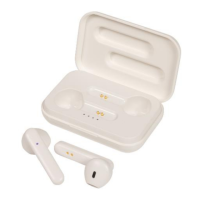
1. Make sure the earphones are fully charged before use, pull both earphones
out of the charging case.
2. The LED indicator should be flashing red and blue. Open the settings of your
smart phone and ensure Bluetooth® is turned on.
3. Once your Bluetooth® is enabled; Scan for devices and the Bluetooth®
name AA-2167 should appear. Bluetooth® Name: AA-2167
4. Press the AA-2167 on the Bluetooth® device list and your smartphone
should show that it is connected.
5. You will hear a voice prompt from the earphones saying “Connected”. The
volume can be controlled by your smartphone or earphones. The battery
status can also be shown in your Bluetooth settings.
NOTE: Press and hold the power button for up to 5 seconds to turn the
earphones o.
NOTE: The earphones will automatically turn o after 3 minutes or if they’re
too far away from your device.
Bluetooth® Hands-Free
Function Button
Answer Incoming Call Press the play/call button to answer the current incoming call
Reject Incoming Call Press the play/call button two times to reject the current
incoming call
Hang Up Call Once a call has been received; press the play/call button again
to hang up
Google Assistant &
Siri®
Press the play/call for up to 1.5 seconds to activate Google
Assistant or Siri® on your smartphone. Your smartphone or
tablet requires Google Assistant or Siri in order to work


 To Next Page