
 Need help?
Do you have a question about the DigiTech DEATHMETAL and is the answer not in the manual?
Lists 12 critical safety instructions for operating the apparatus safely and preventing damage.
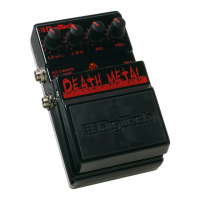
Controls the distortion output level. Turn clockwise to increase, counter-clockwise to decrease.
Controls the boost or cut of low frequencies. Turn clockwise to increase, counter-clockwise to decrease.
Jack for connecting a DigiTech PS200R power supply. Use appropriate voltage supply.
Controls the boost or cut of mid frequencies. Turn clockwise to increase, counter-clockwise to decrease.
Controls the boost or cut of high frequencies. Turn clockwise to increase, counter-clockwise to decrease.
Connect your instrument here. Connecting cable engages battery power. Disconnect when not in use.
Spring-loaded hinges to hold the pedal. Push to release pedal for battery compartment access.
Turn effect on/off with pedal. LED indicates status. Dim LED means battery needs replacement.
Out 1 for amplifier, Out 2 with speaker emulation for mixer/recorder.
Step-by-step instructions for connecting the pedal and setting up for initial use.
Detailed steps to open the pedal, replace the 9V battery, and reassemble.
 Power
Power| power supply | 9V Alkaline Dry Battery |
|---|---|
| current draw | 21mA (at 9VDC) |
| power consumption | 4.8 Watts (w/optional PS200R power supply) |
| battery life | approximately 18 hours |
 Electrical Specifications
| input impedance | 1 MOhms |
|---|---|
| output impedance | 100 Ohms |
| optional power supply PS200R - 100 | 100V ~ 50/60Hz |
| optional power supply PS200R - 120 | 120V ~ 60Hz |
| optional power supply PS200R - 230 | 230V ~ 50Hz |
| optional power supply PS200R - 240 | 240V ~ 50Hz |
 Weight and Dimensions
| dimensions | 4 15/16”(L) x 3 1/8”(W) x 2 1/8”(H) |
|---|---|
| weight | 1.38 lbs |



 To Next Page