-4-
and outlined below.
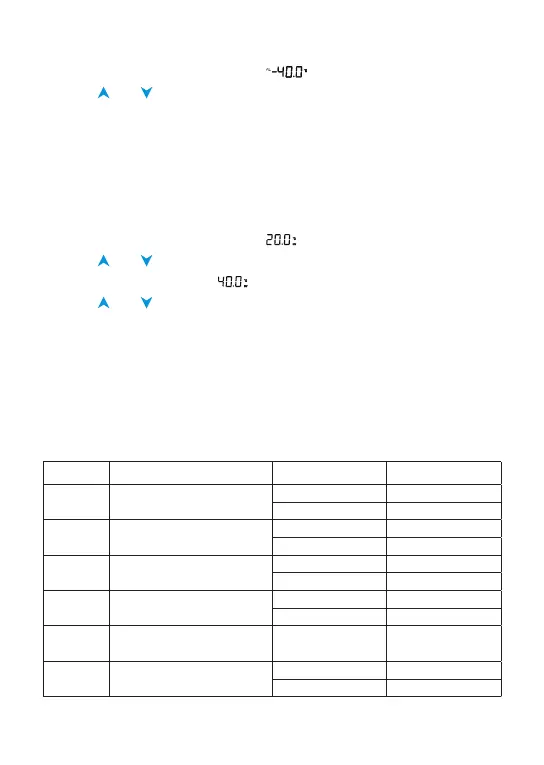
1. Long press the SET button until “
” ashing.
2. Press and to adjust the temperature value.
3. Press SET button to set next function.
4. Long press SET button to save and exit.
For example
User want to start cooling equipment when PV=28
°
C
, and stop cooling
equipment when PV=22
°
C
, DP=3 minutes.
1. Long press the SET button until “ ” ashing.
2. Press and to change the run temperature (RV) to 28
°
C
.
3. Press SET button to set “ ” stop temperature (SV).
5. Press and to change the SV to 22
°
C
.
6. Long press SET button to save and exit.
7. Connect the cooling equipment to the outlet.
How to restore default settings
Keep pressing SET key until connect the power to this device, controller
will restore factory setting after BI-BI-BI sound.
Function range and setting
CODE Function Setting Range Default Setting
RV Run Temperature Value
-40~120
°
C 20
°
C
-40~248
°
F 68
°
F
SV Stop Temperature Value
-40~120
°
C 40
°
C
-40~248
°
F 104
°
F
AH High Temperature Alarm
-40~120
°
C 120
°
C
-40~248
°
F 248
°
F
AL Low Temperature Alarm
-40~120
°
C -40
°
C
-40~248
°
F -40
°
F
DP
Time of Compressor Delay
Starting
0~10minutes 0
CA Temperature Calibration
-15~15
°
C 0
°
C
-15~15
°
F 0
°
F


 To Next Page