14
Getting Ready
Charging
When you purchase your product, the internal battery is
not fully charged. Make sure to charge the product before
use. When the charging light in red turns off, charging is
complete.
◎ The product may become warm while charging, but this
is not abnormal.
◎ Charging while using camera etc. may take longer.
◎ When you operate the product with the specified charger
connected, the product may repeat short-time charging/
discharging resulting in short battery life.
◎
When temperature of environment or the product is
extremely high or low, charging may be stopped. Try to
charge the battery as far as possible at room temperature.
◎ If the charging light blinks in red, check if the product
is correctly connected. Even if the light keeps blinking,
stop charging and then contact an au shop or Keitai
Guarantee Service Center.
◎ Firmly close the external connection terminal cover after
charging to prevent water or dust from getting in. And do
not pull strongly or twist the cover.
◎
If charging is stopped while the charging light is still turned
on, the battery may not be fully charged even with "
"
(Full) displayed. In that case, available time will be short.
◎ Do not allow metal accessories or conductive foreign
objects (metal fragments, pencil leads, etc.) to come into
contact with or get inside the connection terminal.
Charging with specified AC
Adapter (sold separately)
Charging with Common AC Adapter 05 (sold separately)
is explained. For information on the specified AC adapter
(sold separately), see "Introduction of related accessories"
(▶P. 57).
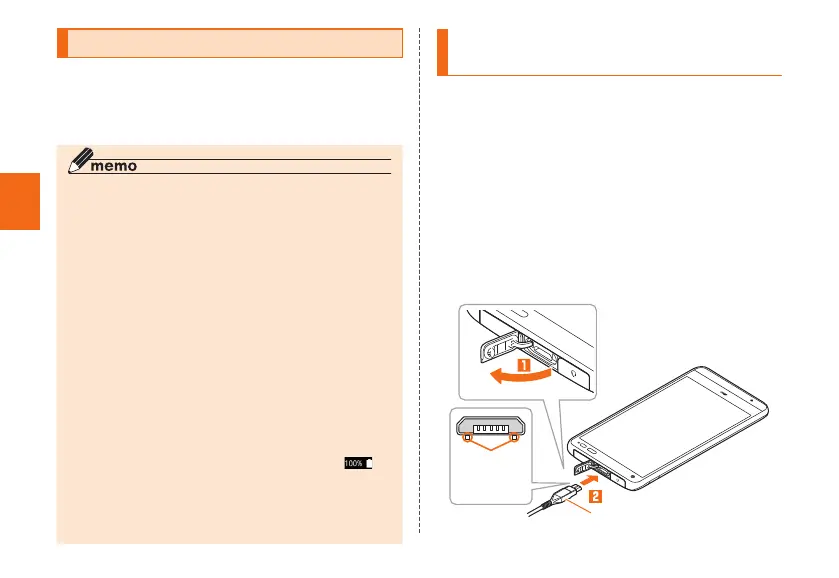
1
Open the external connection terminal cover
of the product
2
Check the orientation of the microUSB plug
of Common AC Adapter 05 (sold separately)
and insert it straight into the external
connection terminal
With the
projection
facing down
Common AC Adapter 05
(sold separately)



 To Next Page