Basic Operation
18
Switching the home app
Switch the home app of the product.
1
Home screen → [Change home]
Change home screen appears.
• Alternatively, to switch home app, from Apps list →
[Settings] → [Change home] → Select home apps
to switch → [OK].
2
Standard home ▶P. 17 "Using Home screen"
Entry Home ▶P. 18 "Using Entry Home"
au Basic Home ▶P. 19 "Using au Basic Home"
3
[OK]
Using Entry Home
This is home app with the screen looked like a conventional cell
phone to use a smartphone at ease even for the first time user.
1
Change Home screen → [Entry Home] → [OK]
Description screen of Entry Home appears. Follow the
onscreen instructions.
2
[OK]
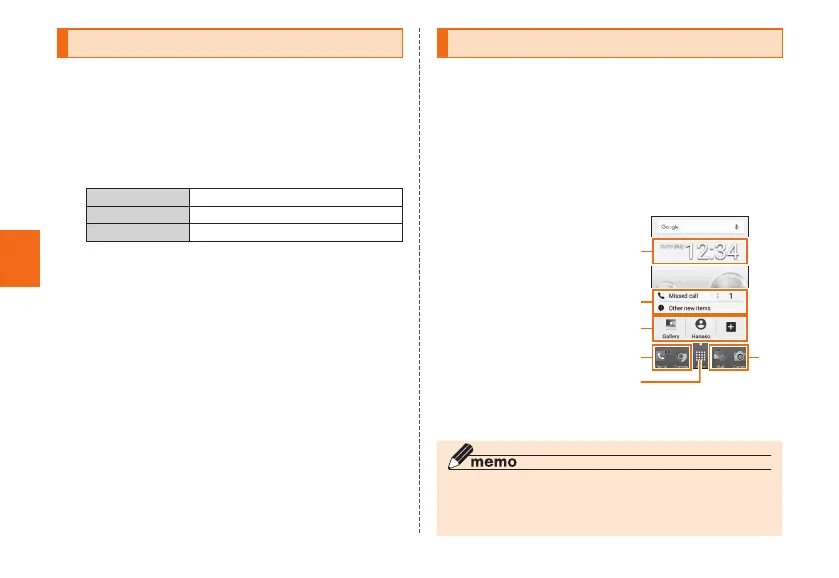
Standby screen of Entry Home appears.
① Date
② Notification
③ Shortcut key
④ App icon
⑤ Apps menu
④
⑤
④
③
②
①
《Standby screen of Entry
Home》
◎ To restore the Home screen from Entry Home to "Standard
home", from the standby screen of Entry Home →
[Apps] → [Settings] → [Change home] → [OK].



 To Next Page