Basic Operation
20
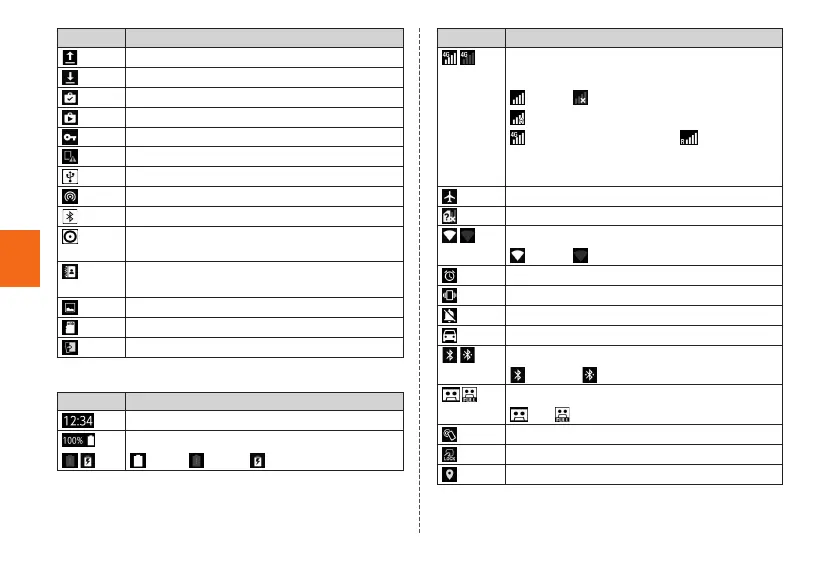
Icon Description
Sending/uploading data
Receiving/downloading data
Installation completed
Update available
VPN is connected
New OS update or software update
USB tethering
Wi-Fi
®
tethering
Bluetooth
®
tethering
Wi-Fi
®
tethering or Bluetooth
®
tethering is
used with USB tethering at the same time
Address book plus display in the Notification
panel
Screenshot captured
Unmounting microSD memory card
Settings screenshot is enabled
■ Examples of main status icon
Icon Description
Time
Battery level
100%/ empty/ charging
Icon Description
Signal strength/Signal condition (LTE/WiMAX
2+)
level 4/ out of service area/
in communication
LTE/WiMAX 2+ available
*
/ roaming
(Communication mode according to the
network is also shown)
Airplane mode is set
au Nano IC Card 04 uninserted
Wi-Fi
®
signal strength
level 4/ level 0
Alarm set
Silent mode (Vibrate) set
Silent mode (Mute) set
Silent mode (Drive) set
Bluetooth
®
function in use
standby/ connected
Auto answering set
set/ full
Reader/Writer, P2P function in use
"NFC/Osaifu-Keitai lock" is set
GPS in use
*
In Japan, you can use "LTE" and "WiMAX 2+" networks. "4G" is displayed
for both networks. According to the signal congestion etc., the product is
connected to the less congested network.



 To Next Page