10
5.3 Recall the memories
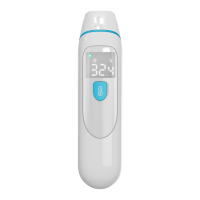
The thermometer can store 32 sets of measurement data, when the data is full, the
last one will always replace the first one.
If you want to review the previous measurement data, in the state of Thermometer
shutdown, pressing setting button for About 3 seconds until you see the ‘M’
symbolFlicker on the screen, release the button.
Press the button, you can see the number ‘1’ appears on the right side of screen, it
means the first memory, then the number ‘1’ disappears quickly and pop up the first
remembered temperature value. Press the button one by one, so you can see all the
remembered temperature values in turn for all of memories.After review the memory
data, press the button for about 5 seconds, thermometer will shutdown and save the
setting automatically.
5.4
℃ and ℉ conversion
If you want to convert ℃ to ℉or ℉ to ℃, in the state of thermometer shutdown,
pressing the Setting button for about 6 seconds until you see the‘
℃’ s y m b o l or the ‘℉’
symbolflicker on the screen, then release the button. Press the button again, then
the ℃symbol or the ℉symbol will be converted to another.
Don`t release the button when “M” Symbol appearing, only release when “C” or “F”
appearing. After finish conversion, Press the button for about 5 seconds, thermometer
will shutdown and save the setting automatically.
5.5 Turn on or off the buzzer/speaker/vibration
The three PC809, PC809EV, PC809V models are different in how they interact with
users at the end of the measurement: the PC809 uses a buzzer to ‘beep’, the PC809EV


 To Next Page