*Due to con nuous development of the app, the layout and available features may be subject to
change.
SMART SCENES
Smart Scenes is a powerful tool providing the op to customize the opera on of the air
condi
ner based both on condi ons within the room and outside in uences. This gives the user
the op
n of specifying much more intelligent ac ns. These are split into two categories Scene
and Automa
n.
SCENE
Scene allows for a one touch bu
on to be added to the Home screen. The bu on can be used to
change a number of se
ngs in one go, and can change all the se ngs within the unit. A number of
scenes can easily be setup, allowing the user to easily change between a number of preset
c
ura ns.
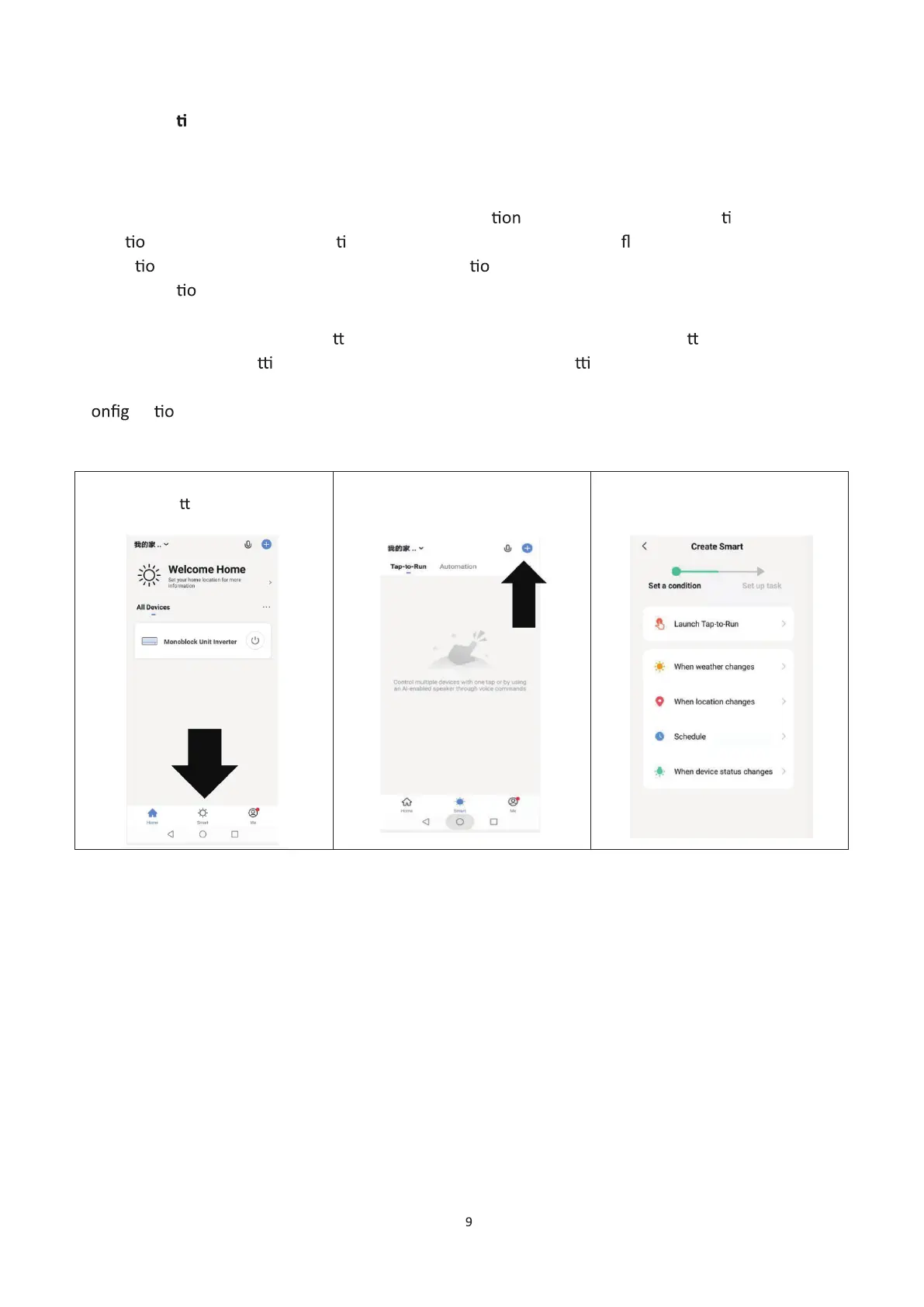
Below is an example of how to set up a scene:
1. Press on the Smart Scene tab
at the bo om of the Home
screen.
2. Press on the Plus in the top
right corner to add a smart
scene.
Tap-to-Run to create a new
Scene.
1


 To Next Page