Operation
Down” button on the remote
control (Figure 3).
“2. COD” will appear in place of
the sleep timer digits.
Release the “3. Temperature
Down” button and the “Flame
Speed Down” button.
Press the Initialization Button 4.
on the unit (Figure 1C).
Press the Flame/Heat On/5.
Off Button
button on the
remote.
Your remote will now
have a different frequency
communicating with the Log
Grate.
Remote Control Functions
(All letter references are to Figure 3)
B. Set Temperature
Press F button (
) to turn Log
Grate on.
Press H to raise the thermostat.
Press G to lower the thermostat.
Press both H and G to change °F
to °C.
C. Light Dimmer
Press the F button ( ) to turn the
Flame/Heat on.
Repeatedly press the J or I button
to decrease or increase the
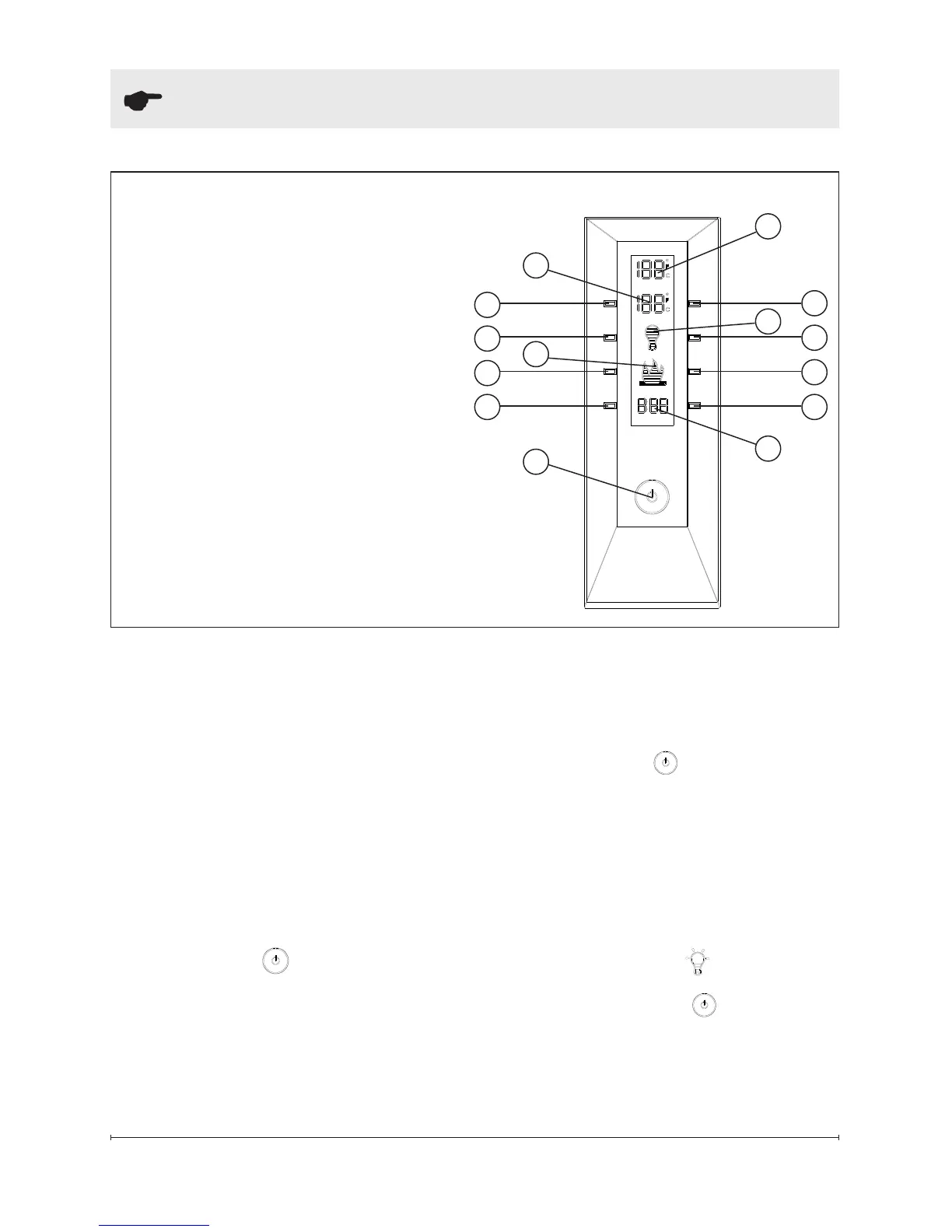
Figure 3 - Remote Control Functions
A. Room Temperature
B. Set Temperature
C. Light Dimmer
D. Flame Speed Control
E. Sleep Timer
F. Flame & Heat On/Off
G. Temperature Down
H. Temperature Up
I. Light Dimmer Down
J. Light Dimmer Up
K. Flame Speed Down
L. Flame Speed Up
M. Sleep Timer Down
N. Sleep Timer Up
K
J
L
I
B
E
A
D
G
C
NM
H
F









 To Next Page