Setting the 'Auto' ON and OFF times
To set the timer:
1. Using your nger tip or tip o a pencil, push in as many segments as necessary
around the dial, according to the times you don't require heat - see Fig.5. Each
segment pushed in switches the heater OFF for that part of the hour All other
segments will be ON. For example, Fig.5 shows the timer set to switch the heater
OFF between 11pm and 1.45am.
2. You can select as many ON periods as you like, within the 24-hour day. The settings
will repeat every day until changed.
3. To change ON and OFF times, simply push in any 'ON' segments you wish to
cancel and pull out new 'ON' segments as required.
NOTE: each segment represents 15minute
Turbo fan
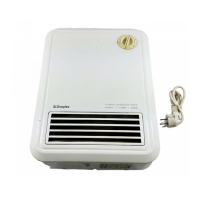
The turbo fan is used to boost the heat output and also the airow around the room.
This circulates the heat and results in a reduced heat up time and a more even heat
distribution. The turbo fan is controlled by the switch on the front of the product,
Fig.2.
The turbo can be turned on independently of the heat.
11




 To Next Page