Choosing•and•Setting•a•Mode
NOTE:
Once modifi ed a programme must be
selected if you want to begin using it.
• Timer•Modes
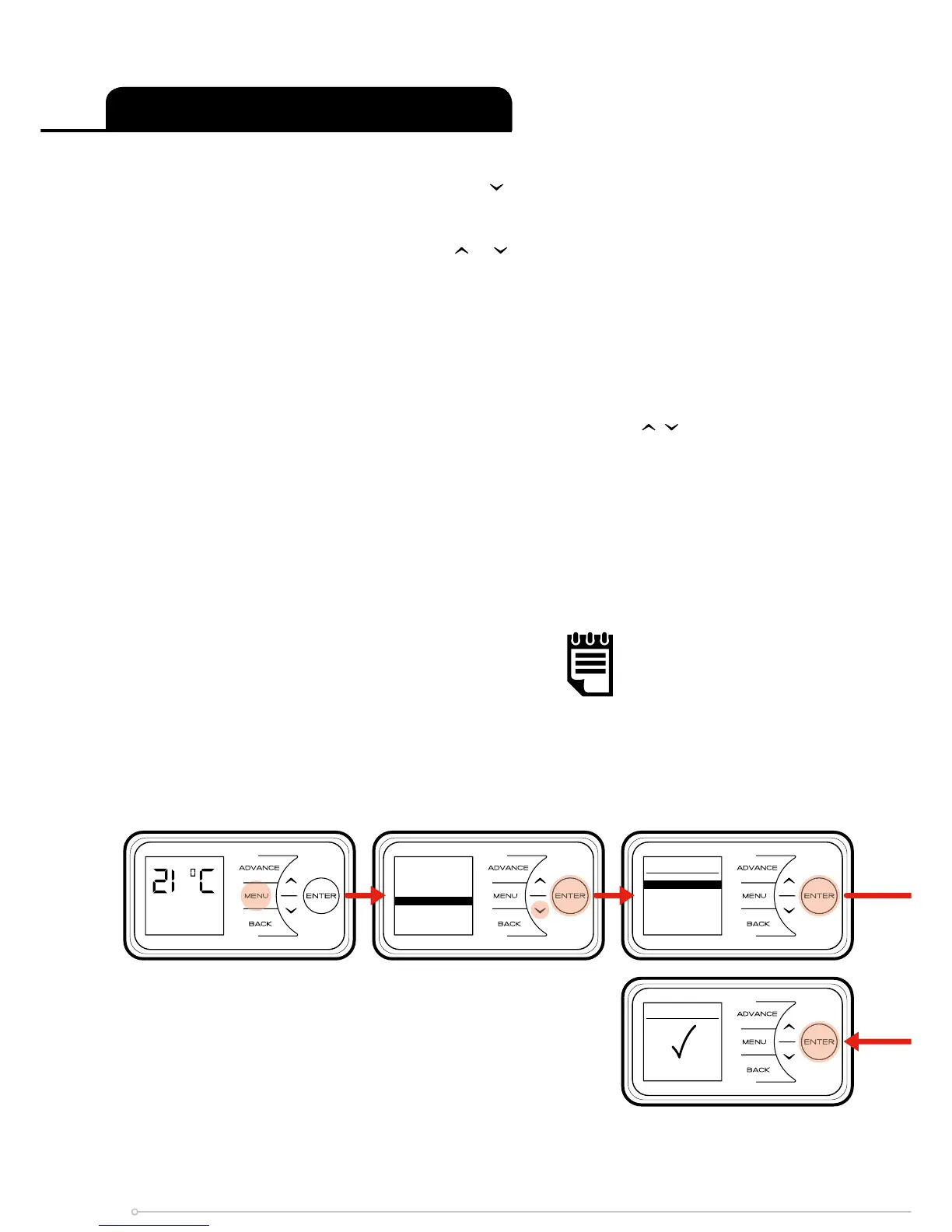
To choose a timer mode press Menu and then to select Mode. Then press Enter.
Then select Timer•Mode, again using the Enter button.
Select the mode required, by pressing the or followed by Enter.
For options Out•All•Day, and User•Timer, three choices are available - Select, Preview and
Modify.
• Select - choose this timer option.
• Preview - view the times currently set.
• Modify - change the times currently set.
When Modify is chosen, select and change each option using the , and Enter buttons. At
the end of each period, select Next to move to the following period. When a day is complete
select Save to update it.
Once the fi rst day has been set up it is possible to copy these settings to successive days or
all days by either choosing Copy•Next or Copy•All.
If preferred each day can be modifi ed individually and saved. It is also possible to Clear each
day or Clear•All•days to factory default times. Options are;
• Save - save times for one day.
• Copy•Next - copy times to following day.
• Copy•All - copy times to all seven days.
• Clear - factory defaults all times that day.
• Clear•All - factory default times for all seven days.
To select a mode, choose Select and press Enter.
Out All Day
Comfort On
Mai n Menu
Dat e / Time
Mod e
Opt i o ns
Mod e
Tim e r
Boo s t
Set b a ck
Cop y All
Sel e c ted
20



 To Next Page