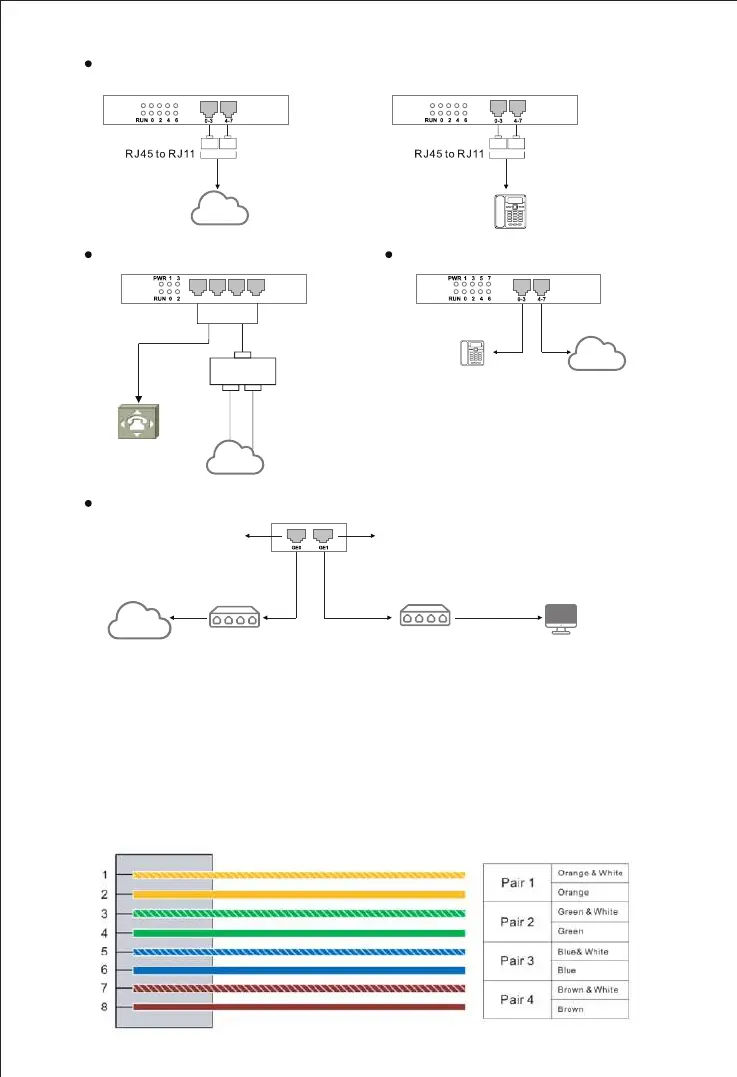
Connect telephone line to the FXS port and connect PSTN line to the FXO port
PSTN Line
PSTN
Telephone Line
Analog Phone
F
X
S
F
X
S
F
X
O
F
X
O
Converter Converter
Connect with Ethernet
Router/Switch
192.168.12.1
Network Cable
192.168.11.1
Network Cable
PC
192.168.11.XXX
IP
Network
Switch
D
T
U
D
T
U
PORT 0 PORT 1 PORT 2 PORT 3
F
X
U
F
X
U
E1/ T1 Cable
PBX or E1/T1 Board
with RJ48 Interface
E1/ T1 Cable
RJ48
BNC
Rx
Tx
Converter
Coaxial Line
PSTN
Connect to E1/T1 Ports
Telephone Line
Analog Phone
PSTN Line
PSTN
Connect to FXS ports and FXO ports
Note: Ports 0-3 are FXS, and ports 4-7 are FXO.
Network Port for Management
Network Port for Service
Note: The UC350's default network port for management is the GE1 port, and the
UC350 Pro's default network port for management is the GE3 port.
RJ45 Wire Sequence
6
UC350 series products support RJ45 Interfaces for FXS/FXO connections. One
RJ45 cable can be split into four pairs of RJ11 interfaces. The outlook wire
sequence of RJ45 cable is shown as follows:



 To Next Page