25
933.TL8 2.32.195.3 2018 Lexus RX 450h (Smart Key)
©2022 VOXX•DEI LLC. All rights reserved.
Quick Reference Guide (customer copy)
List of available commands
Note that the information below is for many Viper, Clifford, Python, Avital, Automate, Autostart
and AstroStart models. Icons and commands may differ depending on the model and options
purchased. Refer to your authorized installation center for more specific information.
Button(s) Actions
Press & hold for 1 second to lock.
Press & hold for 1 second to unlock.
*
Press & hold for 1 second to remote start.
*
Press & hold for 5 seconds to activate the trunk release (optional).
* Icon and remote appearance may differ depending on the model purchased.
SmartStart Bluetooth compatiblity (applicable to DS4/DS4+ ONLY)
This system is equipped with a Bluetooth version of SmartStart offering up to 200' of range. The
simple graphical interface gives you control over the following features of your installed remote
start system or security with remote start system:
Lock/Arm
• Unlock/Disarm
• Remote Car Starter
• Trunk Release
• Panic
• AUX Channels
You can also control multiple vehicles – great for families – and assign more than one user to
control a vehicle. It’s easy with SmartStart! But, this is only the beginning! SmartStart is loaded
with additional features including GPS tracking, SmartSchedule, vehicle status, roadside
assistance, parked car finder and more.
The application enables a “Cloud-Connected Car” like never before, providing 2-way
interaction with your vehicle. Connectivity is managed through the Directed Cloud Services
(DCS) network linking car, app, end user, and the Internet.
For more information, visit www.mysmartstart.com.
Sending commands to your vehicle
Whether you want to remote start the engine, lock/unlock the doors or pop the trunk, there are
3 possible ways you can send commands to your vehicle, using the:
• Factory remote.
• Aftermarket remote.
• Directed SmartStart application via your smartphone.
If applicable, you can also start the engine remotely by pressing the Lock button 3 times quickly
on your factory remote.
Important! To remote start the vehicle, ALL doors must be closed and locked.
Vehicle takeover
The vehicle takeover feature is not available for this vehicle. The engine will shut down as soon
as a door is opened.
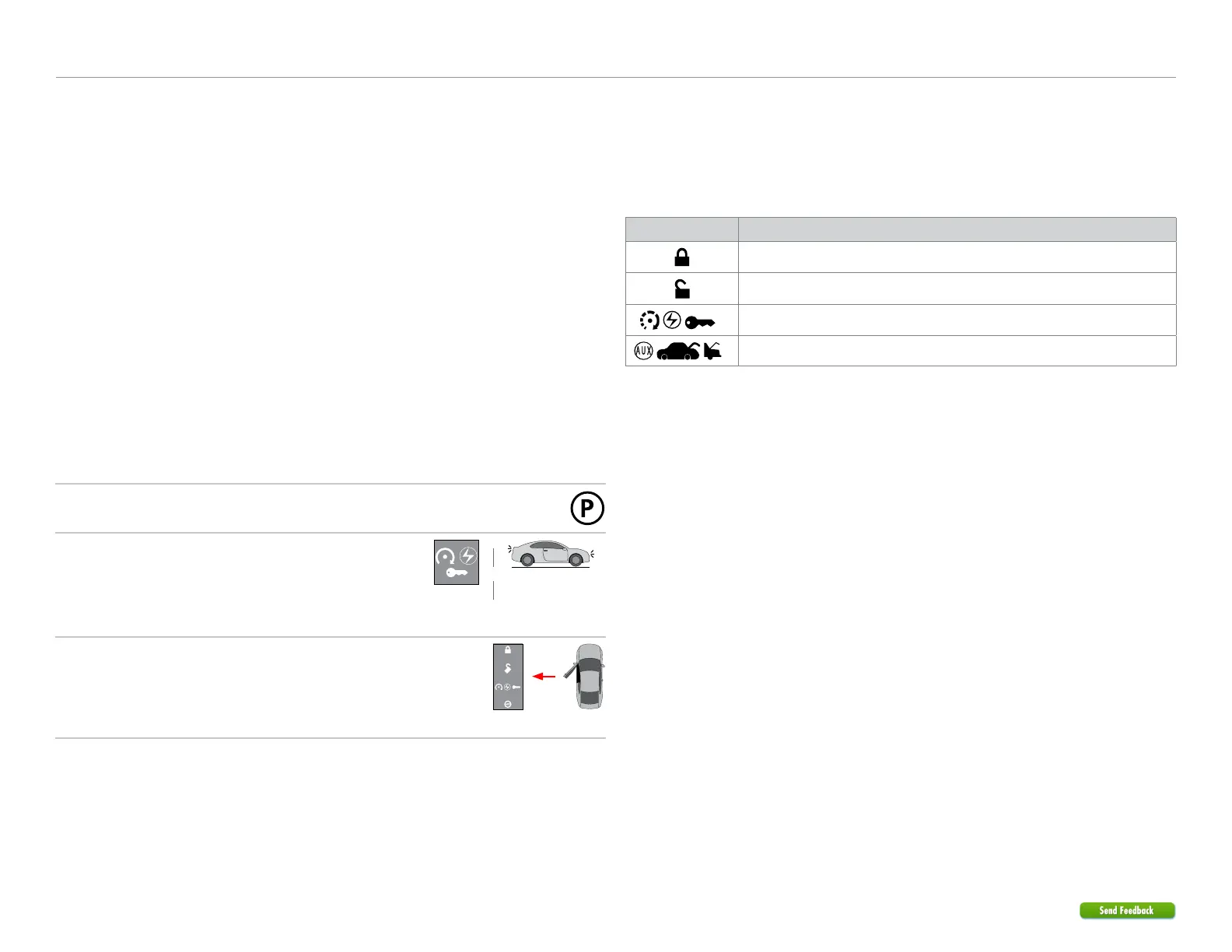
Pit stop/idle mode
1
Stop the vehicle in a safe parking spot and put the gear
in Park (P).
Put
gear in Park
2
Press the Remote Start button on the transmitter.*
The parking lights will flash once to indicate the vehicle is
now in Pit Stop Mode.
Parking lights
flash x1
Press
Remote
Start
button*
&
3
It is safe to leave the engine running and exit the vehicle
with the factory remote in hand.
Note: We recommend that you always lock the doors of
your vehicle when leaving it unattended.
Exit
vehicle
with
remote
* Icon and remote appearance may differ depending on the model purchased.



 To Next Page