
 To Next Page
K
Kristy KaufmanAug 31, 2025
Why PTS shutdown error occurred in Directechs DB3?
- TTonya RobertsAug 31, 2025
The PTS output from the module was not activated due to safety protection.

Why PTS shutdown error occurred in Directechs DB3?
The PTS output from the module was not activated due to safety protection.
What to do if Directechs DB3 bypass data is not detected?
If the bypass data isn't being detected by your Directechs Automobile Accessories, start by checking the bypass line connection. If multiple wires are involved, ensure they're not inverted. Also, verify that the vehicle still operates correctly with the factory key.
Why is the brake not being detected by my Directechs Automobile Accessories?
If the Directechs Automobile Accessories module displays 'Brake was not detected', it means that the brakes were not detected, which prevents the system from shutting down the vehicle.
What to do if ISO 1 is not detected in Directechs Automobile Electronics?
If ISO 1 is not detected, the Yellow/Black wire did not detect the expected signal. Refer to "Installation (wiring diagrams & vehicle wiring reference charts)" to check the connections.
What to do if Directechs DB3 Automobile Accessories ISO 1 is not detected?
The Yellow/Black wire did not detect the expected signal. Refer to 'Installation (wiring diagrams & vehicle wiring reference charts)' to check the connections.
What to do if CAN1 is not detected in Directechs Automobile Electronics?
If CAN1 is not detected, check the Tan and Tan/Black wire connections. Try waking up the data bus by turning the ignition on. If the installation doesn't need this connection, you can skip this step by pressing the programming button 5 times.
What to do if bypass data not detected in Directechs DB3 Automobile Accessories?
Check the bypass line connection. If you're using multiple wires, ensure they aren't inverted. Also, verify that the vehicle still operates correctly with the factory key.
Why Directechs Automobile Accessories speed was detected?
The vehicle was detected as moving, which prevents the system from shutting it down.
Why Runsafe was not disabled in Directechs Automobile Electronics?
No UNLOCK command was received prior to opening the door, or the 45 second timer expired in takeover mode.
Why CAN bus incorrectly detected in Directechs DB3 Automobile Accessories?
If the CAN bus is being incorrectly detected by your Directechs Automobile Accessories, verify the CAN1 and CAN2 connections. Refer to “Installation (wiring diagrams & vehicle wiring reference charts)” to check the connections.
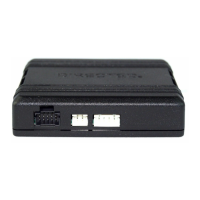
Details connections for the 14-pin blue connector.
Details connections for the 12-pin red connector.
Instructions for connecting the SmartStart module.
Instructions for connecting the XL202 module.
LED status and troubleshooting for module programming.
Error codes and troubleshooting for module programming.
Steps to enter the feature programming routine.
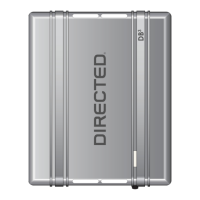
The DB3 is an all-in-one door lock and override module designed for professional installation in vehicles. This guide specifically details its installation in Remote Start Ready (RSR) mode, offering a comprehensive solution for vehicle control and security.
The primary function of the DB3 module in RSR mode is to enable remote start capabilities for compatible vehicles. This means the module can independently start the vehicle without requiring an aftermarket or OEM remote starter. It integrates with the vehicle's existing systems to provide seamless operation.
Beyond remote start, the DB3 offers a range of vehicle control functions. It supports arming and disarming of the factory security system, providing enhanced security. Door lock and unlock control are standard, with an option for driver priority unlock, where only the driver's door unlocks on the first command, and all doors unlock on a second command within five seconds. The module also facilitates trunk or hatch release, adding convenience.
For vehicles equipped with an aftermarket alarm, the DB3 can control it using the OEM remote, streamlining the user experience. A key feature is Key2GO, which is mandatory for immobilizer override in this firmware. Key2GO is designed to bypass advanced encryption layers in modern vehicles, allowing for remote start without sacrificing an original key. It achieves this by using an array of servers to generate a duplicate of the original key, which is then used by the module. This feature is particularly useful when only one key is available for the vehicle.
The DB3 also includes immobilizer bypass functionality, eliminating the need for a physical key to be present for remote start. It provides RAP (Retained Accessory Power) shut down, ensuring that accessories turn off appropriately after the vehicle is shut down. Entry monitoring for all door pins and the hood pin enhances security by detecting unauthorized access. Brake status (foot brake) and e-brake status are also monitored, crucial for safe remote start operation.
The module supports various activation methods. The 3x OEM Lock Remote Start Activation allows users to start the vehicle by pressing the lock button on their OEM remote three times consecutively. Additionally, it can be activated using an RF System or a SmartStart module, both sold separately, offering flexible control options. SmartStart integration provides advanced control via a smartphone application, including GPS tracking, SmartSchedule, vehicle status, roadside assistance, and a parked car finder.
The DB3 module is designed for ease of use once installed. Remote start can be initiated through multiple methods: the factory remote (e.g., pressing the lock button three times), an aftermarket remote, or the Directed SmartStart application on a smartphone. The module's RSR capability means that once programmed, it can handle the remote start sequence autonomously.
The "Pit Stop/Idle Mode" is a convenient feature allowing the user to leave the engine running while exiting the vehicle. To activate this, the vehicle must be in Park (P), and the remote start button on the transmitter is pressed. The parking lights flash once to confirm entry into Pit Stop Mode, indicating it's safe to exit the vehicle with the remote.
Vehicle takeover with a regular key is straightforward. After a remote start, the user sends an unlock command, enters the vehicle, inserts the key into the ignition barrel, turns it to the ON position, depresses the brake pedal, puts the car in gear, and drives off. This seamless transition ensures continuous operation after a remote start.
The module offers customizable features and options, which can be configured using the DirectLink software or the Directechs Mobile application. These include options for RFTD Output Type (No RF Output, RFTD Output, SmartStart), Unlock Driver Priority (driver only or all doors), Comfort Closure with Lock (windows roll up, or windows and sunroof roll up), Heated Seats activation (disabled or enabled), and Heated Seats/Defroster Temperature Control (activating at specific temperatures or always ON).
Smart OEM Alarm Control is another key feature, allowing the module to synchronize with the OEM alarm. This ensures that the vehicle disarms and rearms as needed during the remote start sequence, monitoring the alarm and door lock status to determine if disarm/rearm is required.
The DB3 module incorporates LED diagnostics and troubleshooting to assist installers and users in identifying and resolving issues. Different LED flash patterns indicate various statuses, such as module power, programming sequence, CAN network detection, and error codes. For instance, a solid red LED indicates the module has no power, while flashing green and red suggests initialization failure. Specific error codes, like "CAN2 not detected" or "Bypass data not detected," are communicated through distinct red flash patterns, guiding the installer to the root cause.
The module supports both soft and hard reset procedures. A soft reset erases only the programming steps, leaving the firmware and settings intact. This is useful for correcting programming errors without re-flashing the entire module. A hard reset, however, reverts the flashed firmware back to its default factory settings. This is a more drastic measure and may require reconfiguring certain settings, such as RFTD and D2D options, after the reset.
Regular updates to the firmware and configuration options are available through the DirectLink software or Directechs Mobile application, ensuring the module remains compatible with new vehicle models and benefits from performance enhancements. The system is designed for professional installation, and any attempts to install it by untrained individuals may lead to severe damage to the vehicle's electrical system. Safety warnings emphasize the importance of proper installation and operation, including never operating the system in an enclosed area without adequate ventilation and ensuring the remote start system is disabled when the vehicle is being serviced or parked in an enclosed area.
 General
| Operating Temperature | -40°C to +85°C |
|---|---|
| Firmware | Upgradable via Weblink |
| Power Source | Vehicle's 12V System |
| Supported Protocols | CAN |
| Operating Voltage | 12V |