Chapter 4 - Settings
57
Chapter
1
Chapter
2
Chapter
3
Chapter
4
Chapter
5
Chapter
6
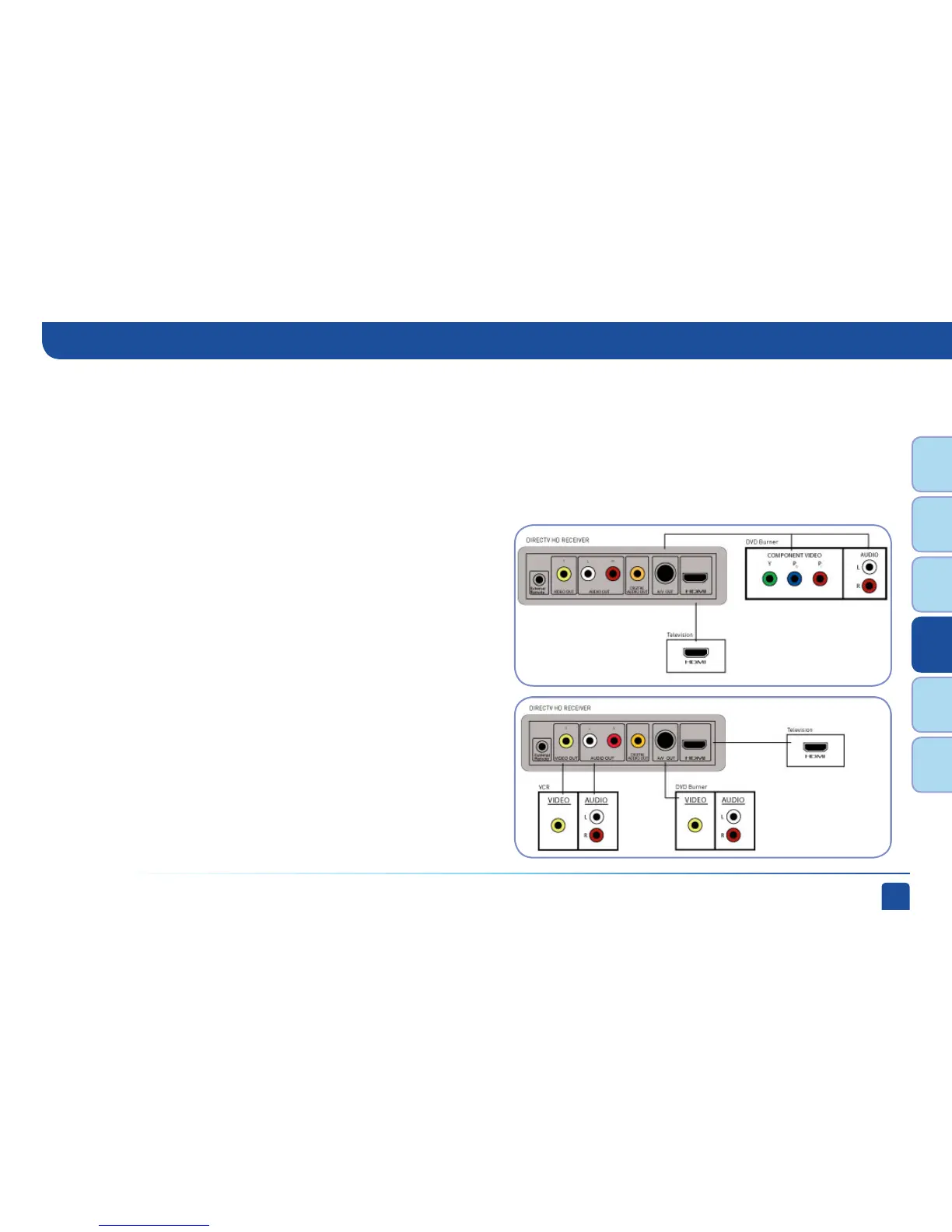
Some HD receivers have a special A/V Out connector that supports
either component or RCA (composite) video. Receiver model H25
comes with the A/V Out cable that supports component video and
RCA audio. You can also purchase an optional cable with A/V Out to
RCA audio and video (composite) connectors.
Here is an example using a TV that has an HDMI connector as the
best audio/video input.
This example also shows connecting your receiver to a DVD
burner using the AV Out cable that comes with your receiver for
component video and RCA audio connections.
Here is an example using a TV that has an HDMI connector as the
best audio/video input.
This example also shows using a DVD burner using the optional
A/V Out cable with RCA video and audio connectors, and a VCR
using RCA video and audio connectors.
Receiver with A/V Out Connector
Example: Using the A/V Out Component Video Cable
Example: Using the A/V Out RCA Video (Composite)
Cable
Connections



 To Next Page