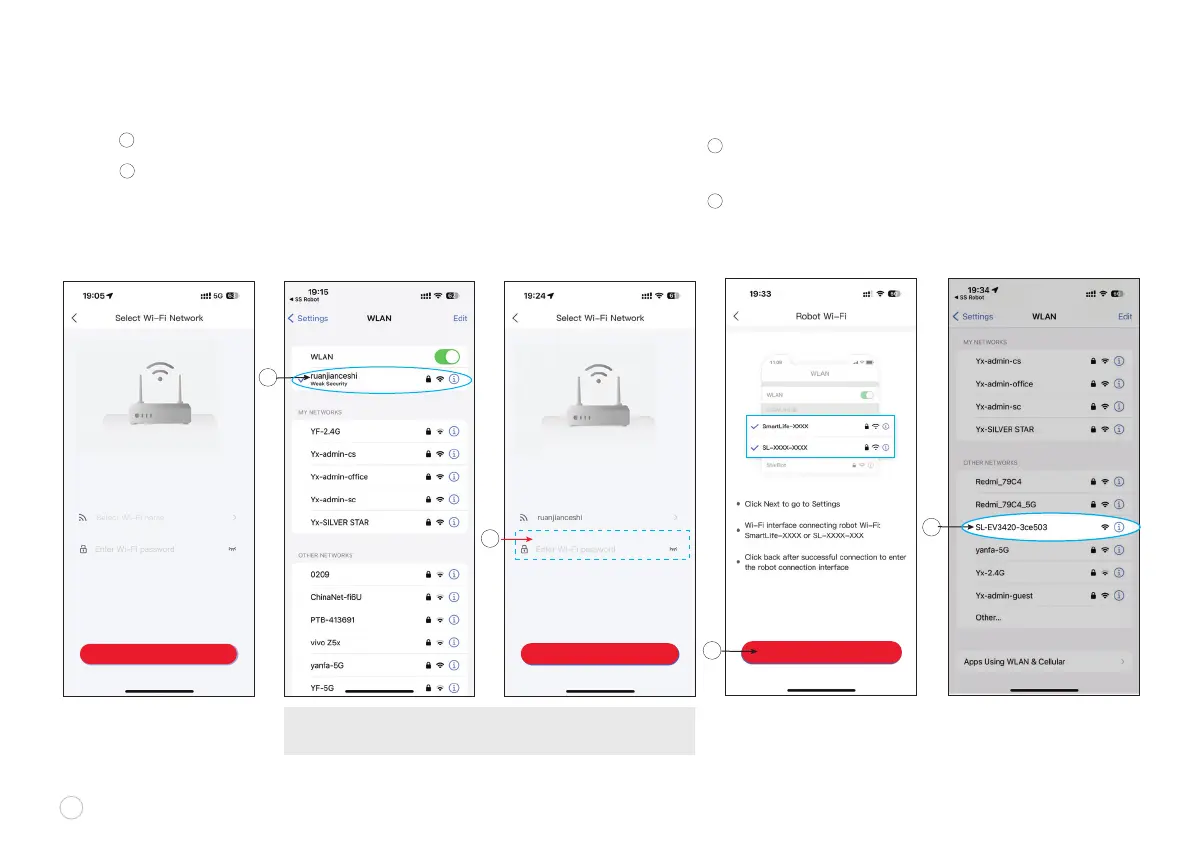
Click “GO TO SET” pictured below and the interface of
the screen switch to Wi-Fi selection
Select the Wi-Fi with the following pre-x sequence
followed by 6 unique characters "SL-EV3420-XXXXXX”
NETWORK SETUP continued
x
F
w
Connect to your home’s Wi-Fi Network
Type in your home Wi-Fi password and
click “Next ” to start network conguration.
8
C
E
D
NOTE: In order to maximize the unit’s Wi-Fi range in your home,
please make sure to switch from 5Ghz to 2.4Ghz Wi-Fi network.
Choose your 2.4Ghz Wi-Fi
Type your home Wi-Fi password
D
C
E
F
NEXT
NEXT
Supports 2.4GHz Wi- Network Only Supports 2.4GHz Wi- Network Only
GO TO SET















 To Next Page