Additional Accessories
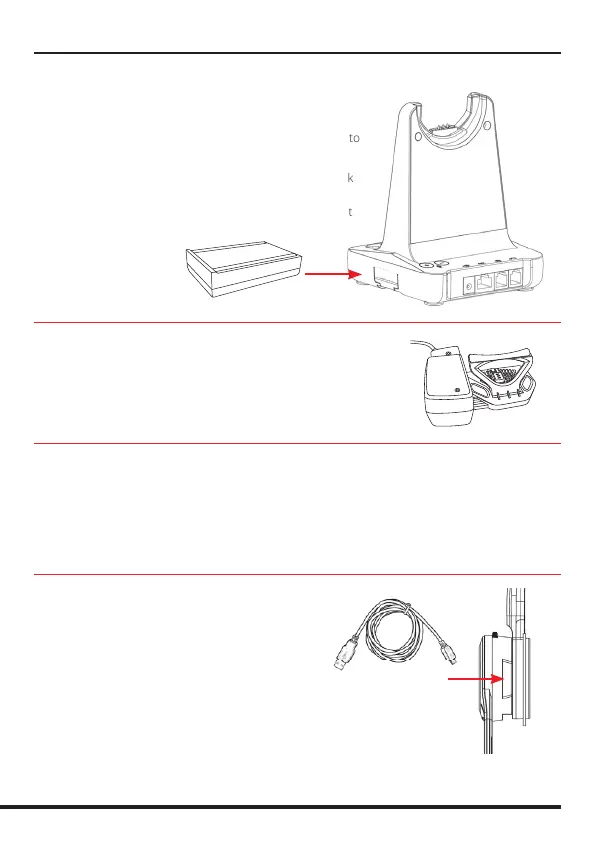
Adapt 30 Cartridge Module for
Bluetooth Connection
• Bluetooth allows the DECT headset to connect wirelessly to
Bluetooth enabled smartphones.
• This headset allows wireless conversations from any desk
phone, softphone and mobile.
• Before inserting your Bluetooth cartridge, make sure that
the base unit is powered-o.
JPL-DECT Lifter
• The JPL-DECT Lifter remotely lifts the desk phone handset
to make or answer a call.
https://www.jpltele.com/product/jpl-dect-lifter/
(Refer to the JPL-DECT Lifter installation guide).
Electronic Hook Switch (EHS) Adapter
• An EHS Adapter enables an incoming call to be answered or ended by using the On/O button
on the Headset.
https://www.jpltele.com/products/ehs-cables/ Refer to the EHS Compatibility Table to see which
adapter you need for your desk phone. (Refer to the EHS Adapter user guide to see how to install
your EHS cable).
USB Cable Type-A to Micro USB
• Optional method for charging the headset.
Connect the micro USB jack to the micro USB port
located on the side of the headset


 To Next Page