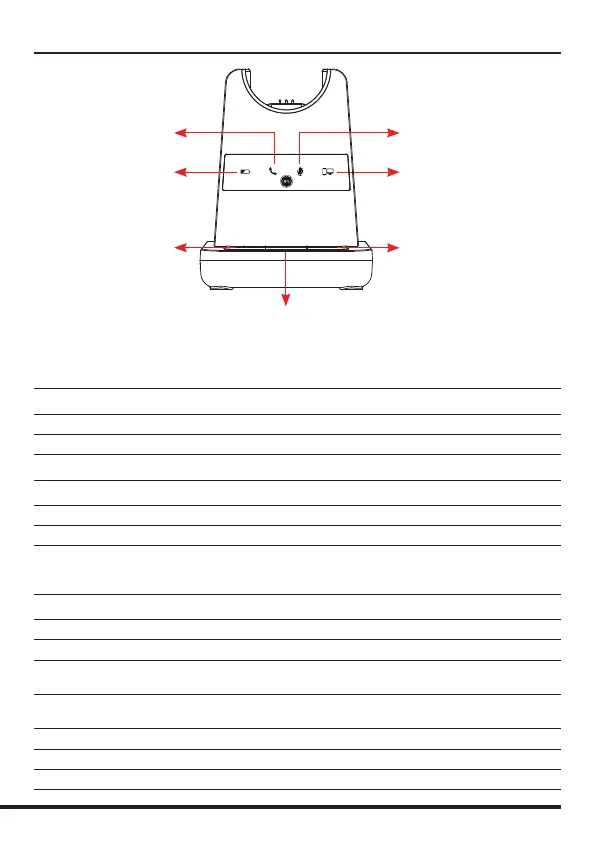
Microphone Mute Indicator
(Red Light)
PC/Bluetooth Indicator
(White Light)
Battery Charge Indicator
(Blue Light)
Telephone Indicator
(Green Light)
Bluetooth
Button
PC/TEL Selection
Microphone
Mute Button
Visual Indicator
Charging Status LED Status
Charging Battery Indicator: ‘Flashing’ 1 sec-ON, 1 sec-OFF
Fully Charged Battery Indicator: ‘ON’
Low Battery Battery Indicator: ‘Flashing’ 0.5 sec-ON, 0.5 sec-OFF
Event LED Status
Press Microphone Mute Mute Indicator: ‘ON’
Press PC/TEL Selection PC/TEL Indicator - TEL: ‘OFF’ PC: ‘ON’
Hook O Selected Mode Indicator: ‘ON’
Audio Indicator
Event Sound Eect
Speaker / Microphone Volume Beep Sound ‘UP’ - High Tone, ‘DOWN’ - Low Tone
Max/Min Speaker Volume Double beep
Max/Min Microphone Volume Double Beep
Microphone Mute When headset is MUTED, press the ‘volume up key’ for 2 seconds
– this will activate Mute beep tone signied by a long beep tone
Microphone Unmute To unmute, press the ‘volume down key’ for 2 seconds and it will
deactivate the mute beep done signied by three short beeps
Mute Reminder Beep (every 15 seconds)
Hook O / On Double Beep (High Tone / Low Tone)
Low Battery Continuous beep in headset when battery is low
Base Unit


 To Next Page