One Chunnel GSM VoIP Gateway
21
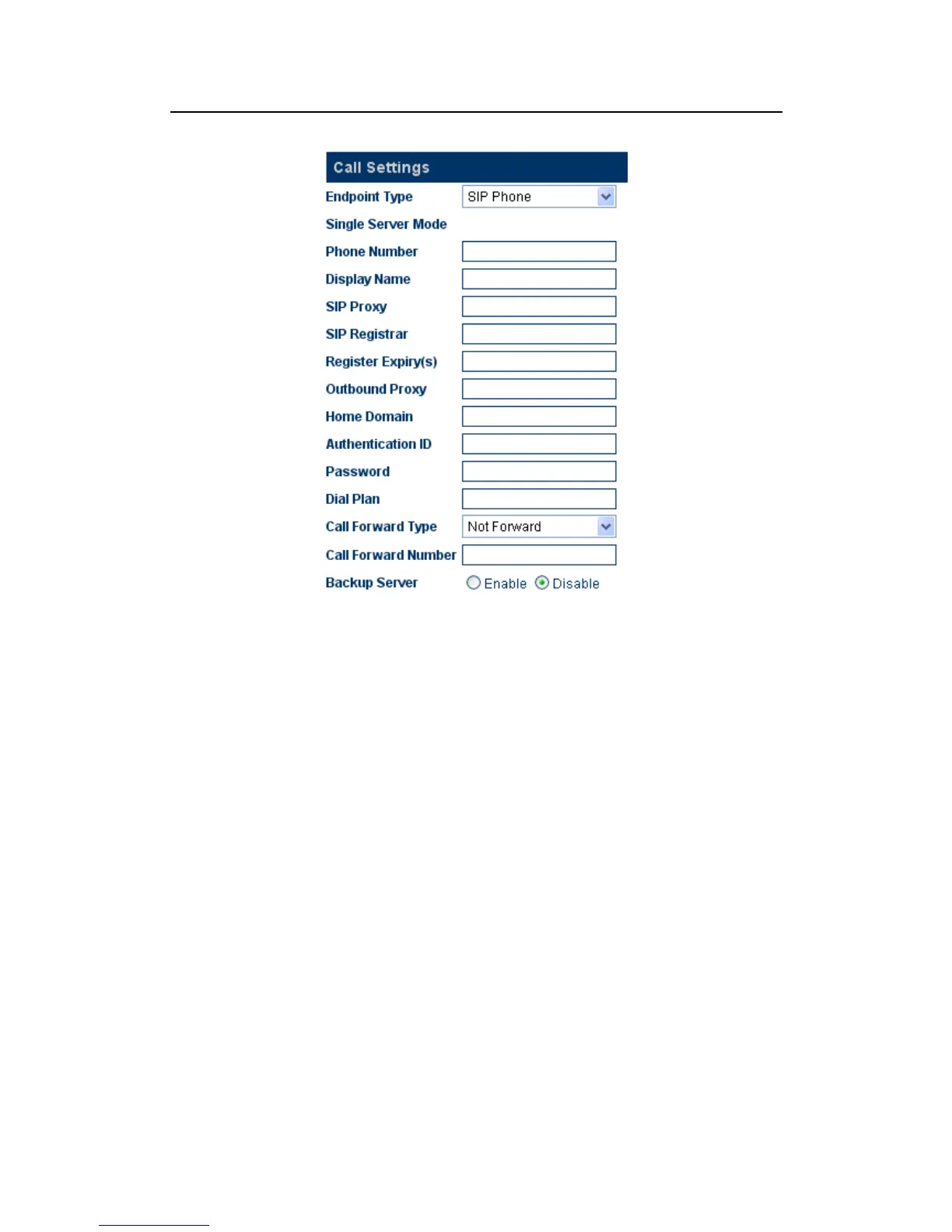
GoIP Gateway’s SIP configure page as follow:
A)Phone Number
Enter a SIP phone number.
B)SIP Proxy
Enter the SIP proxy IP address or domain name. If the registration port isn’t 5060,
then add “
:” and the port number. An example is sip.dtt.tw:8080.
C)SIP Registrar Server
If the Registrar Server is different from the SIP Proxy, enter its IP address or domain
name in this field. If the registration port isn’t 5060, then add “
:” and the port number.
An example is sip.dtt.tw:8080.
D)Home Domain
SIP Networks sometimes use the Home Domain name as an identifier. Enter this field
as required.
E)Authentication ID
Enter the Authentication ID as provided.
F) Password
Enter the authentication password as provided.
G) Display Name
Enter this field for the name to be displayed on the called VoIP party.
H) Backup Server


 To Next Page