9
4. USAGE AND OPERATION
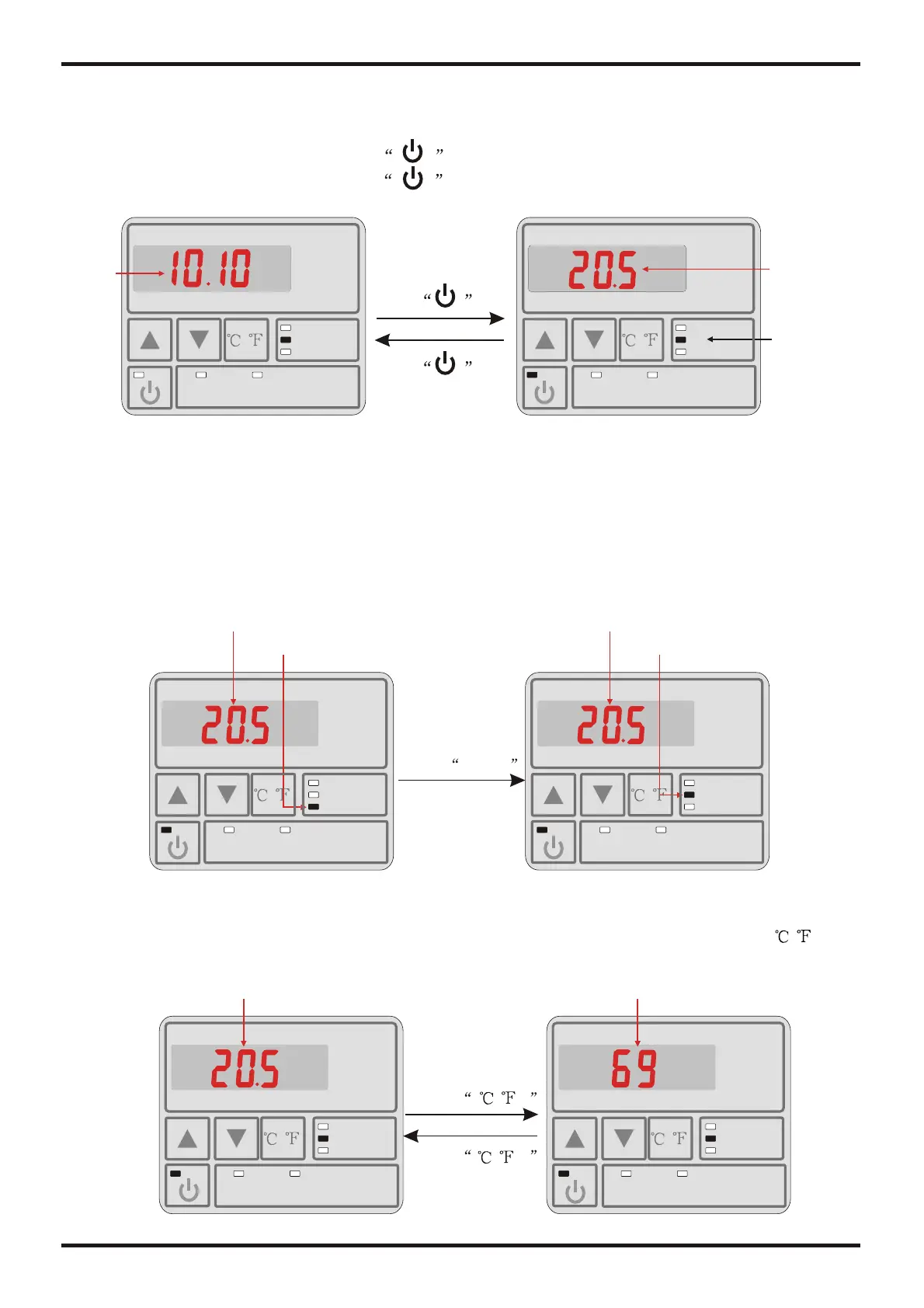
4.2.1 Turn ON/OFF the unit
MODE
HEAT
COOL
CLOCK
TIMER ON
TIMER OFF
When the unit is off, press the key 0.5s to turned on the unit;
When the unit is on, press the key 0.5s to show down the unit;
MODE
HEAT
COOL
CLOCK
TIMER ON
TIMER OFF
Press 0.5s
Heating
indicator light
Heating
Temp.
Standby interface Running interface
System
time
4.2.2 Mode switch
MODE
HEAT
COOL
CLOCK
TIMER ON
TIMER OFF
MODE
HEAT
COOL
CLOCK
TIMER ON
TIMER OFF
You can choose unit mode(The function is only available for heating&cooling unit).
In the unit on or off state you can choose cooling heating or automatic mode by
pressing "MODE" button.
Attention: if the unit is only for heating/cooling, the mode switching operation is invalid.
Cooling temp.
Cooling indicator light
Heating temp.
Heating indicator light
Press MODE
4.2.Usage of wire controller
/
/
/
/
4.2.3Temperature selection
Choose display type of unit temperature, when the unit is on, press mode button / and
choose Celsius degree or Fahrenheit degree freely.
MODE
HEAT
COOL
CLOCK
TIMER ON
TIMER OFF
/
MODE
HEAT
COOL
CLOCK
TIMER ON
TIMER OFF
/
/
/
Celsius degree Fahrenheit degree
AUTO
AUTO
AUTO
AUTO
AUTO
AUTO
Press 0.5s
Press
Press


 To Next Page