Set-up subject to change without notice. For packages not listed contact Dixie-Narco Factory
Service at (800) 688-9090. Page 26 of 72
TIMING
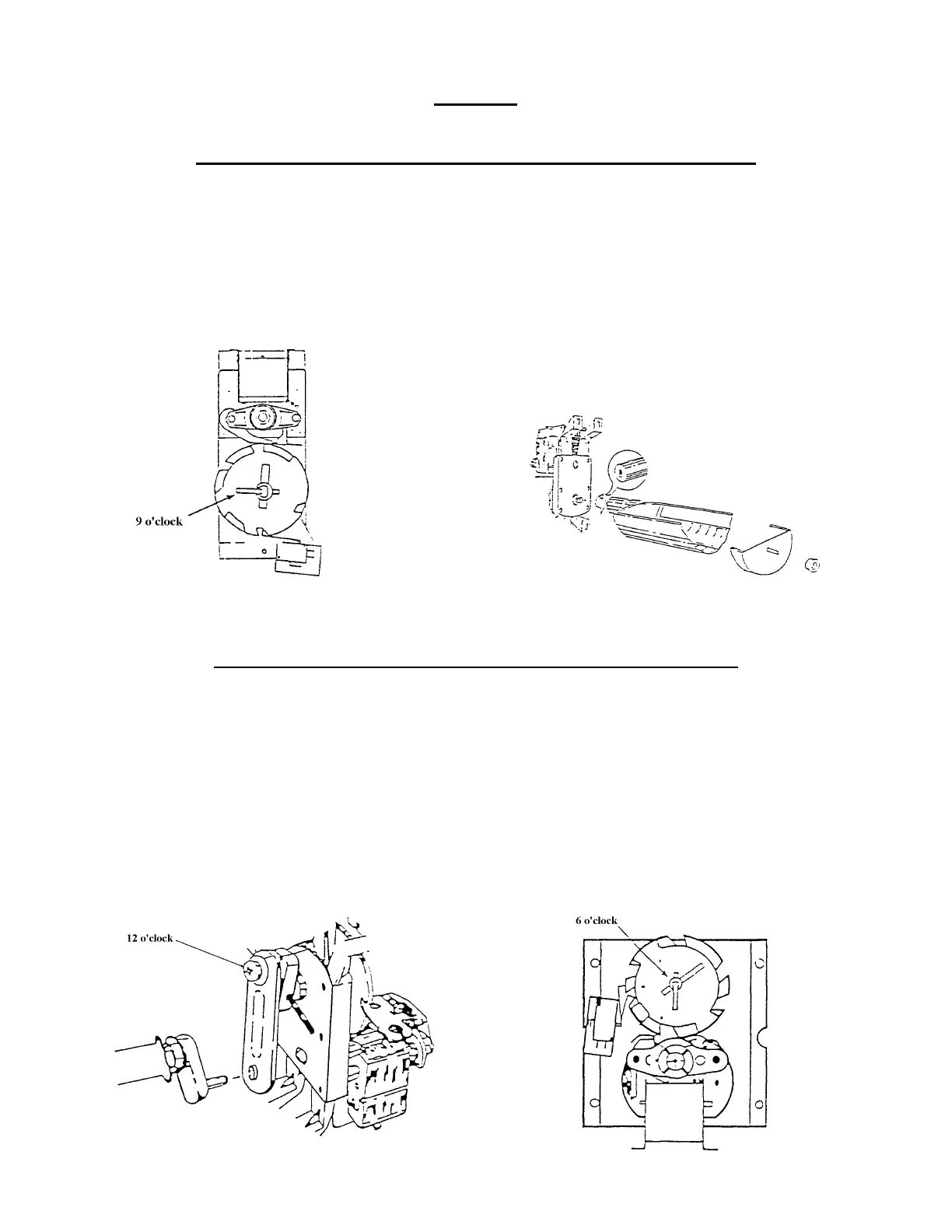
TO SET THE TIMING OF A NARROW COLUMN VEND MOTOR:
1. Make sure the hole through the rear shaft is in a horizontal plane. (If a pin were inserted in the
hole, the pin would be horizontal.) See Fig. 8.
2. The Vend Rotor must be in the loading position when the Motor shaft is inserted in the end of
the Rotor. See Fig. 8.
3. Insert the Motor shaft in the Rotor and secure the Motor.
4. Install the Vending Cam on the front shaft of the Motor making sure the Lock Tab is at the 9
o'clock position. See Fig 7.
5. Install the Adjustable Cam per the instructions given on the previous page.
TO SET THE TIMING OF A WIDE COLUMN VEND MOTOR:
1. Make sure the hole through the rear shaft is in a horizontal plane. (If a pin were inserted in the
hole, the pin would be horizontal). See Fig 10.
2. Slide the Drive Arm (with linkage attached) on the rear shaft as shown. See Fig. 10.
3. Secure by installing the Groove Pin.
4. With the Oscillator in position, align the hole in the Linkage Arm with the pin of the Oscillator.
5. Slide the Linkage on the pin.
6. Install the Vending Cam on the front shaft of the Motor making sure that the Lock Tab is at 6
o'clock as shown. See Fig. 11.
NOTE: When the screw holding the Linkage Arm to the Drive Arm is at the 12 o'clock position
(See Fig. 10), the Lock Tab will be at the 6 o'clock position (See Fig. 11).
7. Install the Adjustable Cam per the instructions on the previous page.
Fig. 7
Fig. 8
Fig. 10
Fig. 11






 To Next Page